A student planner looks capable when it contains three sample assignments. The real test is week seven: two exams, a closing shift, a group presentation, and a paper that is already late. At that point, “supports tasks” is not a useful product description. The planner has to show what is due, what can still fit, and what happens when the original plan breaks.
Quick answer
The best student planner depends on the failure you need it to prevent. MyStudyLife fits rotating classes and exam planning; Power Planner adds grades and GPA; Structured makes one day visually clear; Todoist handles flexible projects; Apple Reminders plus Calendar is the strongest free baseline; and Ellie fits students who want to move tasks around a real calendar. No app can infer assignment effort or academic consequences from a due date alone.
At a glance
Best for | Choosing an iPhone-friendly planner for a full semester rather than a sample week |
Avoid when | Your school requires all work to stay inside its learning-management system or your main need is notes and document storage |
Trial length | Seven days with one changed shift, one late task, and one long assignment broken into steps |
Decision rule | Choose the planner that still makes the next study action obvious after the week changes |
What counts as a student planner
A student planner connects academic commitments with actions: classes, assignments, exams, and the work required before each deadline. A learning-management system is the school's source of record for course materials, submissions, grades, and official dates. A daily planner arranges tasks around available time. One app may cover more than one role, but no independent planner should silently replace the official course system.
How to use this comparison
This guide uses a real-semester-shaped scenario: five courses, a rotating lab, assignments, three exams, a changing work shift, a group project, and overdue work that may still receive credit. Product capabilities were rechecked against official documentation on August 23, 2026.
The apps were not run in a controlled usability lab. Official documentation can establish that a planner supports rotating schedules or grade tracking; it cannot tell you how long your syllabus will take to enter or whether the interface will feel calm during exam week. Use the rubric below to test two finalists with your own non-sensitive sample data.
Your learning-management system remains the source of truth for official dates, submissions, grades, and course policy. A personal planner should make that work actionable, not silently replace it.
The reproducible semester rubric
Use the same rubric before choosing an app:
Test | Pass condition |
|---|---|
Semester capture | Courses, assignments, and exams can remain distinct through the term |
Timetable reality | Repeating or rotating classes and personal commitments can be represented |
Work breakdown | A paper or exam can become several actionable study tasks |
Capacity view | The student can see tasks in relation to classes, shifts, and other fixed time |
Recovery | Missed or late work can be found and deliberately rescheduled |
Academic context | The app supports course or grade context when that context matters |
Cross-device access | The documented platforms match where the student actually works |
Cost fit | The needed workflow is available at an acceptable current price |
The first four are the minimum for this roundup. Grade tracking is valuable but not universal. A planner should not receive a higher score merely because it has more features.
The picks, prices, and platform limits
Prices below are current U.S. prices checked August 23, 2026. App-store and regional prices can differ, so verify the checkout before paying.
App | Plan, current U.S. price, platforms, and important limitation |
|---|---|
Free core; MyStudyLife+ is $6.99/month or $39.99/year. Available on iPhone, iPad, Android, and the web. Rotating timetables are supported through manual setup, but the MSL+ photo-based AI Schedule Wizard supports only non-rotational schedules. | |
Fully functional free version; Premium is under $5 as a one-time lifetime purchase. Available on Windows 11, Mac, iOS, Android, and the web, with one purchase unlocking every platform. Grade and GPA context is strong; the app does not estimate assignment effort for you. | |
Free core; Pro is $6.99/month, $29.99/year, or $99.99 lifetime. Available on iOS, Android, and the web, with Apple-device apps as well. Reminders import and Replan are iOS-only, and there is no native course, semester, or grade model. | |
Beginner is free; Pro is $7/month or $60/year ($5/month billed yearly). Available across the web, iPhone, iPad, Apple Watch, Mac, Windows, and Android. Calendar layout is a Pro feature, and courses and exams remain general projects and tasks. | |
Included with Apple devices and iCloud. Available on iPhone, iPad, Mac, Apple Watch, and iCloud.com; there is no native Android planner. The setup has no semester, course, exam, or grade model. | |
7-day free trial; Pro is $9.99/month or $99.99/year, with a $299.99 lifetime option. Available on iPhone, iPad, Mac, Windows, and the web; no Android app. Students, teachers, and non-profits get 50% off any plan. Ellie has no grade or GPA tracker, and Ellie publishes this guide. |
Best school-specific planner: MyStudyLife
MyStudyLife's current product documentation describes weekly and rotating class schedules, assignments with reminders and partial progress, exam countdowns and revision planning, calendar sync, and cross-device access. Rotating schedules can be entered manually. Its photo-based AI Schedule Wizard is an MSL+ feature and supports only non-rotational schedules.
That object model fits the student who thinks in courses, exams, and revision sessions. A rotating high-school timetable is not an awkward set of generic recurring events; it is one of the app's stated use cases.
Best fit: A student whose main risk is losing track of school-specific commitments across a changing timetable.
Watch out for: Do not assume a timetable photo will import a Week A/Week B rotation. MyStudyLife's official help says rotational schedules must be entered manually. Because we did not enter the full scenario into the app, this audit also cannot tell you how long a five-syllabus setup takes or how clear the late-work state feels.
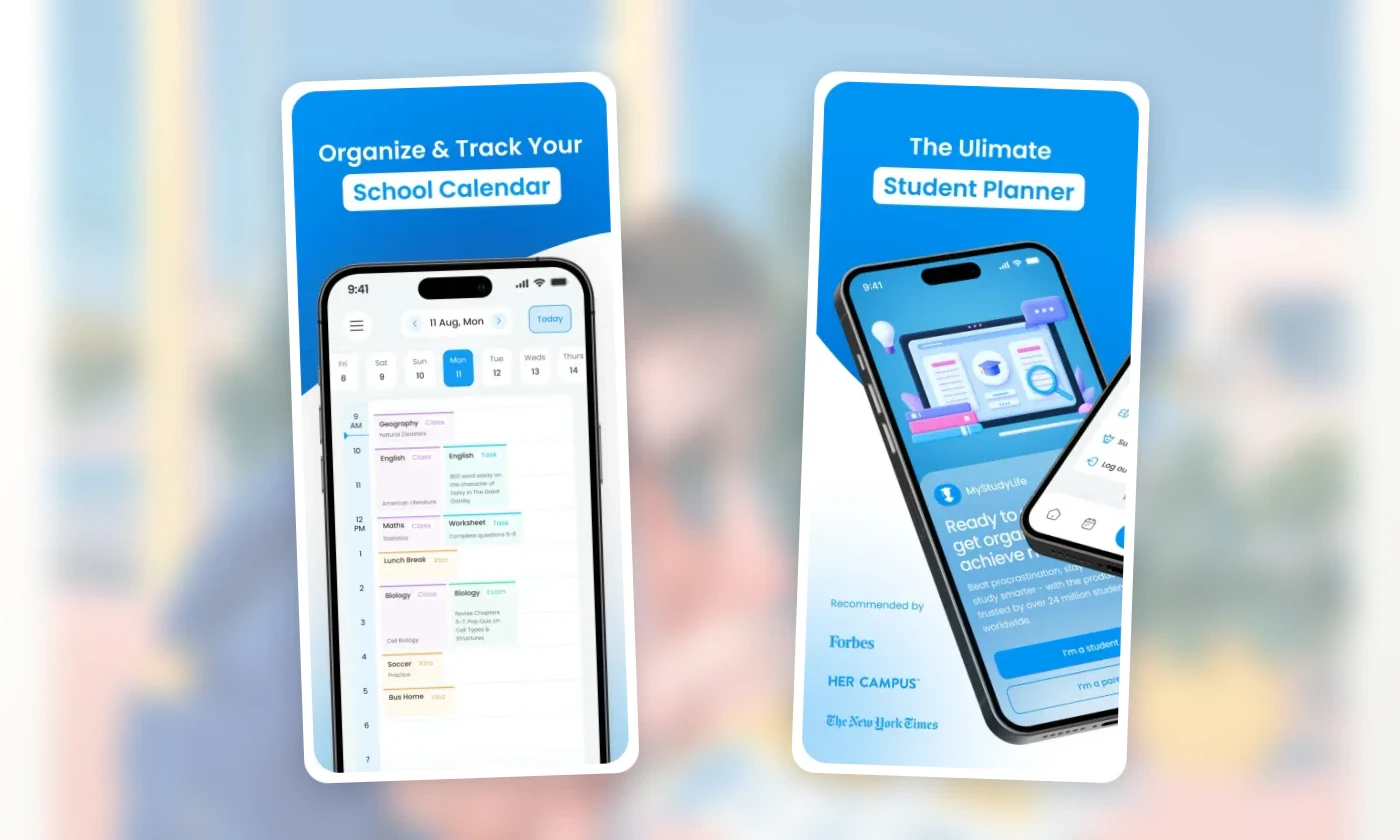
Official MyStudyLife App Store screenshots, captured July 30, 2026. Interfaces and availability can change.
Best for grades and GPA: Power Planner
Power Planner and its official support center document class schedules, assignments and exams, reminders, weighted grades, GPA scales, semester management, subtasks, and cross-platform access.
Power Planner is the clearest choice here when grade context changes the planning decision. If a student needs to know whether a recoverable 20%-weight paper matters more than a low-value quiz, a grade-aware system can hold information that a generic task manager cannot.
Best fit: A student who wants assignments, class schedule, grades, and “what if” academic calculations in one system.
Watch out for: Grade arithmetic is not workload arithmetic. A 5% lab can take longer than a 15% exam review. Students still need to estimate effort and schedule the work.
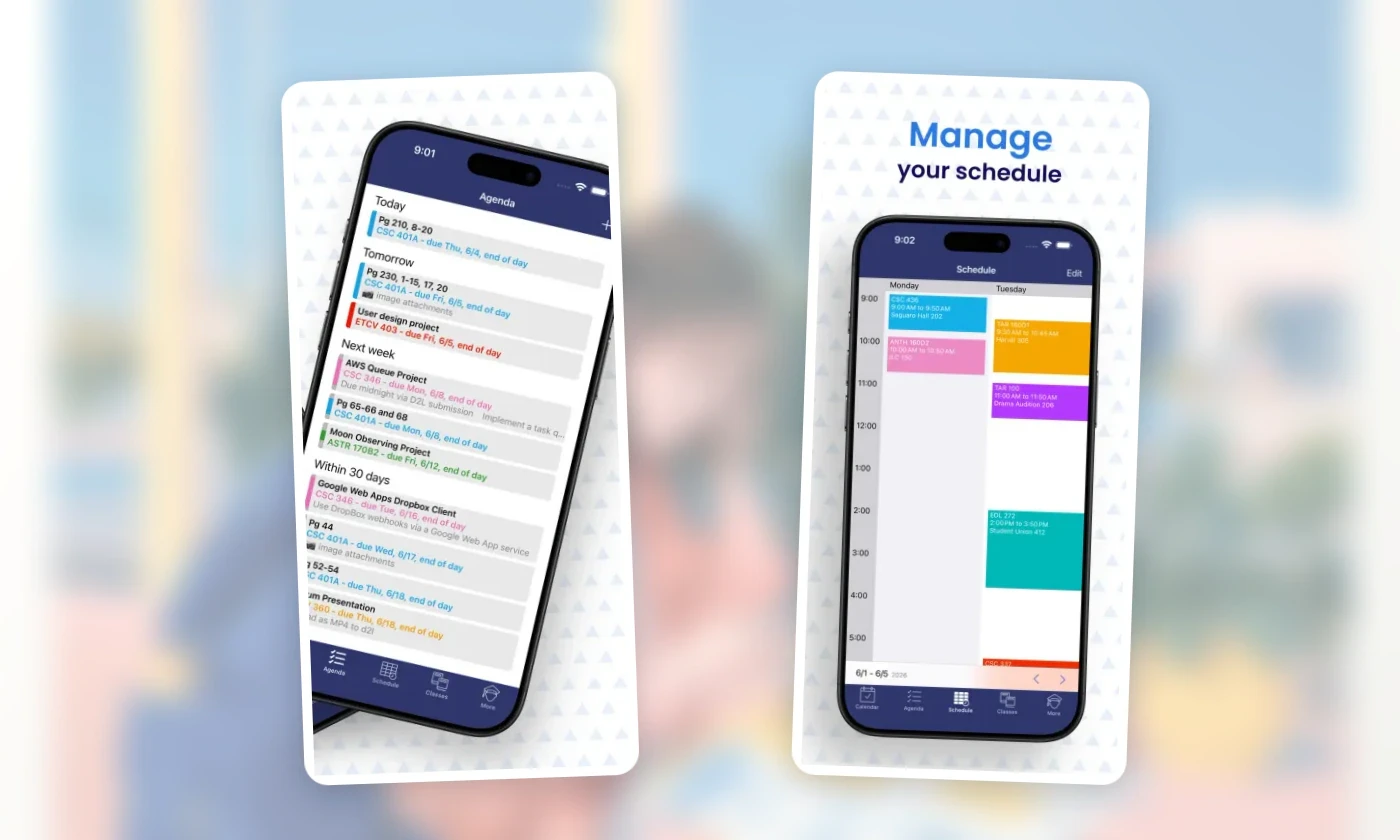
Official Power Planner App Store screenshots, captured July 30, 2026. Interfaces and availability can change.
Best visual day planner: Structured
Structured's U.S. App Store listing describes a drag-and-drop visual timeline, an Inbox, subtasks, a focus timer, widgets, and sync across iPhone, iPad, Apple Watch, and Mac. Structured Pro adds calendar and Reminders connections, recurring tasks, and Replan for reviewing missed work.
Structured is useful when the problem is not remembering the assignment but seeing when today can hold it. The timeline makes classes, meals, routines, and study blocks part of the same day.
Best fit: A student who needs one visually ordered day and is comfortable keeping course metadata elsewhere.
Watch out for: The official listing does not describe a native semester, grade, or exam object. A 14-week course becomes a planning pattern rather than a first-class academic record.
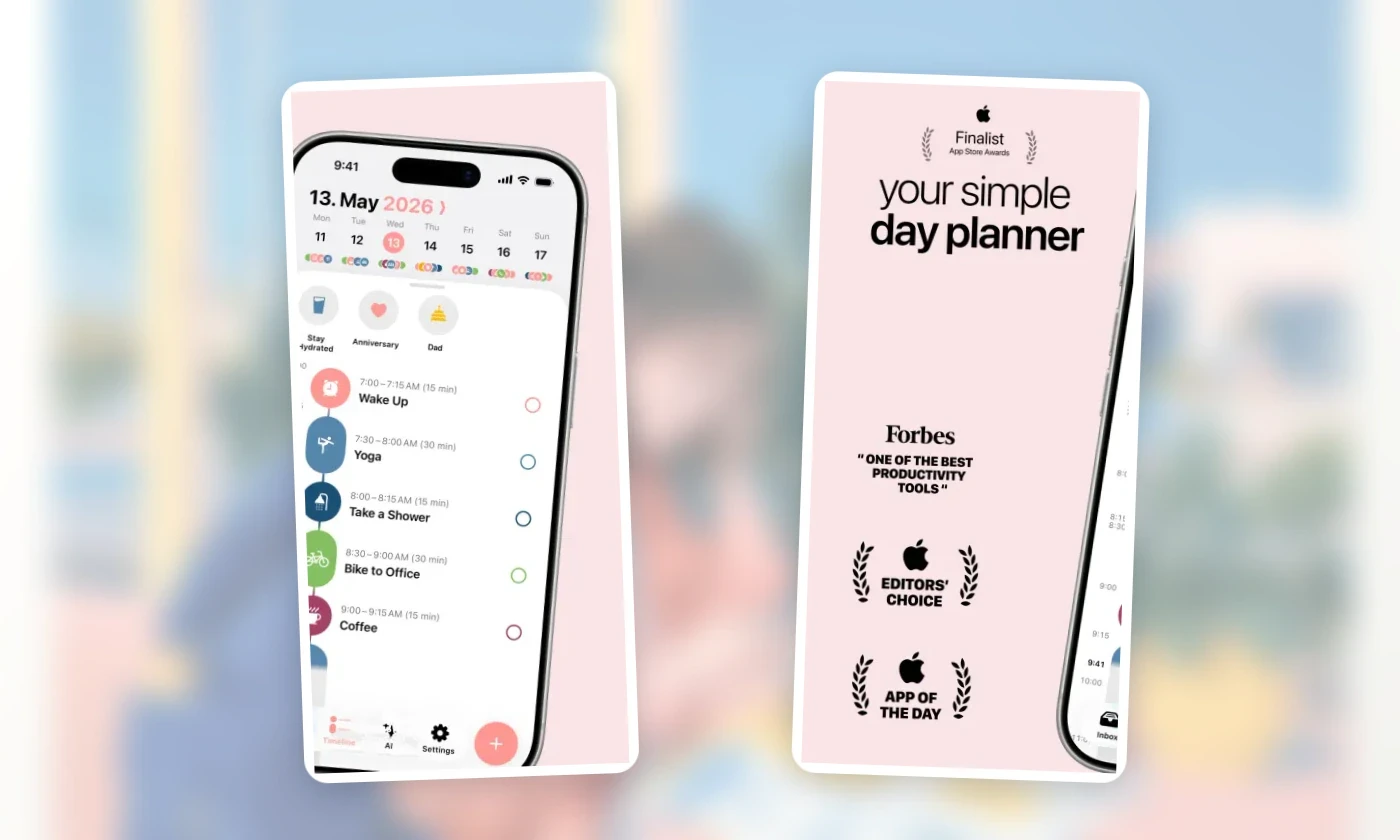
Official Structured App Store screenshots, captured July 30, 2026. Interfaces and availability can change.
Best flexible task manager: Todoist
Todoist's current App Store listing documents projects, sections, subtasks, labels, priorities, recurring tasks, collaboration, comments, files, and broad cross-device synchronization. Its calendar documentation confirms that Google or Outlook events can appear beside tasks on all plans, while the visual calendar layout is paid.
Todoist fits students who want to organize a paper like a project, share tasks for a group presentation, and keep school beside work and personal responsibilities. It is less prescriptive than a school planner, which can be a strength for graduate work or project-heavy courses.
Best fit: A student whose work is project-shaped and who values flexible organization or collaboration.
Watch out for: Flexibility creates setup decisions. Course, exam, due date, and study session are not automatically different objects. The student has to design and maintain that distinction.
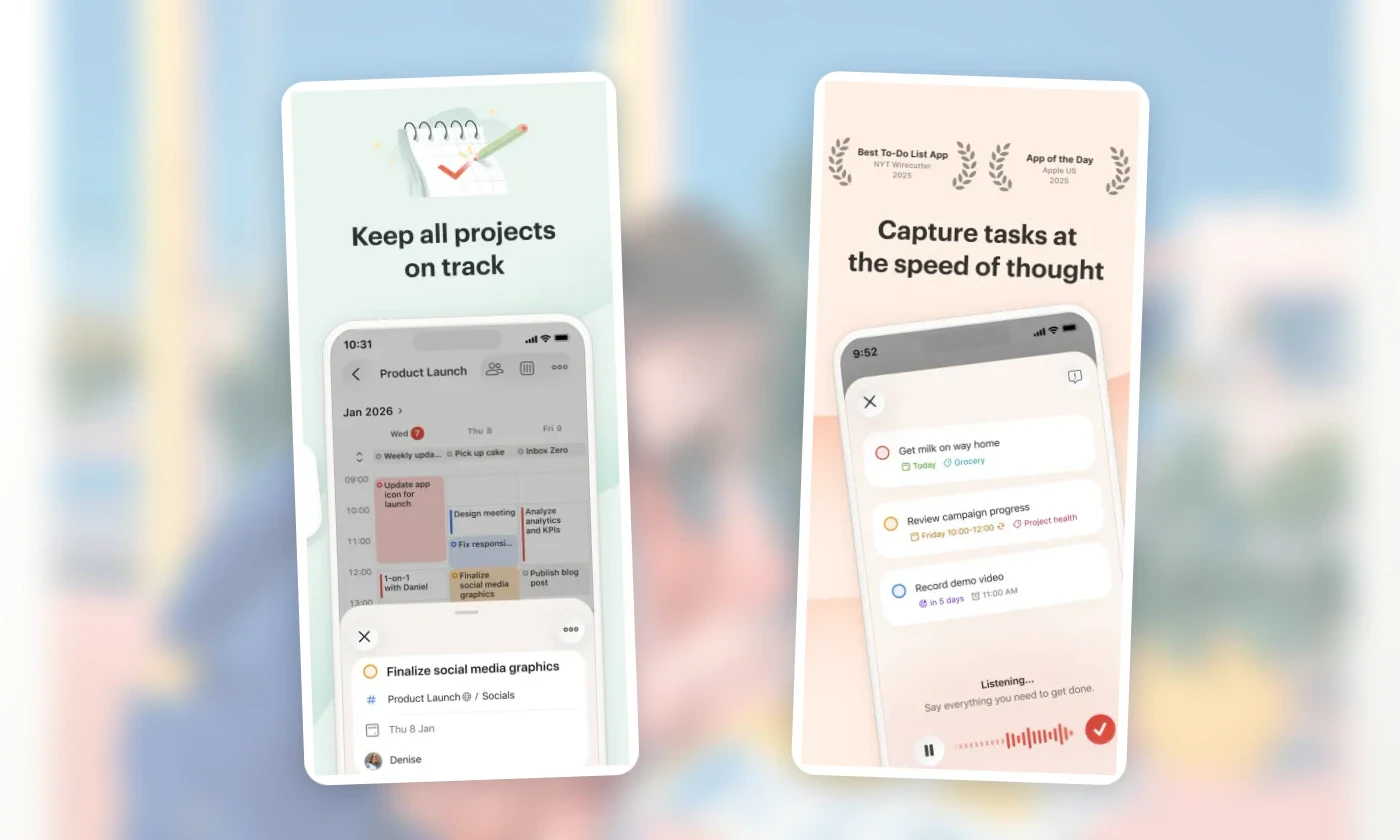
Official Todoist App Store screenshots, captured July 30, 2026. Interfaces and availability can change.
Best free Apple baseline: Reminders plus Calendar
Apple Reminders is free on Apple devices and documents Smart Lists, tags, subtasks, reusable templates, collaboration, recurring reminders, and location triggers. Apple's current Calendar guide confirms that scheduled reminders can be viewed, created, completed, and edited directly in Calendar.
For a student who does not need grades or a special timetable, a course list in Reminders plus fixed classes in Calendar can pass the basic test:
one list or tag per course
due dates on assignments
subtasks for papers and projects
classes and shifts in Calendar
a weekly Smart List for upcoming work
Best fit: A student already inside Apple's ecosystem who wants a capable no-extra-cost starting point.
Watch out for: There is no native semester overview, exam planner, or grade tracker. The two-app setup also makes the weekly capacity check less direct than a single integrated planner.
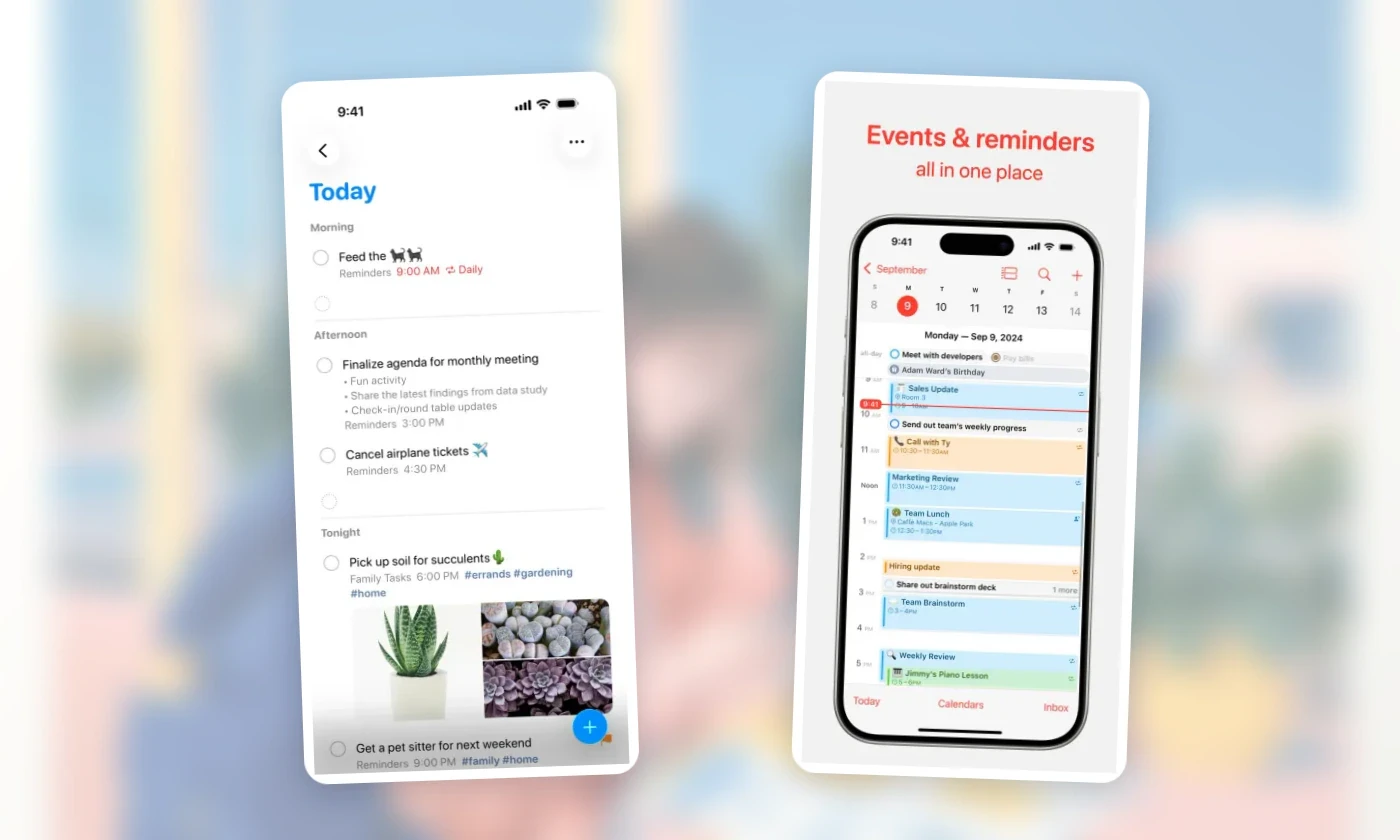
Official Apple Reminders and Apple Calendar App Store screenshots, captured July 30, 2026. Interfaces and availability can change.
Best for moving tasks around a real calendar: Ellie
The Ellie App Store listing documents a daily planner, Brain Dump, and a Timebox view where tasks can be dragged into a calendar alongside Apple and Google Calendar events. Version 4.0.12 was current when checked. Monthly and yearly plans start with a 7-day free trial and include unlimited tasks, labels, recurring tasks, and subtasks.
Import or connect fixed classes first, capture assignment actions as tasks, and schedule only the next credible study actions in Timebox.
Ellie fits a specific student problem: the assignment list exists, the class calendar exists, but they never meet. A student can capture every syllabus task, choose what belongs this week, and then place study actions around classes and shifts.
Ellie does not replace a learning-management system, grade calculator, or course catalog. Power Planner is a better fit when grade modeling is central. MyStudyLife is a better fit for a complex rotating school timetable. That is the honest boundary.
Disclosure: Ellie publishes this guide and benefits if readers choose Ellie. The feature claims above are linked to Apple's current listing. The recommendation should be read as first-party product guidance, not an independent award.
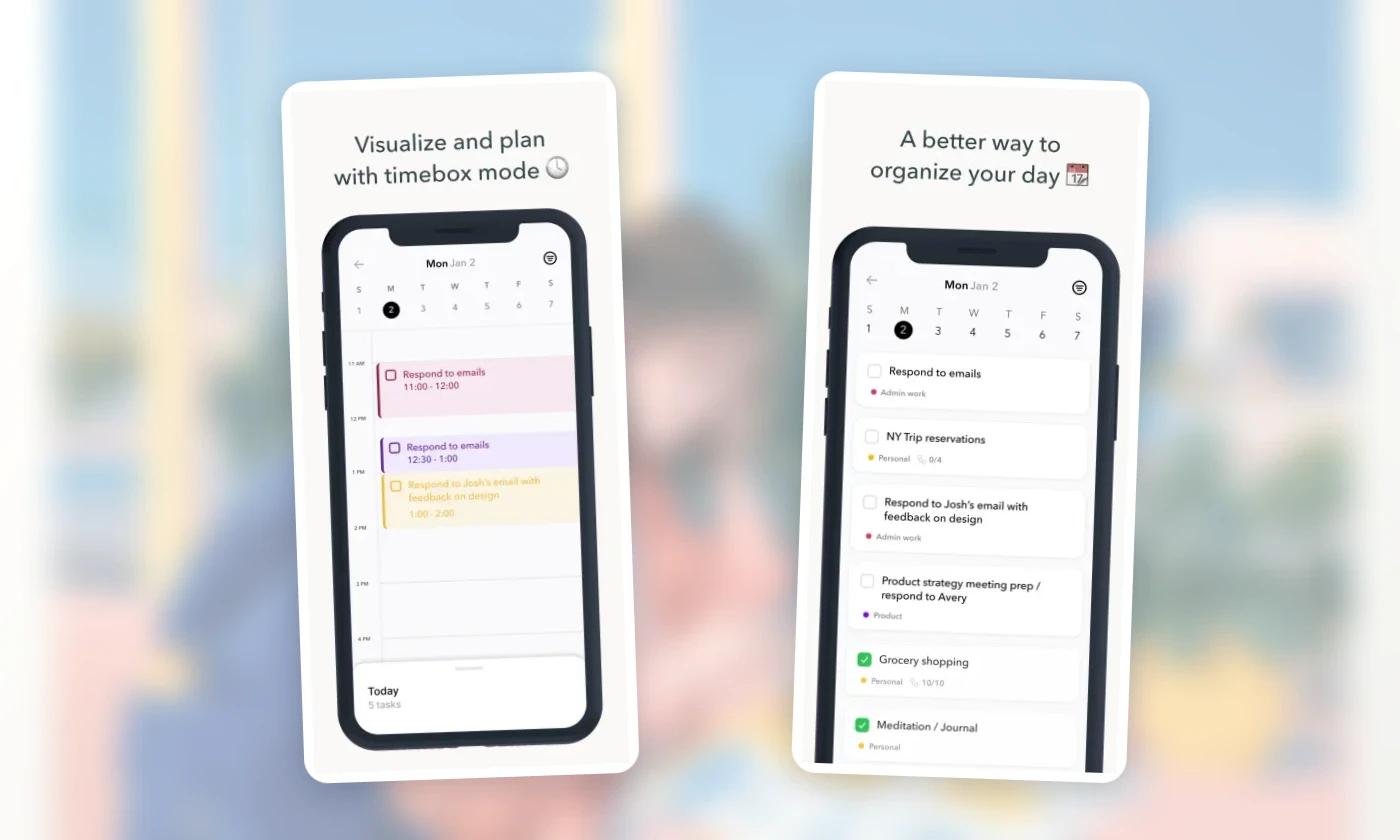
Official Ellie App Store screenshots, captured July 30, 2026. Interfaces and availability can change.
Which app fits two different students?
Scenario 1: rotating classes and parent visibility
Nia is in high school. Her timetable alternates by week, she wants assignments and exams to remain visibly different, and a parent helps check deadlines.
Recommendation: Start with MyStudyLife because manually configured rotating schedules, exams, assignments, and Family Connect are documented parts of the product. Power Planner is the alternative if grade modeling matters more than schedule sharing.
Structured or Ellie could make Nia's day clearer, but either would require a separate convention for the academic timetable. The best visual planner is not automatically the best school system.
Scenario 2: college, work shifts, and long projects
Tomas takes four courses, works two evening shifts, and has a research paper with six milestones. His school LMS already holds grades.
Recommendation: Ellie fits if Tomas wants to place the next paper action around classes and shifts. Todoist fits if project structure and group collaboration matter more than a calendar-first day. Apple Reminders plus Calendar is a credible free test before paying for either.
For the exam collision itself, the app is only the container. Tomas still needs a study plan that allocates several exams by retrieval need, not a longer list of subjects.
Run your own seven-day recovery test
Do not evaluate a student planner during a quiet sample week. Use these seven actions:
Enter one week of classes and shifts.
Add one exam, one paper, one recurring assignment, and one group task.
Break the paper into at least three next actions.
Move one shift.
Mark one task late.
Replan the late task and the displaced study session.
At the end of the week, ask whether the app made the new decision visible.
The winner is not the app with the prettiest initial setup. It is the one you can repair without hiding the consequences.
Use the calendar-versus-to-do-list guide to turn one long assignment into realistic calendar and task sample data. Then use the 7-day free trial to test that workflow before choosing a plan on Ellie's pricing page.
Non-app option
A paper semester calendar plus a weekly sheet can pass most of this rubric. Put every due date on the semester page, classes and shifts on the weekly page, and only the next actions on today's list. Add a small “waiting/late” box so disrupted work does not disappear.
Paper loses automatic reminders and cross-device access. It gains low setup complexity and complete control over the model.
The app cannot choose the learning method. Use the Pomodoro study guide for bounded study sprints and flexible time blocking when class or shift times move.
A student planner looks capable when it contains three sample assignments. The real test is week seven: two exams, a closing shift, a group presentation, and a paper that is already late. At that point, “supports tasks” is not a useful product description. The planner has to show what is due, what can still fit, and what happens when the original plan breaks.
Quick answer
The best student planner depends on the failure you need it to prevent. MyStudyLife fits rotating classes and exam planning; Power Planner adds grades and GPA; Structured makes one day visually clear; Todoist handles flexible projects; Apple Reminders plus Calendar is the strongest free baseline; and Ellie fits students who want to move tasks around a real calendar. No app can infer assignment effort or academic consequences from a due date alone.
At a glance
Best for | Choosing an iPhone-friendly planner for a full semester rather than a sample week |
Avoid when | Your school requires all work to stay inside its learning-management system or your main need is notes and document storage |
Trial length | Seven days with one changed shift, one late task, and one long assignment broken into steps |
Decision rule | Choose the planner that still makes the next study action obvious after the week changes |
What counts as a student planner
A student planner connects academic commitments with actions: classes, assignments, exams, and the work required before each deadline. A learning-management system is the school's source of record for course materials, submissions, grades, and official dates. A daily planner arranges tasks around available time. One app may cover more than one role, but no independent planner should silently replace the official course system.
How to use this comparison
This guide uses a real-semester-shaped scenario: five courses, a rotating lab, assignments, three exams, a changing work shift, a group project, and overdue work that may still receive credit. Product capabilities were rechecked against official documentation on August 23, 2026.
The apps were not run in a controlled usability lab. Official documentation can establish that a planner supports rotating schedules or grade tracking; it cannot tell you how long your syllabus will take to enter or whether the interface will feel calm during exam week. Use the rubric below to test two finalists with your own non-sensitive sample data.
Your learning-management system remains the source of truth for official dates, submissions, grades, and course policy. A personal planner should make that work actionable, not silently replace it.
The reproducible semester rubric
Use the same rubric before choosing an app:
Test | Pass condition |
|---|---|
Semester capture | Courses, assignments, and exams can remain distinct through the term |
Timetable reality | Repeating or rotating classes and personal commitments can be represented |
Work breakdown | A paper or exam can become several actionable study tasks |
Capacity view | The student can see tasks in relation to classes, shifts, and other fixed time |
Recovery | Missed or late work can be found and deliberately rescheduled |
Academic context | The app supports course or grade context when that context matters |
Cross-device access | The documented platforms match where the student actually works |
Cost fit | The needed workflow is available at an acceptable current price |
The first four are the minimum for this roundup. Grade tracking is valuable but not universal. A planner should not receive a higher score merely because it has more features.
The picks, prices, and platform limits
Prices below are current U.S. prices checked August 23, 2026. App-store and regional prices can differ, so verify the checkout before paying.
App | Plan, current U.S. price, platforms, and important limitation |
|---|---|
Free core; MyStudyLife+ is $6.99/month or $39.99/year. Available on iPhone, iPad, Android, and the web. Rotating timetables are supported through manual setup, but the MSL+ photo-based AI Schedule Wizard supports only non-rotational schedules. | |
Fully functional free version; Premium is under $5 as a one-time lifetime purchase. Available on Windows 11, Mac, iOS, Android, and the web, with one purchase unlocking every platform. Grade and GPA context is strong; the app does not estimate assignment effort for you. | |
Free core; Pro is $6.99/month, $29.99/year, or $99.99 lifetime. Available on iOS, Android, and the web, with Apple-device apps as well. Reminders import and Replan are iOS-only, and there is no native course, semester, or grade model. | |
Beginner is free; Pro is $7/month or $60/year ($5/month billed yearly). Available across the web, iPhone, iPad, Apple Watch, Mac, Windows, and Android. Calendar layout is a Pro feature, and courses and exams remain general projects and tasks. | |
Included with Apple devices and iCloud. Available on iPhone, iPad, Mac, Apple Watch, and iCloud.com; there is no native Android planner. The setup has no semester, course, exam, or grade model. | |
7-day free trial; Pro is $9.99/month or $99.99/year, with a $299.99 lifetime option. Available on iPhone, iPad, Mac, Windows, and the web; no Android app. Students, teachers, and non-profits get 50% off any plan. Ellie has no grade or GPA tracker, and Ellie publishes this guide. |
Best school-specific planner: MyStudyLife
MyStudyLife's current product documentation describes weekly and rotating class schedules, assignments with reminders and partial progress, exam countdowns and revision planning, calendar sync, and cross-device access. Rotating schedules can be entered manually. Its photo-based AI Schedule Wizard is an MSL+ feature and supports only non-rotational schedules.
That object model fits the student who thinks in courses, exams, and revision sessions. A rotating high-school timetable is not an awkward set of generic recurring events; it is one of the app's stated use cases.
Best fit: A student whose main risk is losing track of school-specific commitments across a changing timetable.
Watch out for: Do not assume a timetable photo will import a Week A/Week B rotation. MyStudyLife's official help says rotational schedules must be entered manually. Because we did not enter the full scenario into the app, this audit also cannot tell you how long a five-syllabus setup takes or how clear the late-work state feels.
Official MyStudyLife App Store screenshots, captured July 30, 2026. Interfaces and availability can change.
Best for grades and GPA: Power Planner
Power Planner and its official support center document class schedules, assignments and exams, reminders, weighted grades, GPA scales, semester management, subtasks, and cross-platform access.
Power Planner is the clearest choice here when grade context changes the planning decision. If a student needs to know whether a recoverable 20%-weight paper matters more than a low-value quiz, a grade-aware system can hold information that a generic task manager cannot.
Best fit: A student who wants assignments, class schedule, grades, and “what if” academic calculations in one system.
Watch out for: Grade arithmetic is not workload arithmetic. A 5% lab can take longer than a 15% exam review. Students still need to estimate effort and schedule the work.
Official Power Planner App Store screenshots, captured July 30, 2026. Interfaces and availability can change.
Best visual day planner: Structured
Structured's U.S. App Store listing describes a drag-and-drop visual timeline, an Inbox, subtasks, a focus timer, widgets, and sync across iPhone, iPad, Apple Watch, and Mac. Structured Pro adds calendar and Reminders connections, recurring tasks, and Replan for reviewing missed work.
Structured is useful when the problem is not remembering the assignment but seeing when today can hold it. The timeline makes classes, meals, routines, and study blocks part of the same day.
Best fit: A student who needs one visually ordered day and is comfortable keeping course metadata elsewhere.
Watch out for: The official listing does not describe a native semester, grade, or exam object. A 14-week course becomes a planning pattern rather than a first-class academic record.
Official Structured App Store screenshots, captured July 30, 2026. Interfaces and availability can change.
Best flexible task manager: Todoist
Todoist's current App Store listing documents projects, sections, subtasks, labels, priorities, recurring tasks, collaboration, comments, files, and broad cross-device synchronization. Its calendar documentation confirms that Google or Outlook events can appear beside tasks on all plans, while the visual calendar layout is paid.
Todoist fits students who want to organize a paper like a project, share tasks for a group presentation, and keep school beside work and personal responsibilities. It is less prescriptive than a school planner, which can be a strength for graduate work or project-heavy courses.
Best fit: A student whose work is project-shaped and who values flexible organization or collaboration.
Watch out for: Flexibility creates setup decisions. Course, exam, due date, and study session are not automatically different objects. The student has to design and maintain that distinction.
Official Todoist App Store screenshots, captured July 30, 2026. Interfaces and availability can change.
Best free Apple baseline: Reminders plus Calendar
Apple Reminders is free on Apple devices and documents Smart Lists, tags, subtasks, reusable templates, collaboration, recurring reminders, and location triggers. Apple's current Calendar guide confirms that scheduled reminders can be viewed, created, completed, and edited directly in Calendar.
For a student who does not need grades or a special timetable, a course list in Reminders plus fixed classes in Calendar can pass the basic test:
one list or tag per course
due dates on assignments
subtasks for papers and projects
classes and shifts in Calendar
a weekly Smart List for upcoming work
Best fit: A student already inside Apple's ecosystem who wants a capable no-extra-cost starting point.
Watch out for: There is no native semester overview, exam planner, or grade tracker. The two-app setup also makes the weekly capacity check less direct than a single integrated planner.
Official Apple Reminders and Apple Calendar App Store screenshots, captured July 30, 2026. Interfaces and availability can change.
Best for moving tasks around a real calendar: Ellie
The Ellie App Store listing documents a daily planner, Brain Dump, and a Timebox view where tasks can be dragged into a calendar alongside Apple and Google Calendar events. Version 4.0.12 was current when checked. Monthly and yearly plans start with a 7-day free trial and include unlimited tasks, labels, recurring tasks, and subtasks.
Import or connect fixed classes first, capture assignment actions as tasks, and schedule only the next credible study actions in Timebox.
Ellie fits a specific student problem: the assignment list exists, the class calendar exists, but they never meet. A student can capture every syllabus task, choose what belongs this week, and then place study actions around classes and shifts.
Ellie does not replace a learning-management system, grade calculator, or course catalog. Power Planner is a better fit when grade modeling is central. MyStudyLife is a better fit for a complex rotating school timetable. That is the honest boundary.
Disclosure: Ellie publishes this guide and benefits if readers choose Ellie. The feature claims above are linked to Apple's current listing. The recommendation should be read as first-party product guidance, not an independent award.
Official Ellie App Store screenshots, captured July 30, 2026. Interfaces and availability can change.
Which app fits two different students?
Scenario 1: rotating classes and parent visibility
Nia is in high school. Her timetable alternates by week, she wants assignments and exams to remain visibly different, and a parent helps check deadlines.
Recommendation: Start with MyStudyLife because manually configured rotating schedules, exams, assignments, and Family Connect are documented parts of the product. Power Planner is the alternative if grade modeling matters more than schedule sharing.
Structured or Ellie could make Nia's day clearer, but either would require a separate convention for the academic timetable. The best visual planner is not automatically the best school system.
Scenario 2: college, work shifts, and long projects
Tomas takes four courses, works two evening shifts, and has a research paper with six milestones. His school LMS already holds grades.
Recommendation: Ellie fits if Tomas wants to place the next paper action around classes and shifts. Todoist fits if project structure and group collaboration matter more than a calendar-first day. Apple Reminders plus Calendar is a credible free test before paying for either.
For the exam collision itself, the app is only the container. Tomas still needs a study plan that allocates several exams by retrieval need, not a longer list of subjects.
Run your own seven-day recovery test
Do not evaluate a student planner during a quiet sample week. Use these seven actions:
Enter one week of classes and shifts.
Add one exam, one paper, one recurring assignment, and one group task.
Break the paper into at least three next actions.
Move one shift.
Mark one task late.
Replan the late task and the displaced study session.
At the end of the week, ask whether the app made the new decision visible.
The winner is not the app with the prettiest initial setup. It is the one you can repair without hiding the consequences.
Use the calendar-versus-to-do-list guide to turn one long assignment into realistic calendar and task sample data. Then use the 7-day free trial to test that workflow before choosing a plan on Ellie's pricing page.
Non-app option
A paper semester calendar plus a weekly sheet can pass most of this rubric. Put every due date on the semester page, classes and shifts on the weekly page, and only the next actions on today's list. Add a small “waiting/late” box so disrupted work does not disappear.
Paper loses automatic reminders and cross-device access. It gains low setup complexity and complete control over the model.
The app cannot choose the learning method. Use the Pomodoro study guide for bounded study sprints and flexible time blocking when class or shift times move.
Plan a day that can breathe
Ellie keeps tasks beside your calendar, so you can see your real capacity before the day fills up.