A dentist appointment, a report due Friday, milk, and an idea for a trip are sitting in four different apps. The report has also been copied onto the calendar twice. One copy moved; the other did not. The system now contains more information and less truth.
Quick answer
Put something on the calendar when it reserves time or involves another person's time. Put it on a to-do list when it is an action you can complete but still have choices about when to do it. Use a reminder when the main need is a cue at a time, place, or context. Keep reference material and undeveloped ideas in notes. The same commitment can appear in more than one view, but it should have one source of truth.
At a glance
Best for: deciding where a new commitment belongs before it gets duplicated
Avoid when: a workplace, school, or medical system requires a specific record location
Setup time: 10 minutes to choose one default home for each object type
Daily effort: a few seconds per captured item, plus a short review
Evidence level: moderate evidence for external reminders as cognitive offloading; the four-way placement rule is a practical decision aid
Calendar, task, reminder, and note are different objects
A calendar event answers: When is this happening? It has a start, usually an end, and often a location or other participants. A dentist appointment at 2:00 p.m. is an event because the time is part of the commitment.
A task answers: What action must be completed? “Draft the pricing summary” can be done at 9:00 a.m. or 2:30 p.m. unless you deliberately reserve time for it. A due date is not automatically an appointment with yourself.
A reminder answers: What cue would make this intention easier to remember at the right moment? “Take the package when I leave” is primarily a cue problem. The action is short; remembering it at the door is the hard part.
A note answers: What information or possibility do I want to preserve? A restaurant name, a rough trip idea, or meeting context may inform later action without being actionable now.
These definitions describe the job each object performs, not the icon on a particular phone. Apple, for example, lets scheduled reminders appear inside Calendar on current iOS. The reminder remains a completable reminder even though the calendar provides another view of it. Apple explains how reminders can be created and viewed in Calendar.
The four-way “where should this live?” decision tree
Start at the top and stop at the first clear yes.
1. Does another person, place, or hard constraint expect you at a specific time?
Yes: create a calendar event.
Examples:
dentist appointment at 2:00 p.m.
flight departure
class or shift
call agreed for 11:30 a.m.
medication that must be taken within a medically specified window
Add preparation as a separate task when needed. “Dentist appointment” is the event; “complete new-patient form” is a task.
2. Is there a visible action that can be completed?
Yes: create a task.
Write the task as a verb plus an object: “Send revised estimate,” not “estimate.” Give it a hard due date only when a real consequence or agreement creates one.
If the task needs protected time, timebox the same task on the calendar. Do not create a second, unrelated copy called “work on estimate.” One task can have both completion state and scheduled working time.
3. Is the main risk forgetting at a particular moment, place, or interaction?
Yes: create a reminder.
Examples:
take the return package when leaving home
ask Maya about the venue when you next message her
move the car before street cleaning
cancel a trial before renewal
External reminders are a form of cognitive offloading: an intention is placed in the environment instead of being held entirely in memory. Laboratory studies show that reminders can improve remembering, but people also sometimes choose reminders more often than a simple cost-benefit model would predict. Confidence, effort, and how reminder costs are framed affect that choice (Gilbert et al., 2020; Fröscher et al., 2022).
Research finding: reminders can support prospective memory under tested conditions.
Ellie workflow recommendation: reserve alerts for cues that deserve interruption. A notification attached to every low-stakes task makes the important cues harder to distinguish.
4. Is this useful information without a next action?
Yes: create a note.
Examples:
“Lisbon in October might be less crowded”
a reference number
meeting observations
a recipe variation
questions to consider before choosing a project
If a next action appears, create a task that links back to the note. Do not turn every thought into an obligation.
A compact placement model
Object | It promises | Required fields | Completion state? | Good example |
|---|---|---|---|---|
Calendar event | presence at a time | start and context | usually no | “Physical therapy, 3:00–3:45” |
Task | an action will be completed | visible next action | yes | “Send insurance form” |
Reminder | attention at a cue | trigger plus action | yes | “Bring form when leaving” |
Note | information will be retrievable | useful context | no | “Questions for therapist” |
The distinction between tasks and events is also reflected in current planning products. Sunsama's official documentation says tasks are completable items in daily lists, while calendar events are not automatically treated as tasks unless imported. That product-specific model is not a universal law, but it shows why collapsing the two objects can distort workload totals (Sunsama, “Tasks vs Events”).
When one commitment needs two objects
Some commitments contain both attendance and work.
For a presentation:
Event: “Client presentation, Friday 10:00”
Task: “Draft presentation”
Timebox: the task scheduled Wednesday 1:00–2:30
Reminder: “Bring HDMI adapter” triggered when leaving Friday
Note: interview findings and source material
This is not duplication because each object performs a different job. Duplication is two independent copies of “Draft presentation” that can disagree about status or timing.
Use the time-blocking guide when you need help turning a task into protected working time. If you are unsure whether a block should end when time expires or when work finishes, the timeboxing versus time blocking guide explains the distinction.
Worked example: a report due Friday
Nia has a two-page report due Friday at 4:00 p.m. Thursday includes three meetings.
The deadline is not a Friday afternoon work session. Nia creates:
a task: “Send two-page vendor report,” due Friday at 4:00
a subtask: “Confirm Q2 total with Sam”
a 75-minute working block on Wednesday morning
a 30-minute revision block on Friday morning
a reminder Thursday at 1:00 p.m. only if Sam has not replied
The task remains the source of completion truth. The calendar answers when the work has room to happen. The reminder exists only for the external dependency.
If Wednesday's block moves, Nia moves the timebox rather than creating another report task.
Worked example: errands and a possible trip
Mateo captures four items while walking home:
buy milk
return library book
Portland in September?
call the veterinarian at 9:00 tomorrow
“Buy milk” is a task. It may get a location reminder if Mateo reliably shops after work, but it does not need a calendar event.
“Return library book” is also a task. Because the book is easy to forget, Mateo adds a leaving-home reminder and puts the book by the door.
“Portland in September?” is a note. It becomes a task only after Mateo decides to investigate, perhaps “Check September flight prices.”
“Call the veterinarian” is a task with a time-sensitive window. If the office opens at 9:00 and appointments disappear quickly, Mateo may reserve a five-minute calendar block and set one reminder. The action, time reservation, and cue are justified separately.
Use one source of truth
Pick one object that owns each fact:
the calendar owns the agreed appointment time
the task owns completion and the real deadline
the reminder owns its trigger
the note owns reference detail
Integrations may display those objects together. That is useful. Manual copies that can drift are not.
A simple weekly audit catches trouble:
Look for all-day calendar items that are actually movable tasks.
Look for tasks whose due dates are being used as hopeful do dates.
Delete alerts that no longer change behavior.
Convert notes with a real next action into tasks.
Remove duplicate copies after choosing the authoritative one.
How to use the model in Ellie

Capture uncertain work in Ellie's Brain Dump. Clarify it into a verb-led task, then move it into a day only when you intend to act. Ellie's documentation describes the Brain Dump as a capture space that should be reviewed rather than treated as a permanent plan (Ellie Brain Dump guide).
If a task needs protected time, drag that task into the Timebox. Ellie can show external calendar events alongside tasks while keeping the objects distinct, and calendar connection is optional (Ellie Timebox guide).
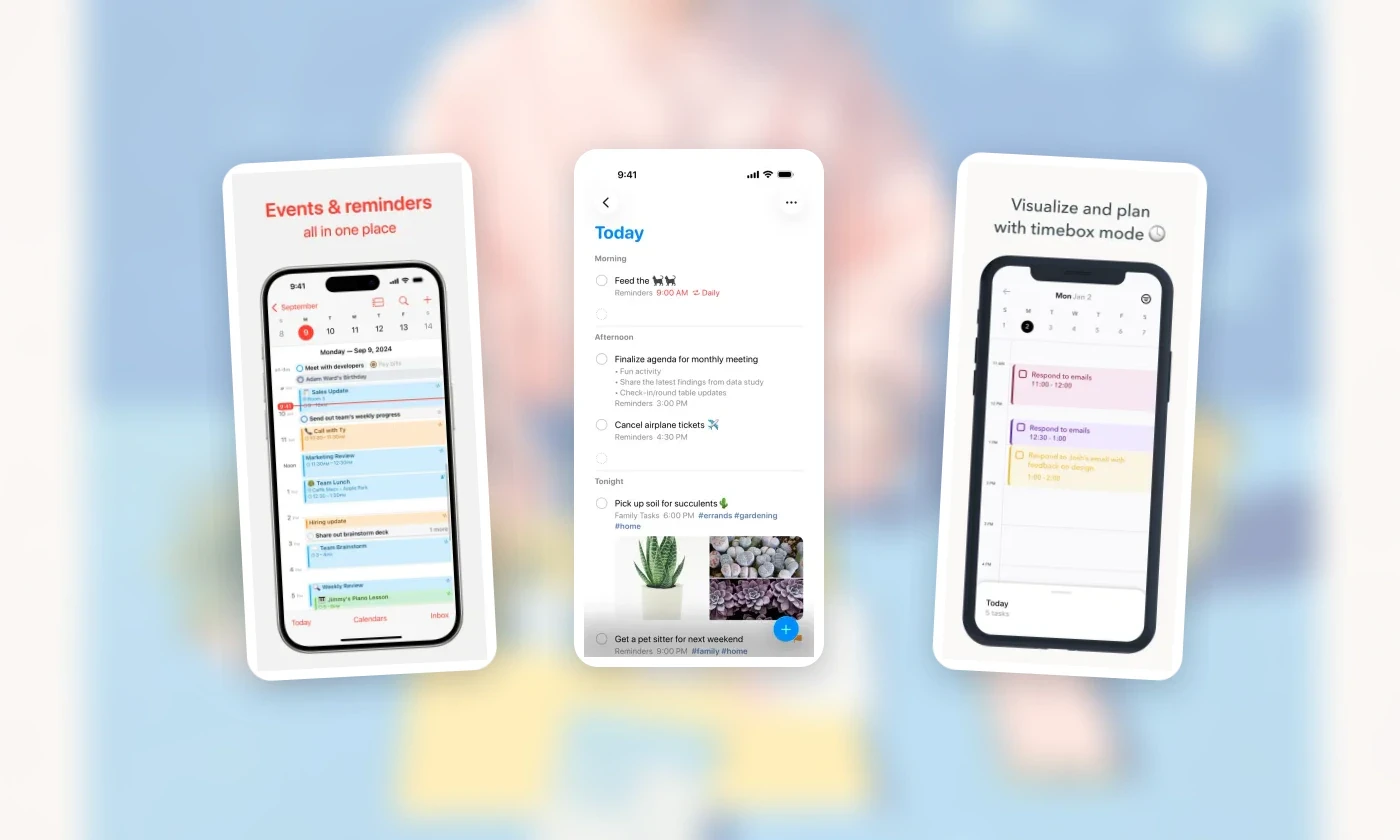
Official Apple Calendar, Apple Reminders, and Ellie App Store screenshots, captured July 30, 2026. Interfaces and availability can change.
Ellie is one implementation, not a requirement. The same method works with paper:
appointments in the dated calendar
actions on one task list
a sticky note or phone alarm for critical cues
reference material in a notebook
Apple Reminders plus Calendar can also keep tasks and events visible in one native view. The placement decision matters more than the brand.
Once each commitment has one clear home, turn the tasks that matter today into a realistic daily plan. Use timeboxing only when the work needs protected calendar space, and use an if-then cue when remembering to start is the real problem.
If the system is clear but the tool is not, compare six daily planner apps for iPhone using those same placement rules.
Ellie is the daily planner we make. It runs on Mac, Windows, the web, iPhone and iPad. You brain dump tasks, drag them onto the days of your week, and timebox them beside your Google, Apple or Outlook calendar events. It has a 7-day free trial, then costs $9.99 a month or $99.99 a year (see plans).
Frequently asked questions
Should a task go on my calendar or my to-do list?
Put it on the calendar only when it needs reserved time or involves someone else’s time. Otherwise keep it on your to-do list and choose when to do it.
Can the same commitment live in both places?
Yes, it can show up in more than one view, but give it one source of truth so a change in one place doesn’t get lost in the other.
When should I use a reminder instead?
Use a reminder when the main risk is forgetting at a particular time, place or moment, not when the work needs a block of time.
Where do ideas and reference material go?
Keep them in notes until they have a clear next action. A note without an action doesn’t belong on a task list or calendar.
A dentist appointment, a report due Friday, milk, and an idea for a trip are sitting in four different apps. The report has also been copied onto the calendar twice. One copy moved; the other did not. The system now contains more information and less truth.
Quick answer
Put something on the calendar when it reserves time or involves another person's time. Put it on a to-do list when it is an action you can complete but still have choices about when to do it. Use a reminder when the main need is a cue at a time, place, or context. Keep reference material and undeveloped ideas in notes. The same commitment can appear in more than one view, but it should have one source of truth.
At a glance
Best for: deciding where a new commitment belongs before it gets duplicated
Avoid when: a workplace, school, or medical system requires a specific record location
Setup time: 10 minutes to choose one default home for each object type
Daily effort: a few seconds per captured item, plus a short review
Evidence level: moderate evidence for external reminders as cognitive offloading; the four-way placement rule is a practical decision aid
Calendar, task, reminder, and note are different objects
A calendar event answers: When is this happening? It has a start, usually an end, and often a location or other participants. A dentist appointment at 2:00 p.m. is an event because the time is part of the commitment.
A task answers: What action must be completed? “Draft the pricing summary” can be done at 9:00 a.m. or 2:30 p.m. unless you deliberately reserve time for it. A due date is not automatically an appointment with yourself.
A reminder answers: What cue would make this intention easier to remember at the right moment? “Take the package when I leave” is primarily a cue problem. The action is short; remembering it at the door is the hard part.
A note answers: What information or possibility do I want to preserve? A restaurant name, a rough trip idea, or meeting context may inform later action without being actionable now.
These definitions describe the job each object performs, not the icon on a particular phone. Apple, for example, lets scheduled reminders appear inside Calendar on current iOS. The reminder remains a completable reminder even though the calendar provides another view of it. Apple explains how reminders can be created and viewed in Calendar.
The four-way “where should this live?” decision tree
Start at the top and stop at the first clear yes.
1. Does another person, place, or hard constraint expect you at a specific time?
Yes: create a calendar event.
Examples:
dentist appointment at 2:00 p.m.
flight departure
class or shift
call agreed for 11:30 a.m.
medication that must be taken within a medically specified window
Add preparation as a separate task when needed. “Dentist appointment” is the event; “complete new-patient form” is a task.
2. Is there a visible action that can be completed?
Yes: create a task.
Write the task as a verb plus an object: “Send revised estimate,” not “estimate.” Give it a hard due date only when a real consequence or agreement creates one.
If the task needs protected time, timebox the same task on the calendar. Do not create a second, unrelated copy called “work on estimate.” One task can have both completion state and scheduled working time.
3. Is the main risk forgetting at a particular moment, place, or interaction?
Yes: create a reminder.
Examples:
take the return package when leaving home
ask Maya about the venue when you next message her
move the car before street cleaning
cancel a trial before renewal
External reminders are a form of cognitive offloading: an intention is placed in the environment instead of being held entirely in memory. Laboratory studies show that reminders can improve remembering, but people also sometimes choose reminders more often than a simple cost-benefit model would predict. Confidence, effort, and how reminder costs are framed affect that choice (Gilbert et al., 2020; Fröscher et al., 2022).
Research finding: reminders can support prospective memory under tested conditions.
Ellie workflow recommendation: reserve alerts for cues that deserve interruption. A notification attached to every low-stakes task makes the important cues harder to distinguish.
4. Is this useful information without a next action?
Yes: create a note.
Examples:
“Lisbon in October might be less crowded”
a reference number
meeting observations
a recipe variation
questions to consider before choosing a project
If a next action appears, create a task that links back to the note. Do not turn every thought into an obligation.
A compact placement model
Object | It promises | Required fields | Completion state? | Good example |
|---|---|---|---|---|
Calendar event | presence at a time | start and context | usually no | “Physical therapy, 3:00–3:45” |
Task | an action will be completed | visible next action | yes | “Send insurance form” |
Reminder | attention at a cue | trigger plus action | yes | “Bring form when leaving” |
Note | information will be retrievable | useful context | no | “Questions for therapist” |
The distinction between tasks and events is also reflected in current planning products. Sunsama's official documentation says tasks are completable items in daily lists, while calendar events are not automatically treated as tasks unless imported. That product-specific model is not a universal law, but it shows why collapsing the two objects can distort workload totals (Sunsama, “Tasks vs Events”).
When one commitment needs two objects
Some commitments contain both attendance and work.
For a presentation:
Event: “Client presentation, Friday 10:00”
Task: “Draft presentation”
Timebox: the task scheduled Wednesday 1:00–2:30
Reminder: “Bring HDMI adapter” triggered when leaving Friday
Note: interview findings and source material
This is not duplication because each object performs a different job. Duplication is two independent copies of “Draft presentation” that can disagree about status or timing.
Use the time-blocking guide when you need help turning a task into protected working time. If you are unsure whether a block should end when time expires or when work finishes, the timeboxing versus time blocking guide explains the distinction.
Worked example: a report due Friday
Nia has a two-page report due Friday at 4:00 p.m. Thursday includes three meetings.
The deadline is not a Friday afternoon work session. Nia creates:
a task: “Send two-page vendor report,” due Friday at 4:00
a subtask: “Confirm Q2 total with Sam”
a 75-minute working block on Wednesday morning
a 30-minute revision block on Friday morning
a reminder Thursday at 1:00 p.m. only if Sam has not replied
The task remains the source of completion truth. The calendar answers when the work has room to happen. The reminder exists only for the external dependency.
If Wednesday's block moves, Nia moves the timebox rather than creating another report task.
Worked example: errands and a possible trip
Mateo captures four items while walking home:
buy milk
return library book
Portland in September?
call the veterinarian at 9:00 tomorrow
“Buy milk” is a task. It may get a location reminder if Mateo reliably shops after work, but it does not need a calendar event.
“Return library book” is also a task. Because the book is easy to forget, Mateo adds a leaving-home reminder and puts the book by the door.
“Portland in September?” is a note. It becomes a task only after Mateo decides to investigate, perhaps “Check September flight prices.”
“Call the veterinarian” is a task with a time-sensitive window. If the office opens at 9:00 and appointments disappear quickly, Mateo may reserve a five-minute calendar block and set one reminder. The action, time reservation, and cue are justified separately.
Use one source of truth
Pick one object that owns each fact:
the calendar owns the agreed appointment time
the task owns completion and the real deadline
the reminder owns its trigger
the note owns reference detail
Integrations may display those objects together. That is useful. Manual copies that can drift are not.
A simple weekly audit catches trouble:
Look for all-day calendar items that are actually movable tasks.
Look for tasks whose due dates are being used as hopeful do dates.
Delete alerts that no longer change behavior.
Convert notes with a real next action into tasks.
Remove duplicate copies after choosing the authoritative one.
How to use the model in Ellie
Capture uncertain work in Ellie's Brain Dump. Clarify it into a verb-led task, then move it into a day only when you intend to act. Ellie's documentation describes the Brain Dump as a capture space that should be reviewed rather than treated as a permanent plan (Ellie Brain Dump guide).
If a task needs protected time, drag that task into the Timebox. Ellie can show external calendar events alongside tasks while keeping the objects distinct, and calendar connection is optional (Ellie Timebox guide).
Official Apple Calendar, Apple Reminders, and Ellie App Store screenshots, captured July 30, 2026. Interfaces and availability can change.
Ellie is one implementation, not a requirement. The same method works with paper:
appointments in the dated calendar
actions on one task list
a sticky note or phone alarm for critical cues
reference material in a notebook
Apple Reminders plus Calendar can also keep tasks and events visible in one native view. The placement decision matters more than the brand.
Once each commitment has one clear home, turn the tasks that matter today into a realistic daily plan. Use timeboxing only when the work needs protected calendar space, and use an if-then cue when remembering to start is the real problem.
If the system is clear but the tool is not, compare six daily planner apps for iPhone using those same placement rules.
Ellie is the daily planner we make. It runs on Mac, Windows, the web, iPhone and iPad. You brain dump tasks, drag them onto the days of your week, and timebox them beside your Google, Apple or Outlook calendar events. It has a 7-day free trial, then costs $9.99 a month or $99.99 a year (see plans).
Frequently asked questions
Should a task go on my calendar or my to-do list?
Put it on the calendar only when it needs reserved time or involves someone else’s time. Otherwise keep it on your to-do list and choose when to do it.
Can the same commitment live in both places?
Yes, it can show up in more than one view, but give it one source of truth so a change in one place doesn’t get lost in the other.
When should I use a reminder instead?
Use a reminder when the main risk is forgetting at a particular time, place or moment, not when the work needs a block of time.
Where do ideas and reference material go?
Keep them in notes until they have a clear next action. A note without an action doesn’t belong on a task list or calendar.
Plan a day that can breathe
Ellie keeps tasks beside your calendar, so you can see your real capacity before the day fills up.