




A better way
to plan your week

A beautiful daily planner app built to keep you calm

No credit card required.

Ellie's hamster peeking over the app window
Five stars

Why people love Ellie

  • “I wake up each morning able to be present because what needs to be done is in Ellie, not in my brain.”

    Lizi D.'s hamster

    Lizi D.

    Morning planner

    Ellie's hamster peeking over the card, eyes happily closed
  • “The game changer for me was the Brain Dump because that’s how I think!”

    Ann S.'s hamster

    Ann S.

    Brain-dump thinker

  • “It has every single feature I need, and none that I don’t.”

    Kimapc's hamster

    Kimapc

    AuDHD, tried every app

    Ellie's hamster peeking over the card and waving
  • “I love being able to drag the tasks to the day but then also drag them to a timeline.”

    Rebeccah W.'s hamster

    Rebeccah W.

    Visual planner

  • “This app got me through grad school + working full time.”

    knittedlogic's hamster

    knittedlogic

    Grad student, full-time job

    Ellie's hamster peeking over the card
  • “Been using it for a couple weeks now and it’s been extremely helpful for my ADHD mind.”

    MattTibby7's hamster

    MattTibby7

    Has ADHD

  • “The ability to forward emails is a game changer to my sanity.”

    Jennifer M.'s hamster

    Jennifer M.

    Busy inbox

  • “It’s easy to log tasks, move tasks, and know what my week is going to look like. I feel more in control.”

    Bella L.'s hamster

    Bella L.

    Has time blindness

    Ellie's hamster hanging from the card and waving
  • “I love this app because I can track how efficient I am.”

    Amar's hamster

    Amar

    Times every task

  • “I spend less time and energy trying to prioritize and more time on the things that matter.”

    Emily V.'s hamster

    Emily V.

    Recovering overthinker

    Ellie's hamster hanging from the card
  • “Ellie is just so clean, beautiful and smooth.”

    HorizonRater's hamster

    Joachim K.

    Switched from Sunsama

  • “Helps my crazy creative brain get stuff done.”

    Kimberly899's hamster

    Kimberly899

    Creative, plans at night

How I use the app to plan my day 👇

Here is a quick video showing how I (app creator) personally use the app to plan/timebox my day

Your week

A better way to visualize your week

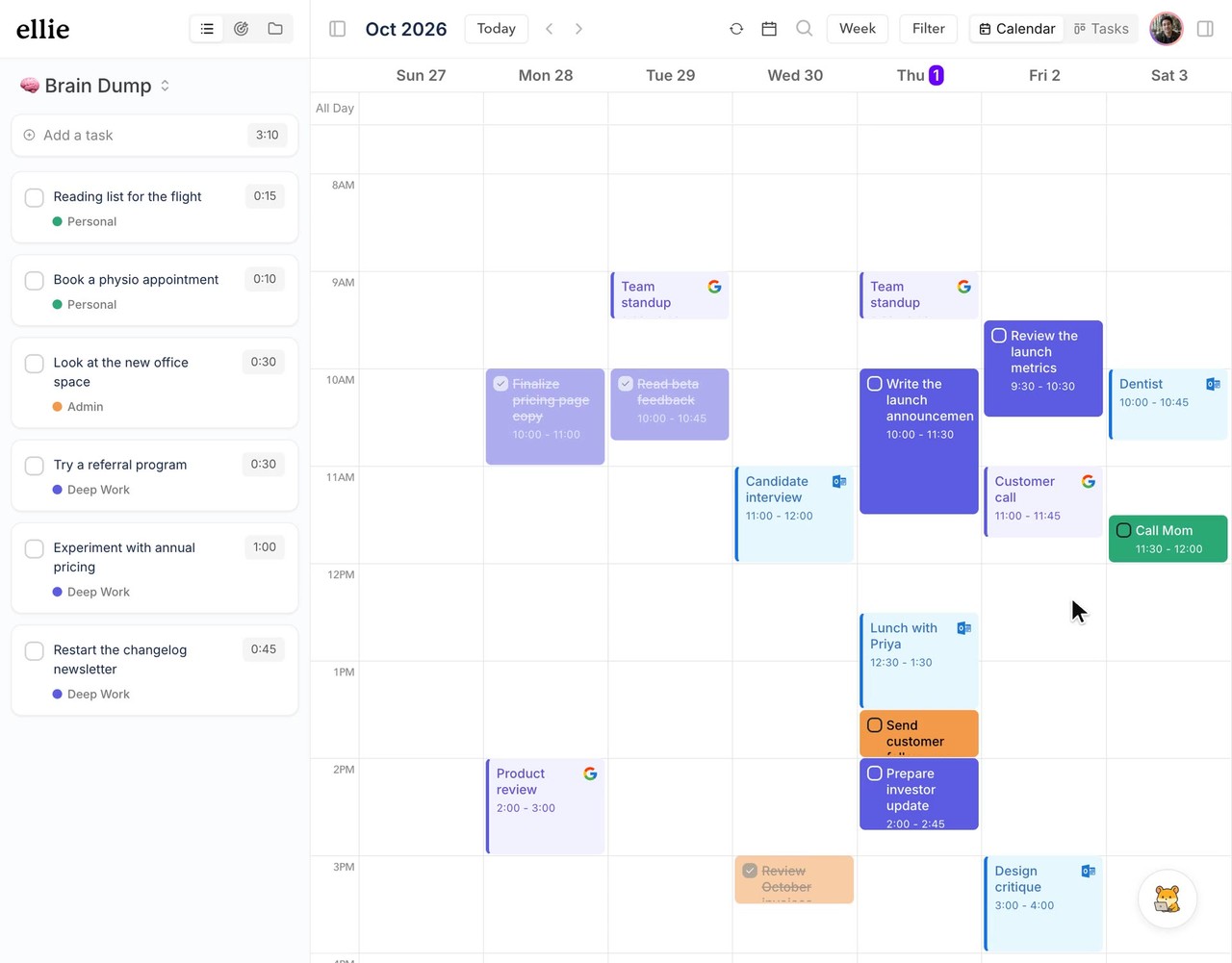
Every day gets its own column, so you can see the whole week at once.

Desktop

iPhone

Desktop

iPhone

Desktop

iPhone

Timeboxing

Drag tasks into your calendar

Your tasks next to your meetings, on your Mac or your iPhone. See what fits, then drop it in.

Desktop

iPhone

Desktop

iPhone

Desktop

iPhone

Works with

Google Calendar

Outlook

Apple Calendar

Works with

Google Calendar

Outlook

Apple Calendar

Brain dump

Get it out of your head

Type it into your Brain Dump, or just say it to Siri. Either way, it lands in one list.

Brain dump everything

Type it in a second. Sort it out later.

Or just tell Siri

Hands full? Just say it, and it lands in your Brain Dump.

Siri

“Add task to brain dump”

What’s the task?

“Call the dentist”

Added to Brain Dump

Call the dentist

iPhone and iPad

Your entire day in your hand

See what’s next, block time for it, and start the timer.

iPhone

iPad

Ellie on iPhone: today’s tasks with time estimates
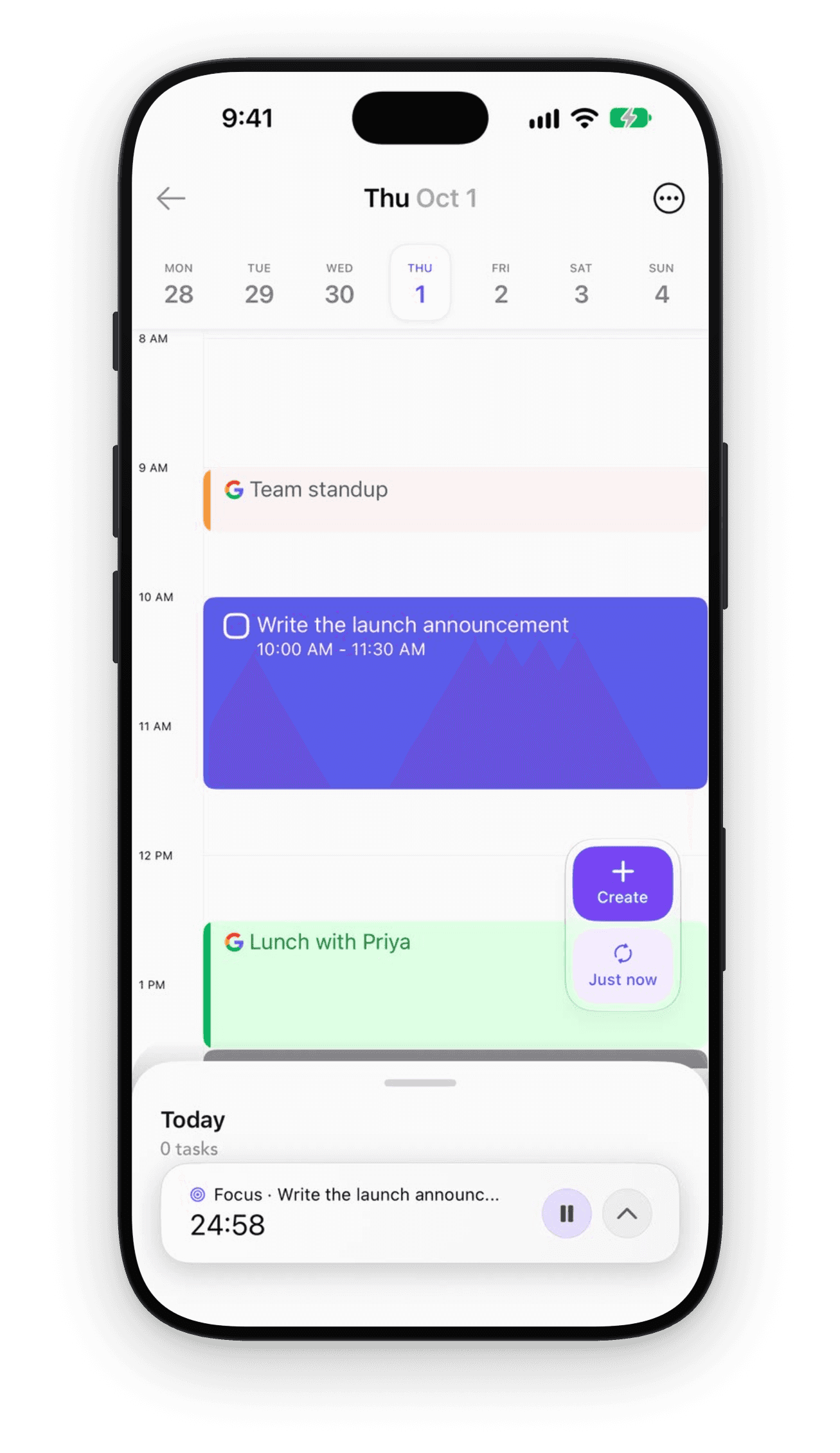
Ellie on iPhone: the Timebox with a focus timer running
Ellie on iPhone: a full-screen focus timer on Write the launch announcement

iPhone

iPad

Ellie on iPhone: today’s tasks with time estimates
Ellie on iPhone: a full-screen focus timer on Write the launch announcement

iPhone

iPad

Ellie on iPhone: today’s tasks with time estimates

And everything else you’d expect

Analytics

Analytics

Ellie’s time insights: tasks completed and actual versus estimated time

Recurring tasks

Recurring tasks

Ellie’s repeat options for a task

Labels & filters

Labels & filters

Filtering Ellie by label

Keyboard shortcuts

Keyboard shortcuts

Ellie’s keyboard shortcuts

Pomodoro timer

Pomodoro timer

Ellie’s focus timer bar: Write the launch announcement, 24:58

Daily planning & shutdown

Daily planning & shutdown

Ellie’s daily shutdown: three tasks completed and the time by label

Subtasks

Subtasks

A task with three subtasks, one checked off

Task templates

Ellie’s task templates

Lists

Ellie’s lists: Brain Dump, Product Launch, Client Work and Home

Due dates

Due dates

Focus mode

Focus mode

AI assistant

AI assistant

Quick capture on Mac

Quick capture on Mac

iPhone widgets

Reminders

Email to task

Search

Bring your agents (or use ours)

Bring your agents (or use ours)

Plan out loud with ChatGPT, Claude or Ellie’s own assistant.

ChatGPT

Open in ChatGPT ↗

Plan my Friday around the launch

ChatGPT

Used Ellie

Done. Friday has the launch post, two customer calls and a review block.

Claude

Connect with MCP

What’s left on my plate this week?

Claude

Ellie · 6 tasks

About 3h 15m. Thursday is your lightest day, so I moved the review there.

Ellie’s assistant

Built in

Move everything I didn’t finish today to Thursday

Ellie

Done. I moved 3 tasks to Thursday and kept their estimates.

Ellie's hamster typing

Works with your existing tools

Notion
Slack

Works with your existing tools

Notion
Slack

Sync with Notion and Todoist, turn Slack messages into tasks, and connect everything else with Zapier.

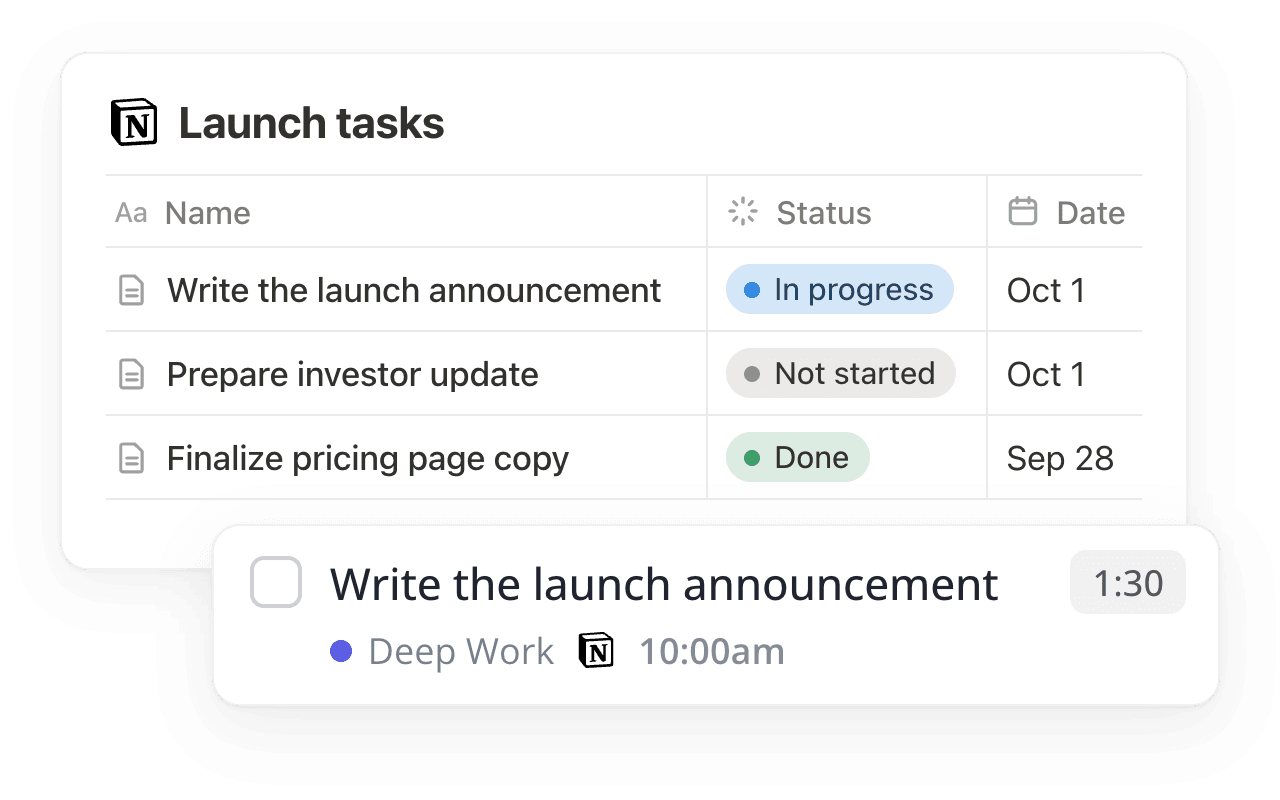
A Notion task database next to the same task in Ellie
Notion

Two-way sync with Notion

Two-way sync with Notion

Pull tasks in from your Notion databases. Check one off in Ellie and Notion updates too.

A Todoist inbox brought into Ellie’s Brain Dump
Todoist

Import from Todoist

Import from Todoist

Bring your Todoist tasks over in one go, then keep both in sync.

A Slack message saved to Ellie’s Brain Dump with the Create Task in Ellie shortcut
Slack

Turn Slack messages into tasks

Turn Slack messages into tasks

Right-click any message and choose Create Task in Ellie.

Connect anything with Zapier

Connect anything with Zapier

Send tasks into Ellie from the apps you already use.

Ellie’s hamster holding a little plug

Built for how you plan

Students, founders, teachers and parents all run their days in Ellie. Here’s what a day looks like for each.

🎒 Students

🩺 Med students

🚀 Founders

🍎 Teachers

🏡 Parents

For students

Classes, shifts and finals in one calm week

Brain-dump every assignment, give each one a rough time, and see which days are already full before the week starts.

1

Sunday: brain-dump every assignment with its due date

2

Mornings: drag study blocks in between classes

3

Study time: run Pomodoros and watch the hours add up

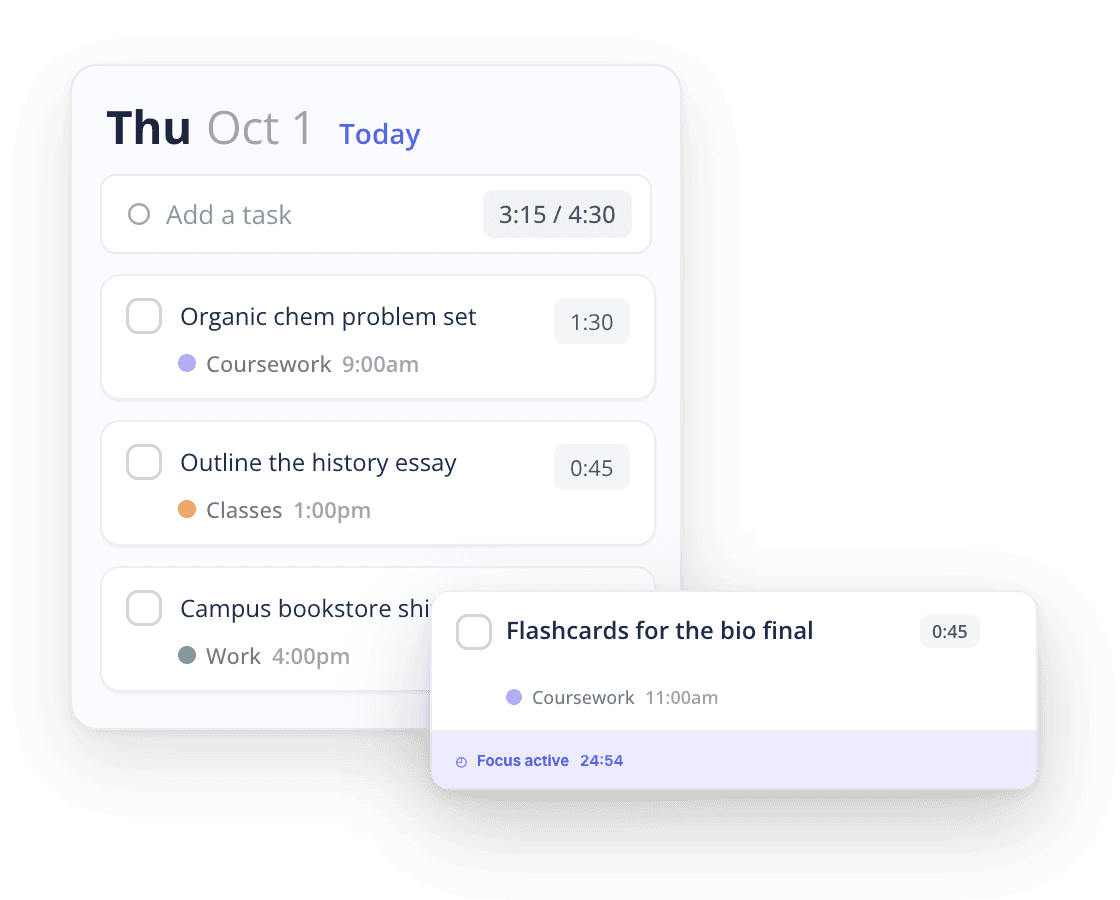
A student's day in Ellie with an active focus session
Ellie the hamster hugging two school textbooks
Ellie's Today column for students
Ellie the hamster hugging two school textbooks

🎒 Students

Sunday: brain-dump every assignment. Mornings: drag study blocks between classes. Study time: run Pomodoros.

Ellie's Today column for med students
Ellie the hamster in mint scrubs holding flashcards with the Anki logo

🩺 Med students

After lectures: dump Anki and question blocks. Each morning: estimate every block. Long days: the rest rolls over.

A founder’s week in Ellie: tasks timeboxed next to Google and Outlook events
Ellie the hamster holding up an orange Y Combinator sign

🚀 Founders

All week: forward asks into the Brain Dump. Each morning: timebox deep work. End of day: roll the rest to tomorrow.

Ellie's Today column for teachers
Ellie the hamster with a red apple on a book

🍎 Teachers

Sunday: plan lessons from a template. School days: block grading time. Every week: recurring prep comes back.

A parent’s Thursday in Ellie next to school pickup and soccer practice
Ellie the hamster holding a baby hamster

🏡 Parents

Sunday: brain-dump forms and bills. School days: fit errands around pickup. Every week: bills and chores come back.

Works on all your devices

Web

Mac

Windows

iPhone

iPad

Mac

A native app for your desk, with a timer in the menu bar.

Ellie on a MacBook: Brain Dump, Thursday to Saturday on the board, and the Timebox

iPhone

Catch tasks the moment they come to you.

Ellie on iPhone: Thursday’s Timebox with a focus timer running

iPad

Your whole week, with room to plan.

Ellie on iPad: Brain Dump, the weekend board and Friday’s Timebox

Windows

The full planner on your PC, with a floating timer.

Ellie

Ellie on Windows: the week calendar with tasks next to Google and Outlook meetings
Ellie the hamster tapping on her phone

Hi, I’m Chris 👋

I built Ellie because I needed a simple system to organize my day. I multitask a lot, and things kept slipping my mind.

Ellie gave me one place to offload everything and plan what actually fits. It’s literally a second 🧠 for me.

My hope is that it improves your day as much as it has improved mine.

Why I built Ellie →

Chris Raroque

Chris Raroque

Ellie developer

Ellie app icon
Amy app icon
Luna app icon
Mogul app icon
Moonjar app icon

Ellie, Amy, Luna, Mogul, and Moonjar.

Give your brain the night off

Dump everything into Ellie, give tomorrow a plan, and close the laptop.

Try Ellie free

Web, Mac, Windows, iPhone and iPad. No credit card required.

Ellie the hamster peeking with happy eyes