Todoist vs TickTick (2026): Which Task Manager Is Actually Better?

Chris Raroque

Todoist and TickTick are two of the most popular task management apps in the world, and they look similar on the surface — both let you capture tasks, set due dates, and organize projects. But once you start actually using them day to day, the differences matter.
This comparison breaks down where each app genuinely excels, where it falls short, and who each one is actually best for.
The quick answer
Choose Todoist if you want a clean, focused task manager with the best natural language input in the business and a massive integration ecosystem. It does one thing — task management — and does it extremely well.
Choose TickTick if you want more built-in features without paying more. TickTick bundles a calendar view, habit tracker, Pomodoro timer, and Eisenhower matrix into one app — features that Todoist either doesn’t have or requires third-party integrations for.
Consider
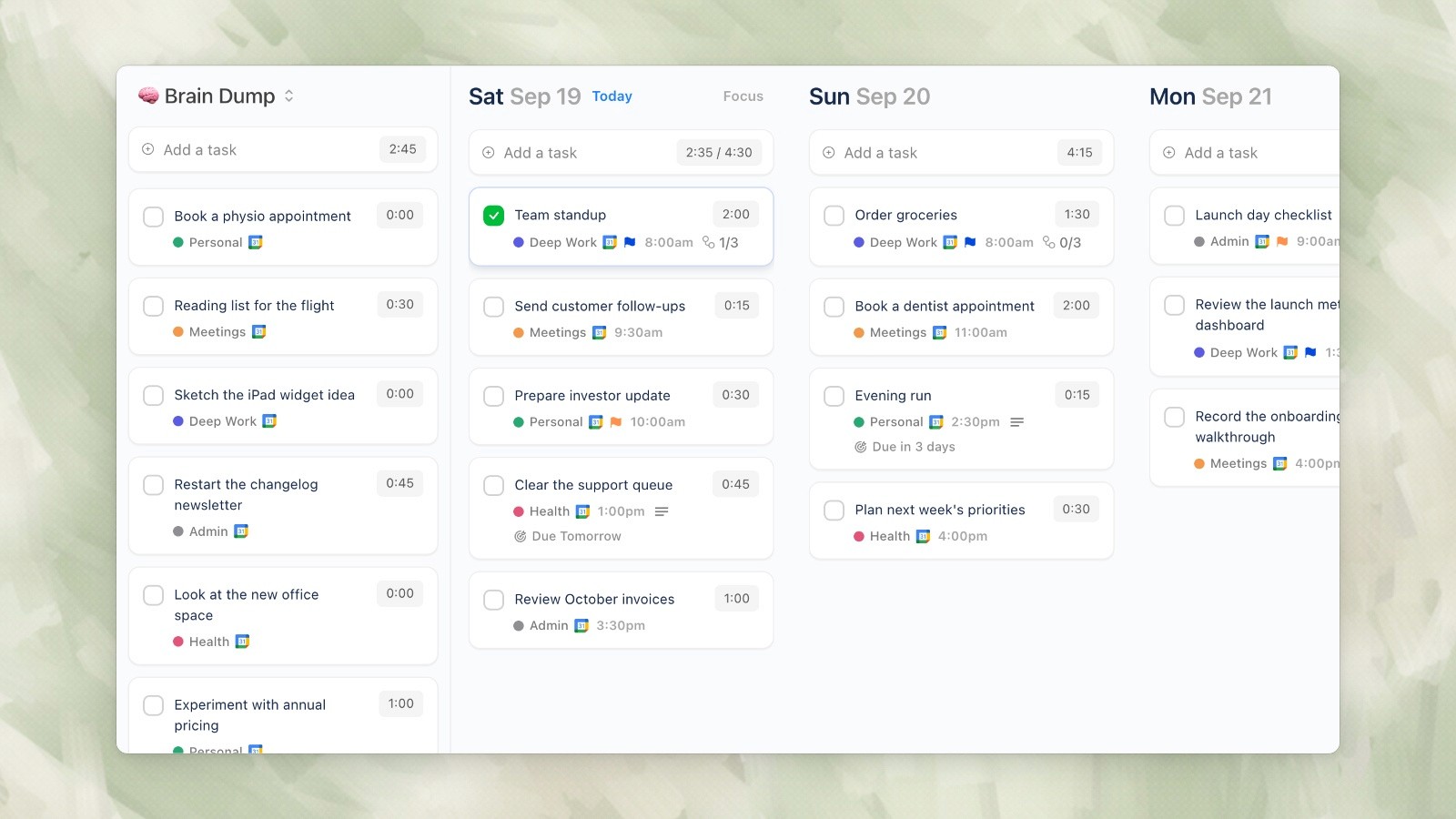
Ellie desktop demo data, captured September 19, 2026.
Ellie if what you actually need isn’t a task manager but a daily planner. More on this at the end.
Feature comparison at a glance
Feature | Todoist | TickTick |
|---|---|---|
Free plan | Yes (5 projects) | Yes (9 lists) |
Paid price | $7/mo or $5/mo annual | ~$3.99/mo or $35.99/yr |
Natural language input | Excellent (best in class) | Good |
Calendar view | No (requires integration) | Yes (built-in) |
Kanban boards | Yes | Yes |
Habit tracker | No | Yes (built-in) |
Pomodoro timer | No | Yes (built-in) |
Eisenhower matrix | No | Yes (built-in) |
Subtasks | Yes | Yes |
Recurring tasks | Excellent | Good |
Integrations | 300+ (best in class) | 30+ |
Collaboration | Yes (comments, assignments) | Yes (shared lists) |
Platforms | Web, Mac, Windows, iOS, Android | Web, Mac, Windows, iOS, Android |
Offline mode | Yes | Yes |
API | Yes (robust) | Limited |
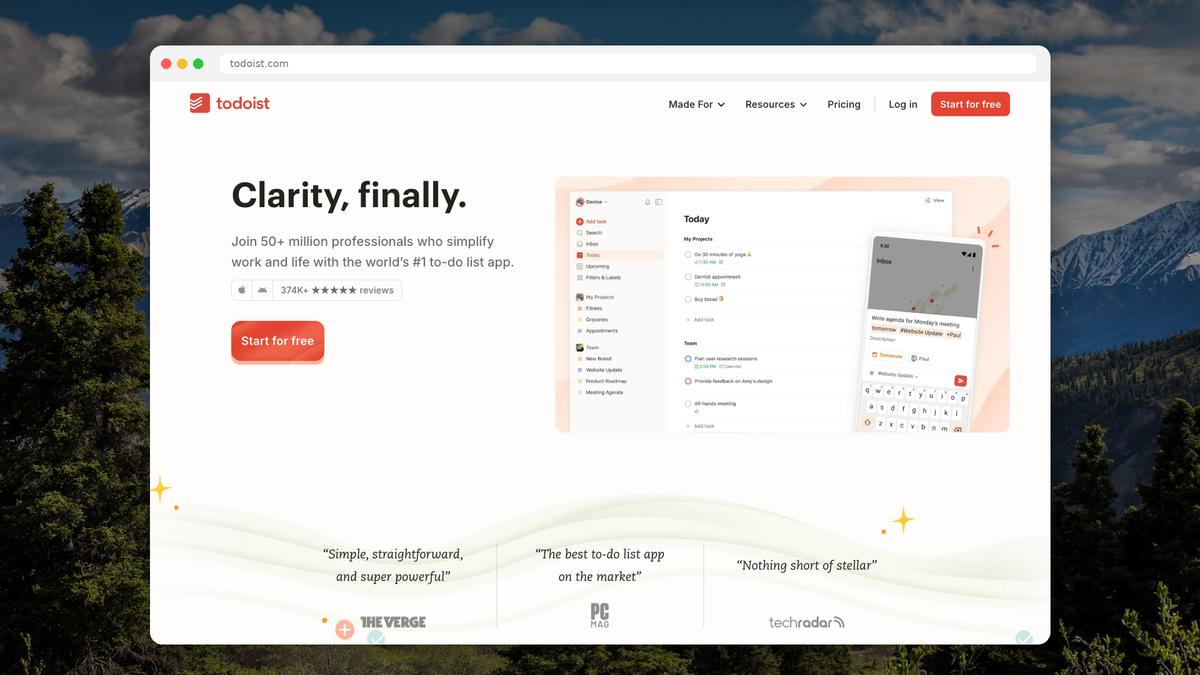
Where Todoist wins
Natural language input
Todoist’s quick-add is a step above everything else. Type “Email Sarah about the proposal tomorrow at 2pm #Work p1” and Todoist correctly parses the task name, due date, time, project, and priority in one shot. TickTick has similar functionality but it isn’t as reliable with complex inputs.
Integration ecosystem
With 300+ integrations, Todoist connects to virtually everything — Slack, Gmail, Google Calendar, Zapier, IFTTT, Notion, and hundreds more. If your workflow involves a lot of different tools, Todoist acts as the central hub. TickTick’s integration library is much smaller.
Simplicity and focus
Todoist is deliberately minimal. It doesn’t try to be a calendar, a habit tracker, or a Pomodoro timer. For people who value a clean, distraction-free interface and want each tool to do its specific job well, Todoist’s restraint is a feature, not a limitation.
Recurring task flexibility
Todoist handles recurring tasks with remarkable nuance. “Every 3rd Wednesday,” “every weekday except holidays,” “after 2 days” (from completion, not due date) — it handles complex recurrence patterns that trip up most competitors.
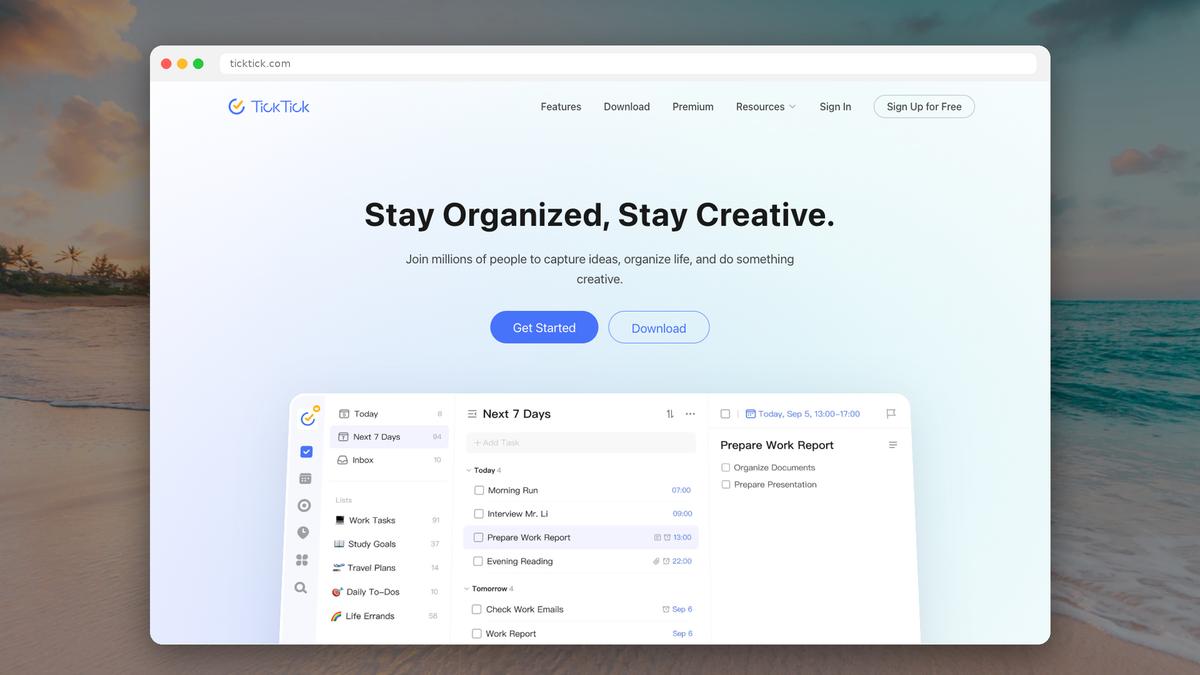
Where TickTick wins
Built-in calendar
This is TickTick’s biggest advantage. You can see your tasks alongside your calendar events without leaving the app or setting up any integration. For visual planners who want to see their day as a timeline, this is huge. Todoist requires syncing with Google Calendar or similar, which adds friction and can feel disconnected.
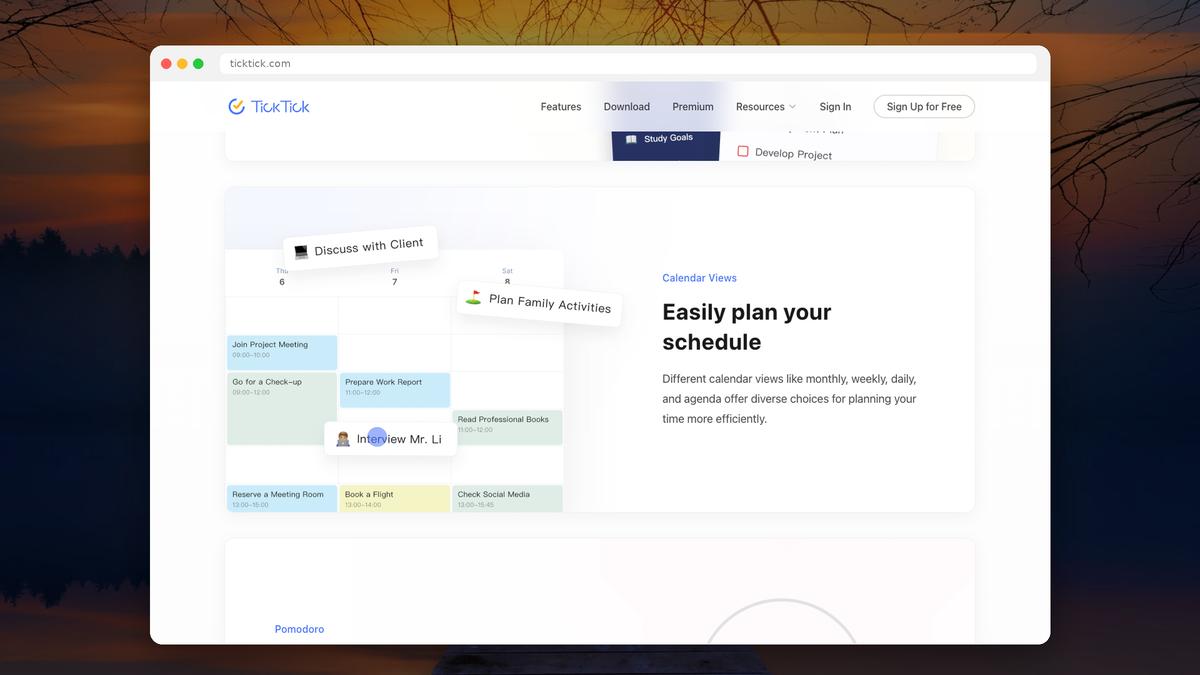
Habit tracking
TickTick includes a full habit tracker that lets you set daily, weekly, or custom habits with streaks, completion rates, and statistics. If you’re trying to build routines alongside managing tasks, TickTick combines both in one place. With Todoist, you’d need a separate habit app.
Pomodoro timer
TickTick has a built-in Pomodoro timer attached to individual tasks. Start a focus session directly from a task, and TickTick tracks how much time you’ve spent on it. Todoist has no built-in timer — you’d need a third-party app like Toggl or Forest.
Price
At $35.99/year (~$3/month), TickTick Premium is roughly half the cost of Todoist Pro ($5/mo annual, $7/mo monthly). Given that TickTick includes more built-in features, the value proposition is compelling.
Eisenhower matrix view
TickTick offers a native Eisenhower matrix (urgent/important grid) for prioritizing tasks. It’s a small thing, but for people who use this framework, having it built in eliminates the need for a separate tool or workaround.
Where both fall short
Here’s the thing neither Todoist nor TickTick does particularly well: daily planning.
Both apps are excellent at capturing and organizing tasks. You can build project hierarchies, set due dates, and filter by labels. But when it comes to the actual question of “What am I doing today, and when?” — neither one provides a great answer.
Todoist’s “Today” view shows you a flat list of everything due today. TickTick’s calendar view is better, but it’s still primarily a task manager with a calendar bolted on — not a purpose-built daily planner.
If your struggle isn’t “I need to organize my tasks” but rather “I have too many tasks and I don’t know what to work on today,” you might need a different kind of tool entirely.
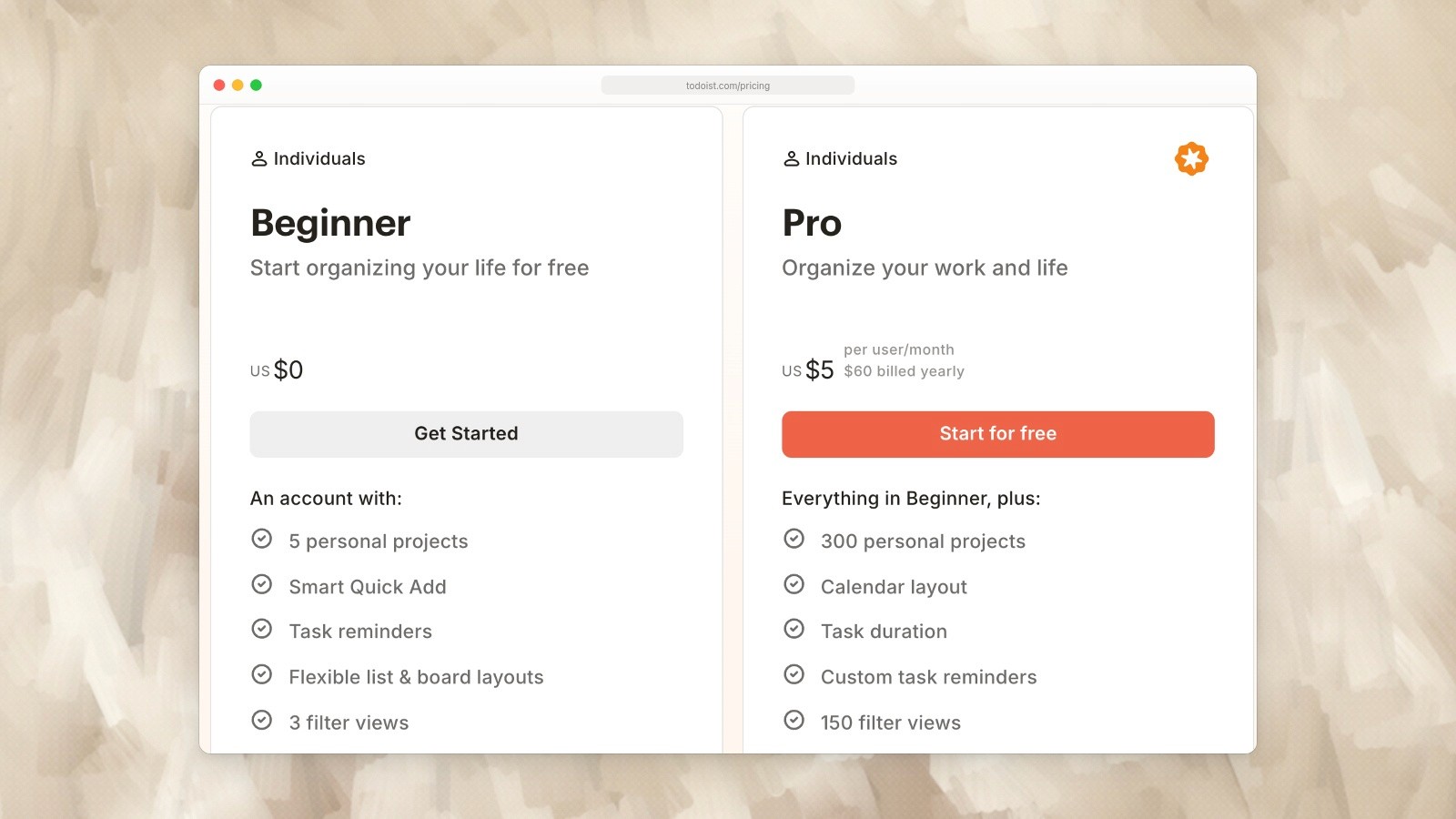
Todoist individual plans: Beginner is free and Pro is shown at US$60 billed yearly. Captured September 19, 2026. Source.
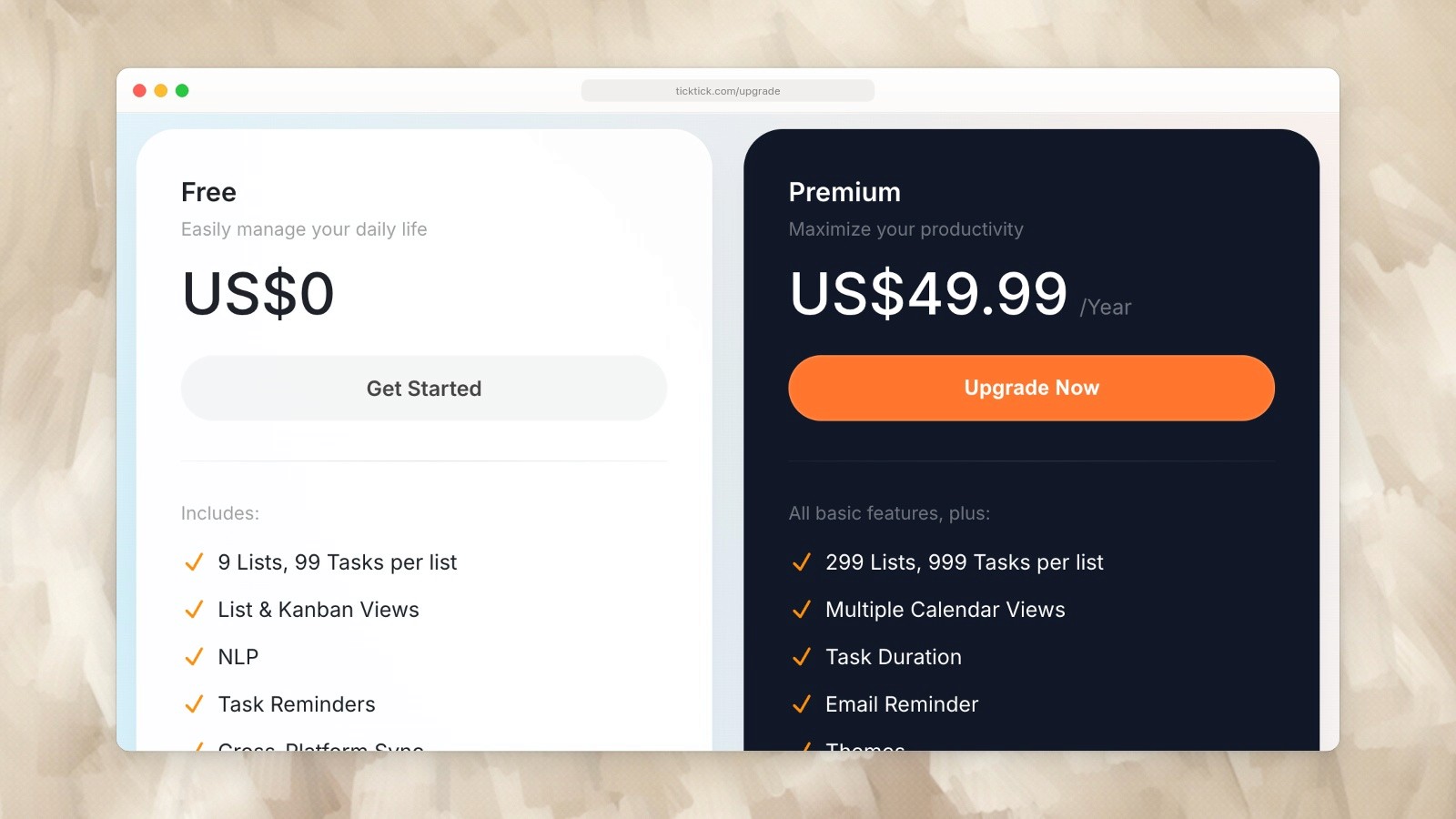
TickTick Free and Premium; Premium is listed at US$49.99 per year. Captured September 19, 2026. Source.
Pricing breakdown (2026)
Plan | Todoist | TickTick |
|---|---|---|
Free | 5 projects, 5 collaborators per project | 9 lists, 2 calendar views, basic features |
Paid (monthly) | $7/mo (Pro) | ~$3.99/mo (Premium) |
Paid (annual) | $5/mo / $60/yr (Pro) | $35.99/yr (~$3/mo) |
Team/Business | $10/user/mo (Business) | N/A |
Both apps have generous free tiers. Todoist’s free plan is limited to 5 projects, which can feel constraining if you organize your life into many categories. TickTick’s free plan allows 9 lists, which is slightly more generous.
Who should choose what
Choose Todoist if you: Value the cleanest, fastest task capture experience. Use lots of third-party tools and need integrations. Want a team/business plan for collaboration. Prefer simplicity — one tool, one job. Already use Google Calendar and are happy with the sync.
Choose TickTick if you: Want a built-in calendar, habit tracker, and Pomodoro timer. Are price-sensitive (TickTick is roughly half the cost). Prefer an all-in-one app over multiple tools. Like the Eisenhower matrix for prioritization. Want built-in white noise / nature sounds for focus.
A third option: when you need a daily planner, not a task manager
Both Todoist and TickTick are task managers — they’re designed to help you organize tasks. But if your actual problem is “I feel overwhelmed and I can’t figure out what to work on today,” a task manager might be adding to the noise rather than cutting through it.
Ellie takes a different approach. Instead of building an ever-growing task database, Ellie is built around a daily planning workflow:
Brain dump everything on your mind into one place
Drag tasks to specific days on a visual kanban board
Timebox your day by dragging tasks onto your actual calendar
It integrates with Google, Apple, and Outlook calendars, so your meetings and tasks live in the same view. And tasks you don’t finish automatically roll back to your brain dump — no guilt, no overdue badges.
Ellie has a free plan, with the full experience at $9.99/month (or $4.99/month with an education discount). It’s not trying to replace Todoist or TickTick for project management — it’s solving a different problem: turning a chaotic day into a focused plan.
Todoist and TickTick are two of the most popular task management apps in the world, and they look similar on the surface — both let you capture tasks, set due dates, and organize projects. But once you start actually using them day to day, the differences matter.
This comparison breaks down where each app genuinely excels, where it falls short, and who each one is actually best for.
The quick answer
Choose Todoist if you want a clean, focused task manager with the best natural language input in the business and a massive integration ecosystem. It does one thing — task management — and does it extremely well.
Choose TickTick if you want more built-in features without paying more. TickTick bundles a calendar view, habit tracker, Pomodoro timer, and Eisenhower matrix into one app — features that Todoist either doesn’t have or requires third-party integrations for.
Consider
Ellie desktop demo data, captured September 19, 2026.
Ellie if what you actually need isn’t a task manager but a daily planner. More on this at the end.
Feature comparison at a glance
Feature | Todoist | TickTick |
|---|---|---|
Free plan | Yes (5 projects) | Yes (9 lists) |
Paid price | $7/mo or $5/mo annual | ~$3.99/mo or $35.99/yr |
Natural language input | Excellent (best in class) | Good |
Calendar view | No (requires integration) | Yes (built-in) |
Kanban boards | Yes | Yes |
Habit tracker | No | Yes (built-in) |
Pomodoro timer | No | Yes (built-in) |
Eisenhower matrix | No | Yes (built-in) |
Subtasks | Yes | Yes |
Recurring tasks | Excellent | Good |
Integrations | 300+ (best in class) | 30+ |
Collaboration | Yes (comments, assignments) | Yes (shared lists) |
Platforms | Web, Mac, Windows, iOS, Android | Web, Mac, Windows, iOS, Android |
Offline mode | Yes | Yes |
API | Yes (robust) | Limited |
Where Todoist wins
Natural language input
Todoist’s quick-add is a step above everything else. Type “Email Sarah about the proposal tomorrow at 2pm #Work p1” and Todoist correctly parses the task name, due date, time, project, and priority in one shot. TickTick has similar functionality but it isn’t as reliable with complex inputs.
Integration ecosystem
With 300+ integrations, Todoist connects to virtually everything — Slack, Gmail, Google Calendar, Zapier, IFTTT, Notion, and hundreds more. If your workflow involves a lot of different tools, Todoist acts as the central hub. TickTick’s integration library is much smaller.
Simplicity and focus
Todoist is deliberately minimal. It doesn’t try to be a calendar, a habit tracker, or a Pomodoro timer. For people who value a clean, distraction-free interface and want each tool to do its specific job well, Todoist’s restraint is a feature, not a limitation.
Recurring task flexibility
Todoist handles recurring tasks with remarkable nuance. “Every 3rd Wednesday,” “every weekday except holidays,” “after 2 days” (from completion, not due date) — it handles complex recurrence patterns that trip up most competitors.
Where TickTick wins
Built-in calendar
This is TickTick’s biggest advantage. You can see your tasks alongside your calendar events without leaving the app or setting up any integration. For visual planners who want to see their day as a timeline, this is huge. Todoist requires syncing with Google Calendar or similar, which adds friction and can feel disconnected.
Habit tracking
TickTick includes a full habit tracker that lets you set daily, weekly, or custom habits with streaks, completion rates, and statistics. If you’re trying to build routines alongside managing tasks, TickTick combines both in one place. With Todoist, you’d need a separate habit app.
Pomodoro timer
TickTick has a built-in Pomodoro timer attached to individual tasks. Start a focus session directly from a task, and TickTick tracks how much time you’ve spent on it. Todoist has no built-in timer — you’d need a third-party app like Toggl or Forest.
Price
At $35.99/year (~$3/month), TickTick Premium is roughly half the cost of Todoist Pro ($5/mo annual, $7/mo monthly). Given that TickTick includes more built-in features, the value proposition is compelling.
Eisenhower matrix view
TickTick offers a native Eisenhower matrix (urgent/important grid) for prioritizing tasks. It’s a small thing, but for people who use this framework, having it built in eliminates the need for a separate tool or workaround.
Where both fall short
Here’s the thing neither Todoist nor TickTick does particularly well: daily planning.
Both apps are excellent at capturing and organizing tasks. You can build project hierarchies, set due dates, and filter by labels. But when it comes to the actual question of “What am I doing today, and when?” — neither one provides a great answer.
Todoist’s “Today” view shows you a flat list of everything due today. TickTick’s calendar view is better, but it’s still primarily a task manager with a calendar bolted on — not a purpose-built daily planner.
If your struggle isn’t “I need to organize my tasks” but rather “I have too many tasks and I don’t know what to work on today,” you might need a different kind of tool entirely.
Todoist individual plans: Beginner is free and Pro is shown at US$60 billed yearly. Captured September 19, 2026. Source.
TickTick Free and Premium; Premium is listed at US$49.99 per year. Captured September 19, 2026. Source.
Pricing breakdown (2026)
Plan | Todoist | TickTick |
|---|---|---|
Free | 5 projects, 5 collaborators per project | 9 lists, 2 calendar views, basic features |
Paid (monthly) | $7/mo (Pro) | ~$3.99/mo (Premium) |
Paid (annual) | $5/mo / $60/yr (Pro) | $35.99/yr (~$3/mo) |
Team/Business | $10/user/mo (Business) | N/A |
Both apps have generous free tiers. Todoist’s free plan is limited to 5 projects, which can feel constraining if you organize your life into many categories. TickTick’s free plan allows 9 lists, which is slightly more generous.
Who should choose what
Choose Todoist if you: Value the cleanest, fastest task capture experience. Use lots of third-party tools and need integrations. Want a team/business plan for collaboration. Prefer simplicity — one tool, one job. Already use Google Calendar and are happy with the sync.
Choose TickTick if you: Want a built-in calendar, habit tracker, and Pomodoro timer. Are price-sensitive (TickTick is roughly half the cost). Prefer an all-in-one app over multiple tools. Like the Eisenhower matrix for prioritization. Want built-in white noise / nature sounds for focus.
A third option: when you need a daily planner, not a task manager
Both Todoist and TickTick are task managers — they’re designed to help you organize tasks. But if your actual problem is “I feel overwhelmed and I can’t figure out what to work on today,” a task manager might be adding to the noise rather than cutting through it.
Ellie takes a different approach. Instead of building an ever-growing task database, Ellie is built around a daily planning workflow:
Brain dump everything on your mind into one place
Drag tasks to specific days on a visual kanban board
Timebox your day by dragging tasks onto your actual calendar
It integrates with Google, Apple, and Outlook calendars, so your meetings and tasks live in the same view. And tasks you don’t finish automatically roll back to your brain dump — no guilt, no overdue badges.
Ellie has a free plan, with the full experience at $9.99/month (or $4.99/month with an education discount). It’s not trying to replace Todoist or TickTick for project management — it’s solving a different problem: turning a chaotic day into a focused plan.
Give your brain the night off
Dump everything into Ellie, give tomorrow a plan, and close the laptop.
Try Ellie free
Web, Mac, Windows, iPhone and iPad. No credit card required.
