Routine App Review (2026): The Planner That Combines Tasks, Notes, and Calendar

Chris Raroque

If you’ve ever felt overwhelmed by bloated productivity tools packed with features you’ll never use, Routine might be your answer. This minimalist daily planner has quietly built a reputation for delivering stunning design paired with thoughtful functionality. At its core, Routine combines tasks, calendar, notes, and journaling in a single, elegantly designed interface that prioritizes simplicity over complexity.
In this 2026 review, we’ll explore whether Routine lives up to the hype, examine its strengths and weaknesses, and help you decide if it’s the right fit for your planning needs.
What is Routine?
Routine (routine.co) is a daily planner application that takes a deliberately minimalist approach to productivity. Unlike feature-heavy competitors like Notion or Asana, Routine strips away the complexity and focuses on the core planning workflow: managing your day through tasks, calendar events, notes, and reflections.
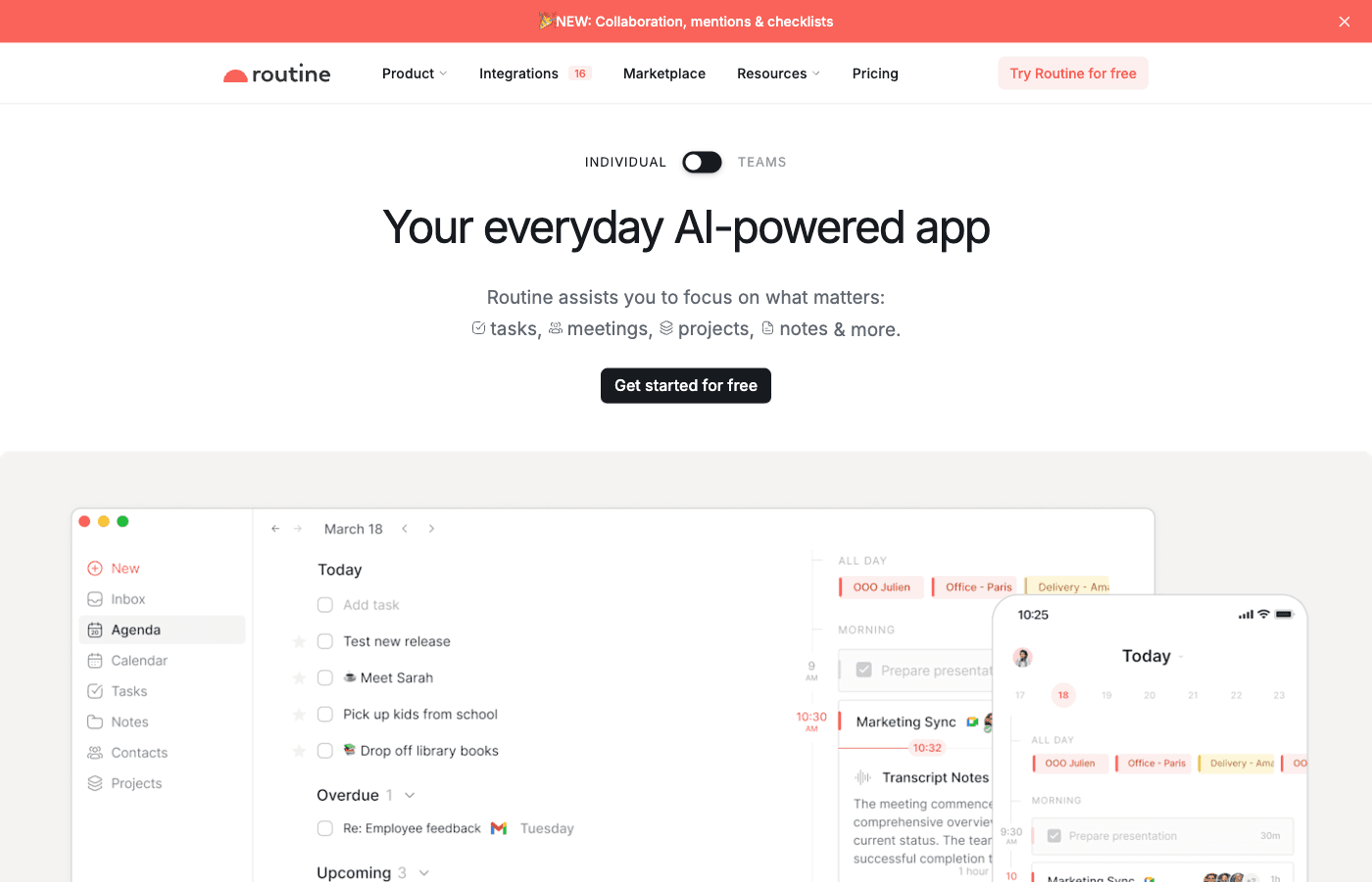
The app is built on the premise that a beautiful, distraction-free interface can actually improve your productivity by making planning feel less like a chore. Every element of Routine’s design has been carefully considered, from the typography to the color palette to the interaction patterns. This attention to detail is immediately apparent when you open the app.
Routine positions itself as the antidote to productivity tool fatigue—a category that’s become increasingly crowded with feature-bloated alternatives that promise to handle every aspect of your work life but often deliver complexity instead of clarity.
Key Features
Smart Task Planner with Drag-and-Drop Scheduling
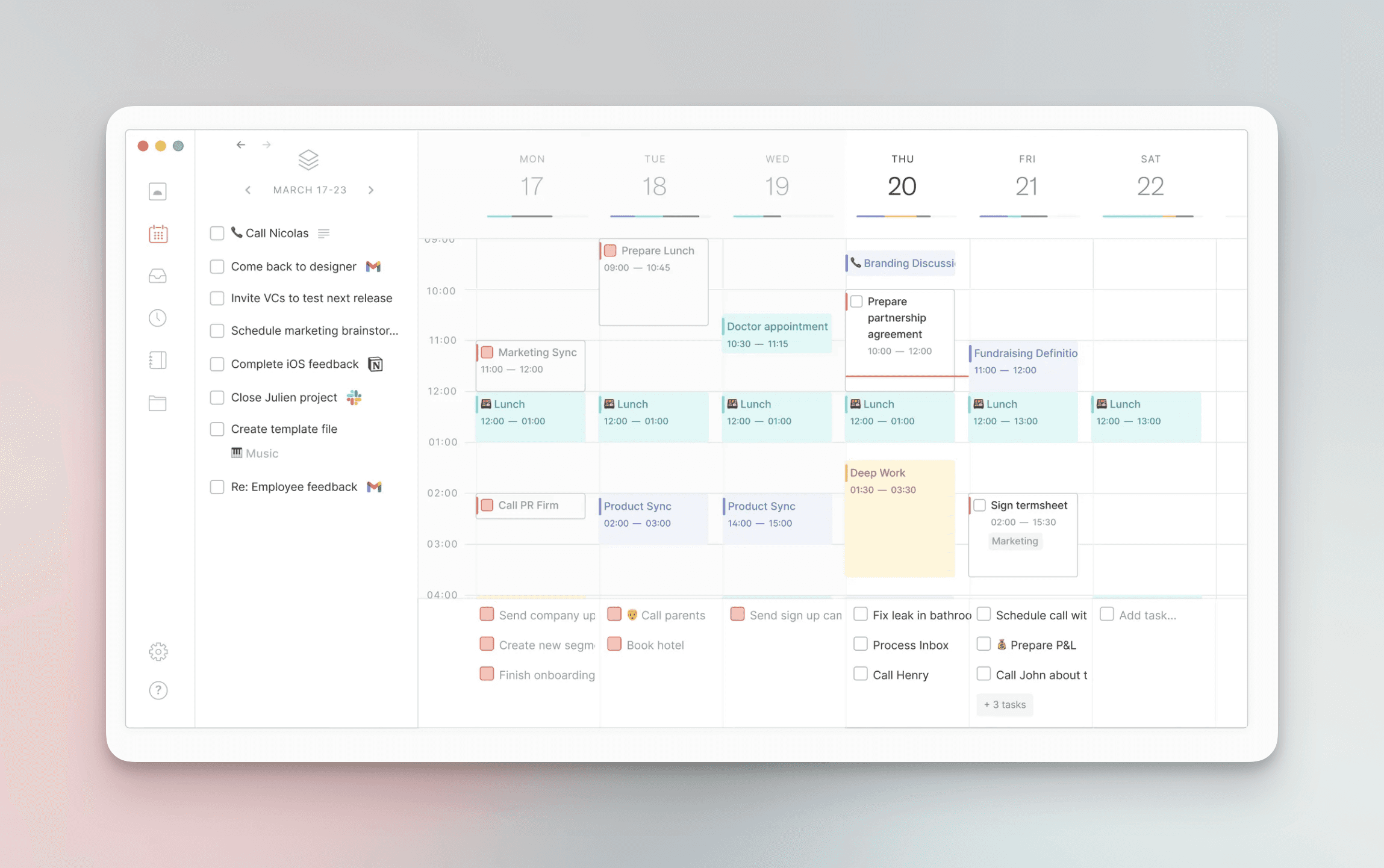
At the heart of Routine is its task management system, which goes beyond simple to-do lists. The app features a drag-and-drop interface that lets you schedule tasks directly onto your calendar. Instead of creating a task and then manually scheduling it, you can visualize exactly when you’ll work on it. This visual approach to task scheduling makes it easier to build a realistic daily plan and avoid overcommitting yourself.
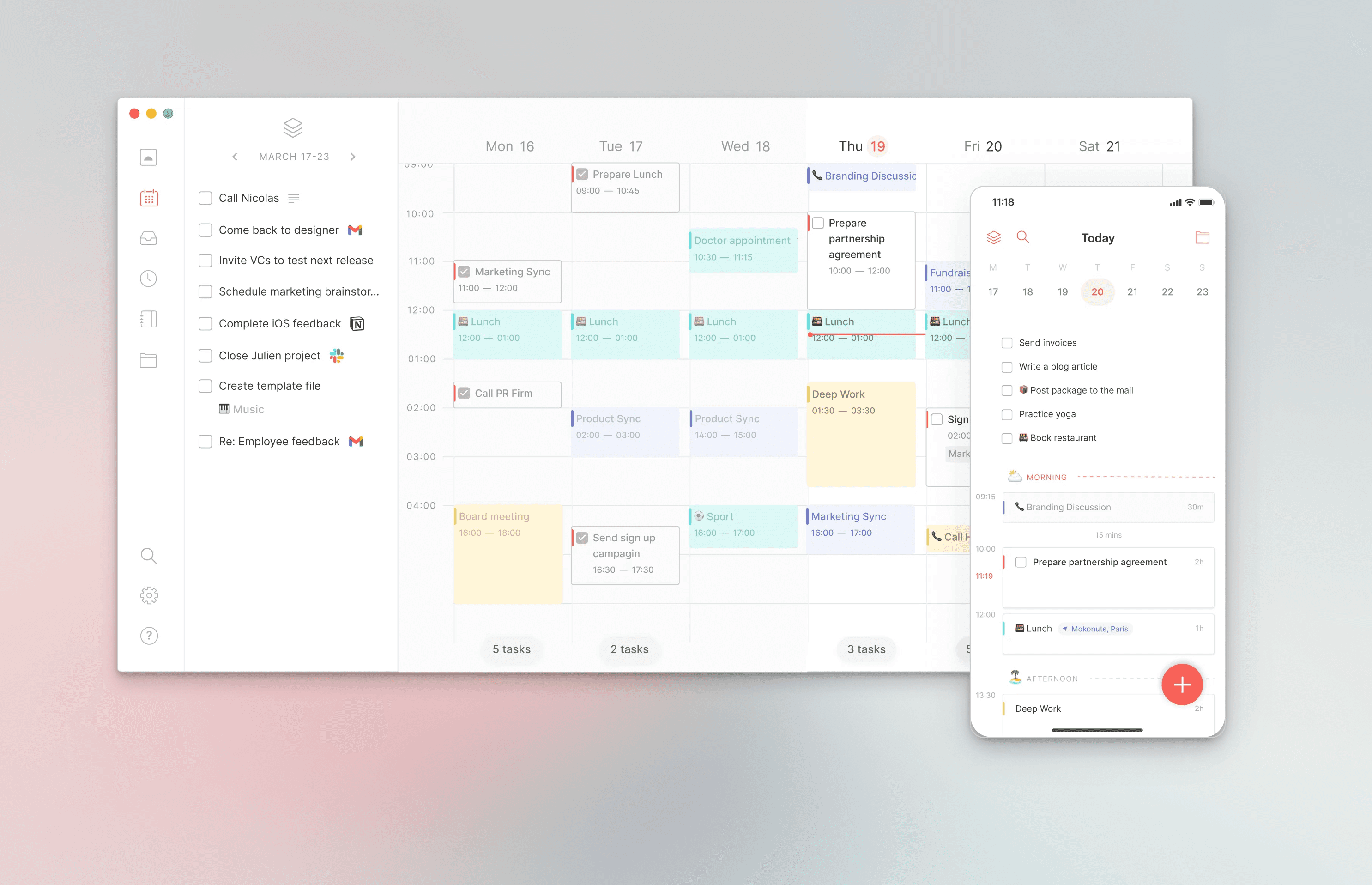
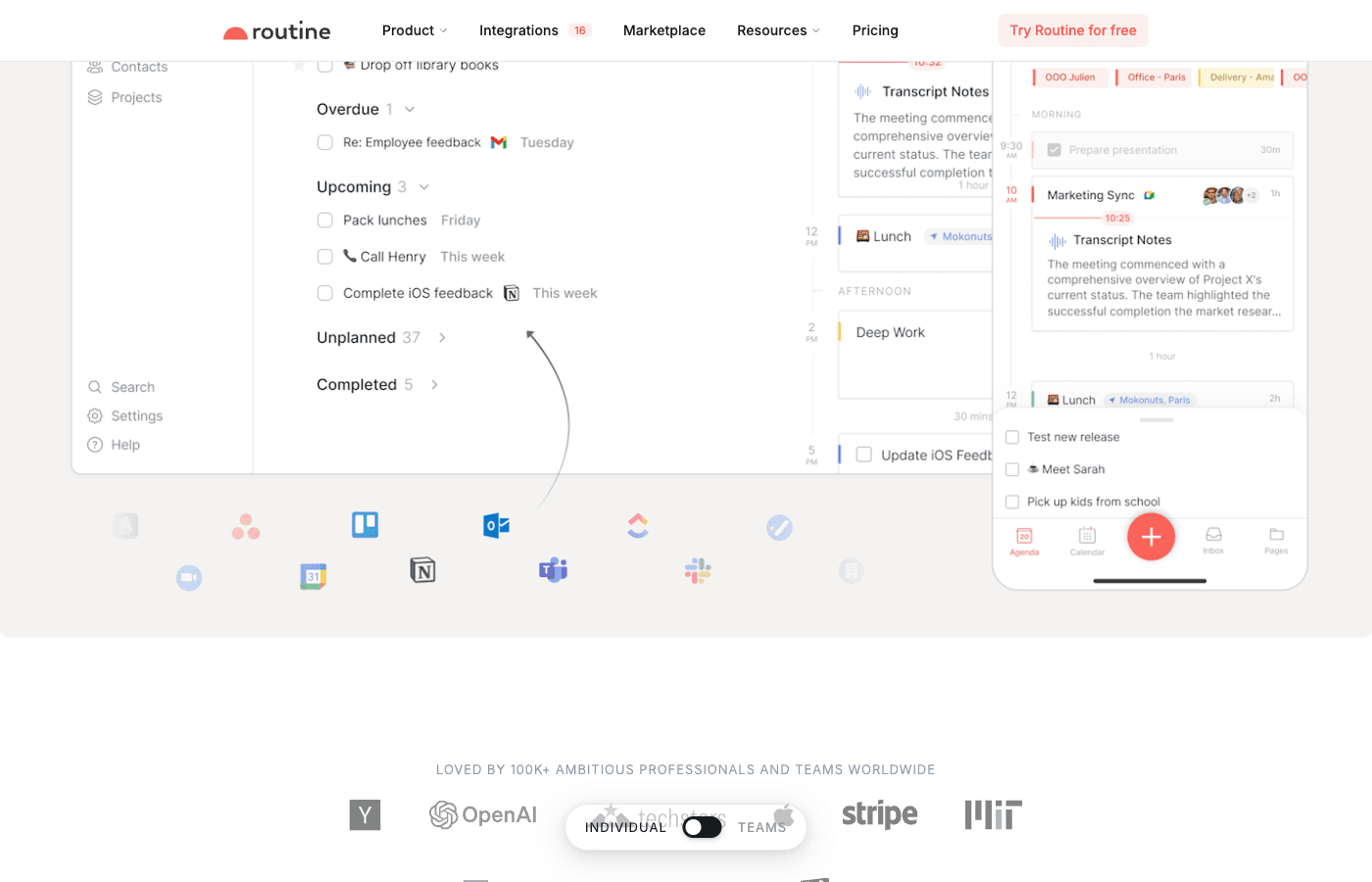
Tasks support due dates, priorities, subtasks, and custom tags. The interface remains clean despite these features—options are presented intuitively without overwhelming you with configuration options.
Integrated Calendar with Multiple Views
Routine’s calendar integration is one of its strongest features. The app supports Google Calendar integration and offers five different viewing options: day, week, and month views, plus 5-day week view and other variations. This flexibility lets you choose the view that matches your planning style. Whether you prefer daily focus or a broad weekly overview, Routine adapts to your preference.
The calendar isn’t just a display of events—it’s the central hub where tasks and calendar events coexist, giving you a unified view of your time and commitments.
Pages for Notes and Documentation
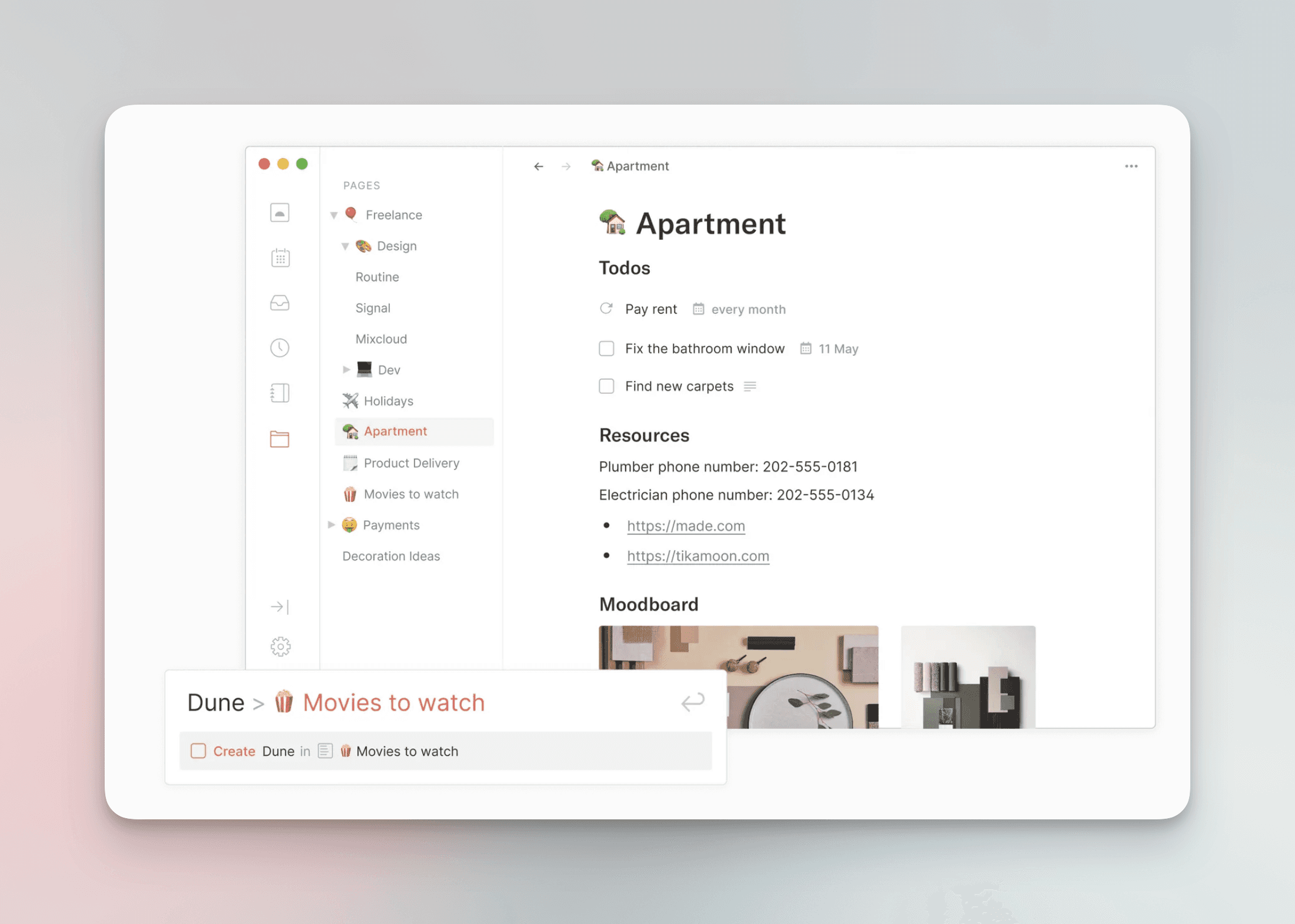
Beyond task and calendar management, Routine includes a Pages feature for capturing notes, ideas, and documentation. This keeps all your planning information in one place without requiring you to context-switch between multiple applications. You can create structured notes, store reference material, and maintain project documentation directly within Routine.
Console for Quick Capture
Routine includes a console feature designed for quick capture of ideas and tasks. When inspiration strikes or you need to quickly jot something down, the console provides a fast, friction-free entry point. This prevents important ideas from slipping away while you’re busy planning.
System Tray Widget
For power users, Routine offers a system tray widget that gives you quick access to your tasks and calendar without opening the full application. This persistent visual reference can help keep you on track throughout your day.
Minimalist Design Philosophy
Perhaps Routine’s most distinctive feature is its design. The application embraces a genuinely minimalist aesthetic—nothing is included for decoration, and every interface element serves a purpose. The visual design is calming and intentional, which many users report helps them focus on planning rather than getting distracted by unnecessary visual elements.
Feature Overview
Feature | Routine | Availability |
|---|---|---|
Task Management | Yes | All plans |
Calendar Integration (Google) | Yes | All plans |
Multiple Calendar Views | Yes (5+ views) | All plans |
Drag-and-Drop Scheduling | Yes | All plans |
Notes/Pages | Yes | All plans |
Journaling | Yes | All plans |
Quick Capture Console | Yes | All plans |
System Tray Widget | Yes | Professional plan |
Team Features | Limited | Professional plan |
AI Scheduling | No | Not available |
Third-Party Integrations | Limited | Google Calendar only |
What Routine Does Well
Arguably the Most Beautiful Productivity App Available
If aesthetics matter to you, Routine stands out. The application is genuinely beautiful in a way that goes beyond superficial polish. The design is cohesive, thoughtful, and intentional. Using Routine is a pleasure—there’s a sense of craftsmanship that’s evident in every interaction. For users who are motivated by working in beautiful tools, Routine delivers on this front better than almost any competitor. Many designers and creative professionals have chosen Routine precisely because the interface inspires rather than frustrates them.
Generous Free Plan with No Feature Gates
Routine’s pricing strategy is refreshingly user-friendly. The free plan includes all core features—tasks, calendar integration, notes, and journaling. You’re not forced to upgrade to access essential functionality. The free plan is genuinely sufficient for personal daily planning use, which is remarkable in an industry where many apps gate even basic features behind paywalls. This approach builds goodwill and lets users experience the full product before committing financially.
Unified Task and Calendar View Without Context Switching
Many productivity apps force you to jump between separate task and calendar applications. Routine integrates both seamlessly. Your tasks live alongside your calendar events in a unified interface. This eliminates the friction of context-switching and makes it easier to build a realistic daily plan. You can see at a glance what you need to accomplish and when you have the time to accomplish it, all without leaving the app.
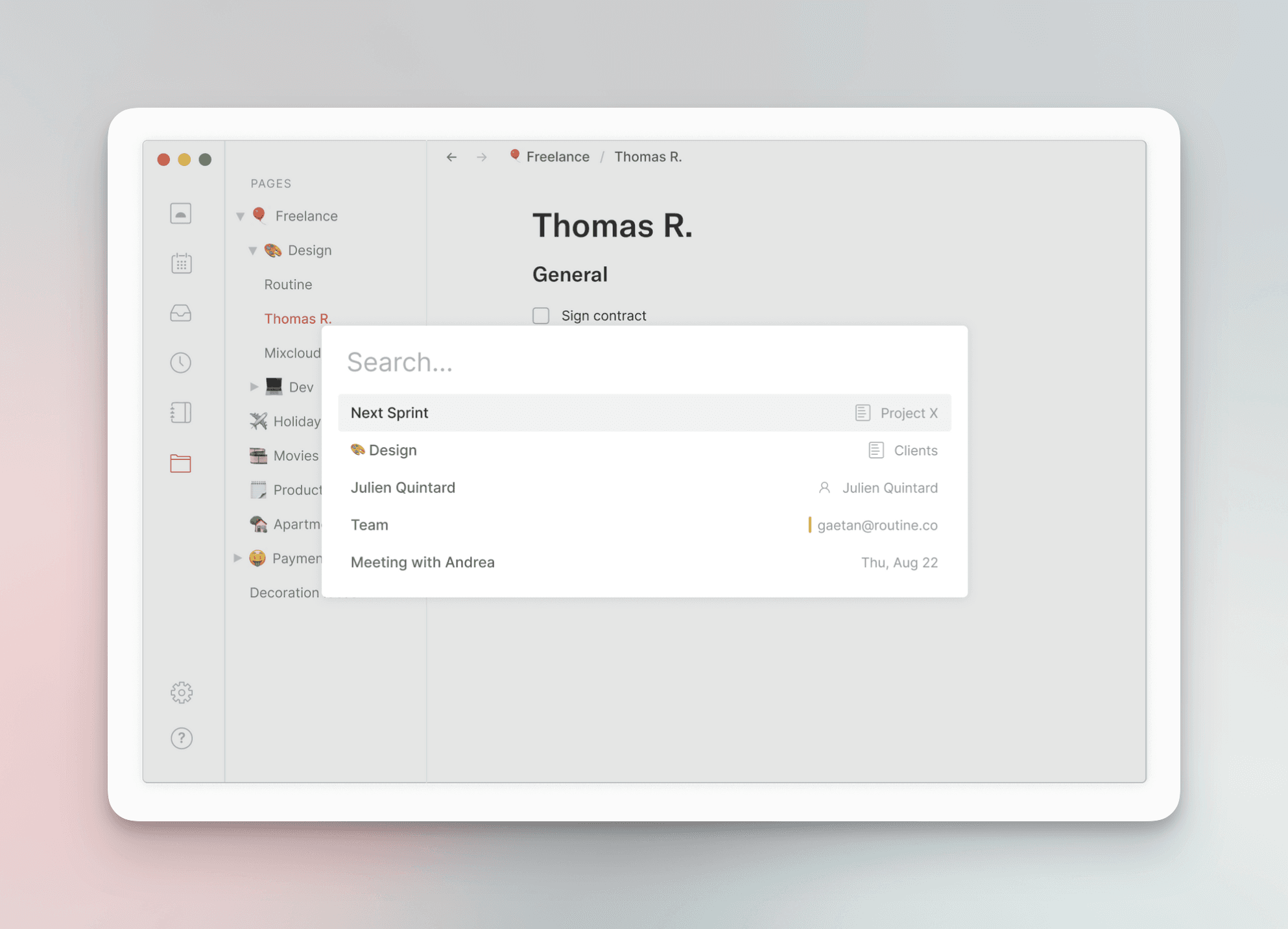
Clean, Distraction-Free Approach
In an era of feature creep, Routine proves that you don’t need 80+ features to build an excellent planning tool. The app is intentionally constrained to core functionality, which keeps the interface clean and reduces decision paralysis. Users report feeling less overwhelmed using Routine compared to more feature-heavy alternatives. This focused approach appeals strongly to people suffering from productivity tool fatigue.
Where Routine Falls Short
Limited Integration Ecosystem
Routine integrates only with Google Calendar. If your workflow relies on other tools—Slack, email, project management platforms, or other calendaring systems—you’re out of luck. Competitors like Akiflow and Motion offer dozens of integrations, allowing them to serve as central hubs for your entire workflow. Routine’s limited integration ecosystem means it works best as a planning tool that stands alongside other applications rather than replacing them.
No AI-Powered Scheduling
Modern productivity apps increasingly offer AI assistance for scheduling. Routine lacks this capability. You won’t get intelligent suggestions about when to schedule tasks or warnings about conflicting commitments. This is a notable gap compared to competitors like Motion, which use AI to optimize your schedule. For users who want the app to do some of the thinking, Routine requires more manual effort.
Basic Team Features
While Routine supports teams, the team features are basic compared to dedicated team productivity tools. The minimum team size is two seats, and collaboration features are limited. If you’re looking to coordinate with a large team or need advanced permission structures, Routine isn’t optimized for this use case. It’s designed primarily for individuals and small teams.
Relatively New With Limited Ecosystem
Routine is a younger application compared to established players like Notion or Asana. This means a smaller community, fewer templates, less third-party ecosystem development, and potentially less stability in the long term. If you value community support, readily available integrations, and years of production stability, the established alternatives offer more assurance. Routine’s newness is a risk factor worth considering for mission-critical workflows.
Pricing
Plan | Price | Best For | Key Features |
|---|---|---|---|
Free | $0/month | Personal use, individuals | All core features including tasks, calendar, notes, journaling |
Professional (Monthly) | $15/month | Power users, professionals | System tray widget, team features (minimum 2 seats), priority support |
Professional (Annual) | $10/month (billed $120/year) | Committed users, best value | Same as monthly plan with discount |
Routine’s pricing is straightforward and transparent. The free plan is genuinely feature-complete for personal use, with no nag screens or feature limitations. The Professional plan adds system tray access and team capabilities. If you need team features, both users must upgrade, and the minimum team size is two seats—something to consider before inviting collaborators.
Compared to competitors, Routine’s pricing is competitive. Asana’s free plan is more limited, Notion’s free plan lacks some features, and Motion’s pricing is higher. Routine’s generous free tier makes it an easy zero-risk trial.
Who Is Routine Best For?
Routine is ideal for several specific user profiles. First, minimalists and design enthusiasts will love the thoughtful, beautiful interface. If you’ve ever felt frustrated by cluttered, overwhelming productivity apps, Routine’s clean approach will feel like a breath of fresh air. Second, personal daily planners who want calendar and task management in one place will appreciate the unified view. You don’t need a complex project management tool—you just need to manage your day effectively.
Third, individuals who value calm, distraction-free tools will benefit from Routine’s intentional simplicity. If decision fatigue and feature paralysis have prevented you from sticking with other planning apps, Routine’s focused feature set removes friction. Finally, people already using Google Calendar who want to layer tasks on top without switching ecosystems will find Routine integrates seamlessly into their existing workflow.
Who Should Skip Routine?
Routine isn’t for everyone. Power users who rely on numerous third-party integrations should look elsewhere—Routine’s Google Calendar-only integration is limiting. If you’re coordinating large teams with complex permission structures, dedicated team tools will serve you better. People who want AI-powered scheduling optimization should consider competitors like Motion instead.
If you need advanced features like Gantt charts, complex workflow automation, or extensive reporting, Routine’s minimalist approach will feel limiting. Enterprise users with complex requirements will be frustrated by the intentional constraints. Finally, if you value community resources, templates, and ecosystem maturity, newer tools like Routine may feel risky compared to well-established alternatives.
The Routine Experience
What sets Routine apart isn’t a single feature—it’s the overall philosophy. Every design decision serves a purpose. The app respects your attention and doesn’t demand it. Colors are carefully chosen, spacing is intentional, and interactions feel natural rather than clunky. Using Routine feels like using a beautifully designed physical planning tool, but with all the advantages of digital automation.
The drag-and-drop task scheduling deserves special mention because it’s genuinely useful. Instead of creating a task and hoping you’ll remember to schedule it, you can immediately place it on your calendar. This single feature makes planning faster and more realistic. Combined with the calendar views and Google Calendar sync, Routine creates a unified planning experience that actually works.
The free plan deserves recognition too. In a landscape where many apps monetize aggressively, Routine trusts users to experience the full product before upgrading. This confidence in the product speaks volumes about its quality and the company’s long-term vision.
Comparing Routine to Competitors
How does Routine stack up against other daily planners? Compared to Asana, Routine is simpler but more beautiful and less overwhelming. Asana offers more integrations and team features but feels complex for individual use. Versus Notion, Routine is far more focused on planning—Notion is a general workspace that you can use for planning, which is a different value proposition. Notion offers more flexibility; Routine offers more simplicity.
Motion and Akiflow both offer AI scheduling and more integrations, making them better for power users. However, they’re also more complex and more expensive. If you want an intelligent scheduling assistant, Motion is superior. If you want simplicity and beauty, Routine wins. The choice depends on whether you prioritize advanced features or a calm, minimalist experience.
For journaling and personal reflection, Routine includes native journaling features that some competitors omit entirely. This makes Routine particularly appealing for people who view planning as part of a broader reflective practice rather than just task management.
Verdict: Is Routine Worth Your Time?
Routine is an excellent choice if you value beautiful design, simplicity, and a distraction-free planning experience. It’s the most beautiful daily planner available, and the generous free plan lets you verify this yourself without financial risk. If you’re a minimalist tired of bloated productivity tools, Routine will likely feel like relief.
The unified task and calendar view is genuinely useful, and the app integrates smoothly with your existing Google Calendar setup. The journaling features add a reflective dimension often missing from pure task managers. For individuals and small teams focused on daily planning, Routine delivers an exceptional experience.
However, if you need extensive integrations, AI-powered optimization, or complex team collaboration, look elsewhere. Routine’s intentional minimalism is a strength for its target audience but a limitation for power users.
Bottom line: Download the free version and try it. If you appreciate beautiful design and simple planning tools, you’ll likely become a paid subscriber. If you need more complexity or integrations, Routine will eventually feel limiting.
Looking for an Alternative?
If you’re exploring daily planning tools, you might also consider Ellie—a thoughtfully designed planner that combines the best of simplicity and functionality.
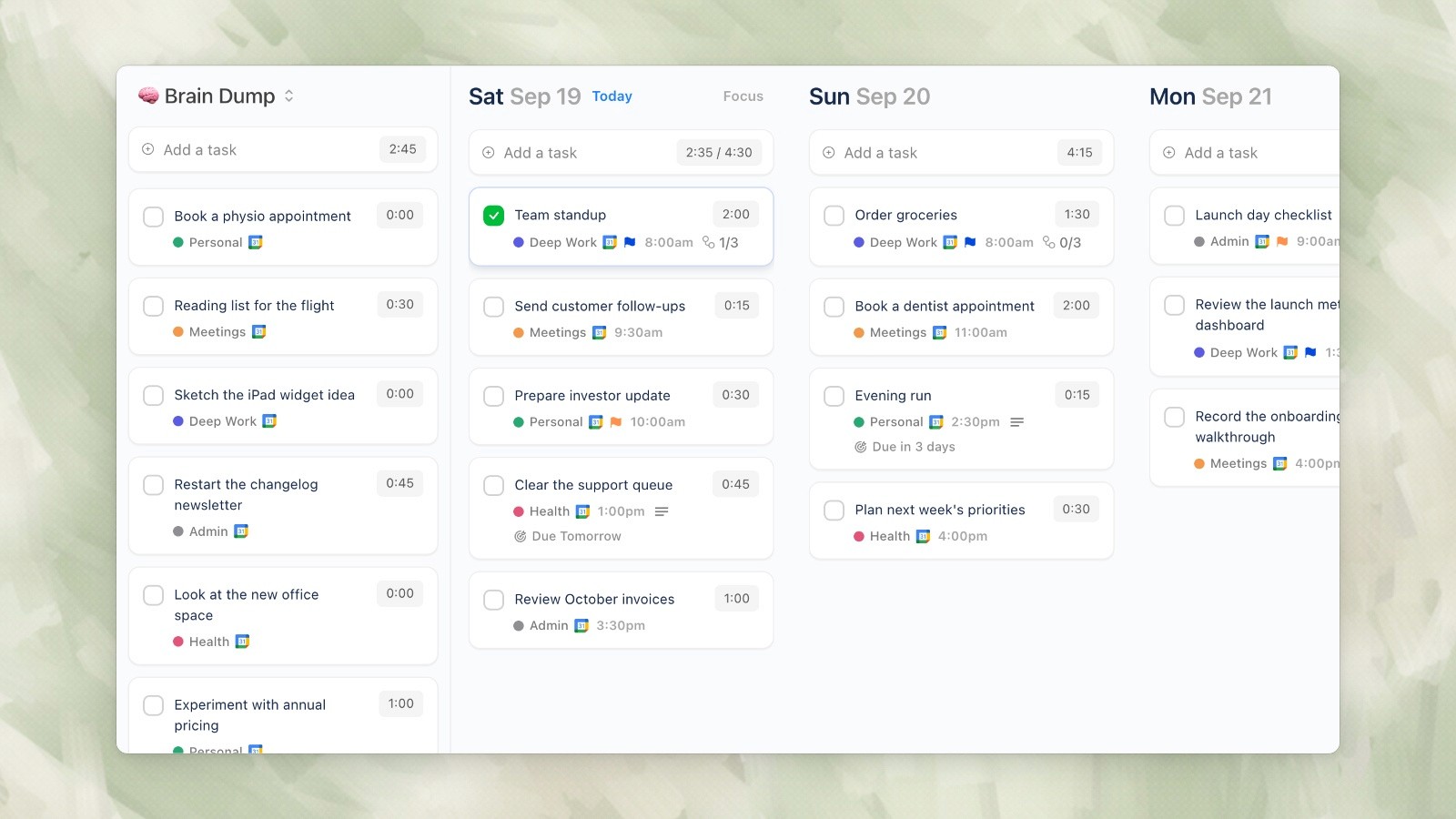
Ellie desktop demo data, captured September 19, 2026.
Discover Ellie planner for a modern approach to daily planning that respects your time and attention.
If you’ve ever felt overwhelmed by bloated productivity tools packed with features you’ll never use, Routine might be your answer. This minimalist daily planner has quietly built a reputation for delivering stunning design paired with thoughtful functionality. At its core, Routine combines tasks, calendar, notes, and journaling in a single, elegantly designed interface that prioritizes simplicity over complexity.
In this 2026 review, we’ll explore whether Routine lives up to the hype, examine its strengths and weaknesses, and help you decide if it’s the right fit for your planning needs.
What is Routine?
Routine (routine.co) is a daily planner application that takes a deliberately minimalist approach to productivity. Unlike feature-heavy competitors like Notion or Asana, Routine strips away the complexity and focuses on the core planning workflow: managing your day through tasks, calendar events, notes, and reflections.
The app is built on the premise that a beautiful, distraction-free interface can actually improve your productivity by making planning feel less like a chore. Every element of Routine’s design has been carefully considered, from the typography to the color palette to the interaction patterns. This attention to detail is immediately apparent when you open the app.
Routine positions itself as the antidote to productivity tool fatigue—a category that’s become increasingly crowded with feature-bloated alternatives that promise to handle every aspect of your work life but often deliver complexity instead of clarity.
Key Features
Smart Task Planner with Drag-and-Drop Scheduling
At the heart of Routine is its task management system, which goes beyond simple to-do lists. The app features a drag-and-drop interface that lets you schedule tasks directly onto your calendar. Instead of creating a task and then manually scheduling it, you can visualize exactly when you’ll work on it. This visual approach to task scheduling makes it easier to build a realistic daily plan and avoid overcommitting yourself.
Tasks support due dates, priorities, subtasks, and custom tags. The interface remains clean despite these features—options are presented intuitively without overwhelming you with configuration options.
Integrated Calendar with Multiple Views
Routine’s calendar integration is one of its strongest features. The app supports Google Calendar integration and offers five different viewing options: day, week, and month views, plus 5-day week view and other variations. This flexibility lets you choose the view that matches your planning style. Whether you prefer daily focus or a broad weekly overview, Routine adapts to your preference.
The calendar isn’t just a display of events—it’s the central hub where tasks and calendar events coexist, giving you a unified view of your time and commitments.
Pages for Notes and Documentation
Beyond task and calendar management, Routine includes a Pages feature for capturing notes, ideas, and documentation. This keeps all your planning information in one place without requiring you to context-switch between multiple applications. You can create structured notes, store reference material, and maintain project documentation directly within Routine.
Console for Quick Capture
Routine includes a console feature designed for quick capture of ideas and tasks. When inspiration strikes or you need to quickly jot something down, the console provides a fast, friction-free entry point. This prevents important ideas from slipping away while you’re busy planning.
System Tray Widget
For power users, Routine offers a system tray widget that gives you quick access to your tasks and calendar without opening the full application. This persistent visual reference can help keep you on track throughout your day.
Minimalist Design Philosophy
Perhaps Routine’s most distinctive feature is its design. The application embraces a genuinely minimalist aesthetic—nothing is included for decoration, and every interface element serves a purpose. The visual design is calming and intentional, which many users report helps them focus on planning rather than getting distracted by unnecessary visual elements.
Feature Overview
Feature | Routine | Availability |
|---|---|---|
Task Management | Yes | All plans |
Calendar Integration (Google) | Yes | All plans |
Multiple Calendar Views | Yes (5+ views) | All plans |
Drag-and-Drop Scheduling | Yes | All plans |
Notes/Pages | Yes | All plans |
Journaling | Yes | All plans |
Quick Capture Console | Yes | All plans |
System Tray Widget | Yes | Professional plan |
Team Features | Limited | Professional plan |
AI Scheduling | No | Not available |
Third-Party Integrations | Limited | Google Calendar only |
What Routine Does Well
Arguably the Most Beautiful Productivity App Available
If aesthetics matter to you, Routine stands out. The application is genuinely beautiful in a way that goes beyond superficial polish. The design is cohesive, thoughtful, and intentional. Using Routine is a pleasure—there’s a sense of craftsmanship that’s evident in every interaction. For users who are motivated by working in beautiful tools, Routine delivers on this front better than almost any competitor. Many designers and creative professionals have chosen Routine precisely because the interface inspires rather than frustrates them.
Generous Free Plan with No Feature Gates
Routine’s pricing strategy is refreshingly user-friendly. The free plan includes all core features—tasks, calendar integration, notes, and journaling. You’re not forced to upgrade to access essential functionality. The free plan is genuinely sufficient for personal daily planning use, which is remarkable in an industry where many apps gate even basic features behind paywalls. This approach builds goodwill and lets users experience the full product before committing financially.
Unified Task and Calendar View Without Context Switching
Many productivity apps force you to jump between separate task and calendar applications. Routine integrates both seamlessly. Your tasks live alongside your calendar events in a unified interface. This eliminates the friction of context-switching and makes it easier to build a realistic daily plan. You can see at a glance what you need to accomplish and when you have the time to accomplish it, all without leaving the app.
Clean, Distraction-Free Approach
In an era of feature creep, Routine proves that you don’t need 80+ features to build an excellent planning tool. The app is intentionally constrained to core functionality, which keeps the interface clean and reduces decision paralysis. Users report feeling less overwhelmed using Routine compared to more feature-heavy alternatives. This focused approach appeals strongly to people suffering from productivity tool fatigue.
Where Routine Falls Short
Limited Integration Ecosystem
Routine integrates only with Google Calendar. If your workflow relies on other tools—Slack, email, project management platforms, or other calendaring systems—you’re out of luck. Competitors like Akiflow and Motion offer dozens of integrations, allowing them to serve as central hubs for your entire workflow. Routine’s limited integration ecosystem means it works best as a planning tool that stands alongside other applications rather than replacing them.
No AI-Powered Scheduling
Modern productivity apps increasingly offer AI assistance for scheduling. Routine lacks this capability. You won’t get intelligent suggestions about when to schedule tasks or warnings about conflicting commitments. This is a notable gap compared to competitors like Motion, which use AI to optimize your schedule. For users who want the app to do some of the thinking, Routine requires more manual effort.
Basic Team Features
While Routine supports teams, the team features are basic compared to dedicated team productivity tools. The minimum team size is two seats, and collaboration features are limited. If you’re looking to coordinate with a large team or need advanced permission structures, Routine isn’t optimized for this use case. It’s designed primarily for individuals and small teams.
Relatively New With Limited Ecosystem
Routine is a younger application compared to established players like Notion or Asana. This means a smaller community, fewer templates, less third-party ecosystem development, and potentially less stability in the long term. If you value community support, readily available integrations, and years of production stability, the established alternatives offer more assurance. Routine’s newness is a risk factor worth considering for mission-critical workflows.
Pricing
Plan | Price | Best For | Key Features |
|---|---|---|---|
Free | $0/month | Personal use, individuals | All core features including tasks, calendar, notes, journaling |
Professional (Monthly) | $15/month | Power users, professionals | System tray widget, team features (minimum 2 seats), priority support |
Professional (Annual) | $10/month (billed $120/year) | Committed users, best value | Same as monthly plan with discount |
Routine’s pricing is straightforward and transparent. The free plan is genuinely feature-complete for personal use, with no nag screens or feature limitations. The Professional plan adds system tray access and team capabilities. If you need team features, both users must upgrade, and the minimum team size is two seats—something to consider before inviting collaborators.
Compared to competitors, Routine’s pricing is competitive. Asana’s free plan is more limited, Notion’s free plan lacks some features, and Motion’s pricing is higher. Routine’s generous free tier makes it an easy zero-risk trial.
Who Is Routine Best For?
Routine is ideal for several specific user profiles. First, minimalists and design enthusiasts will love the thoughtful, beautiful interface. If you’ve ever felt frustrated by cluttered, overwhelming productivity apps, Routine’s clean approach will feel like a breath of fresh air. Second, personal daily planners who want calendar and task management in one place will appreciate the unified view. You don’t need a complex project management tool—you just need to manage your day effectively.
Third, individuals who value calm, distraction-free tools will benefit from Routine’s intentional simplicity. If decision fatigue and feature paralysis have prevented you from sticking with other planning apps, Routine’s focused feature set removes friction. Finally, people already using Google Calendar who want to layer tasks on top without switching ecosystems will find Routine integrates seamlessly into their existing workflow.
Who Should Skip Routine?
Routine isn’t for everyone. Power users who rely on numerous third-party integrations should look elsewhere—Routine’s Google Calendar-only integration is limiting. If you’re coordinating large teams with complex permission structures, dedicated team tools will serve you better. People who want AI-powered scheduling optimization should consider competitors like Motion instead.
If you need advanced features like Gantt charts, complex workflow automation, or extensive reporting, Routine’s minimalist approach will feel limiting. Enterprise users with complex requirements will be frustrated by the intentional constraints. Finally, if you value community resources, templates, and ecosystem maturity, newer tools like Routine may feel risky compared to well-established alternatives.
The Routine Experience
What sets Routine apart isn’t a single feature—it’s the overall philosophy. Every design decision serves a purpose. The app respects your attention and doesn’t demand it. Colors are carefully chosen, spacing is intentional, and interactions feel natural rather than clunky. Using Routine feels like using a beautifully designed physical planning tool, but with all the advantages of digital automation.
The drag-and-drop task scheduling deserves special mention because it’s genuinely useful. Instead of creating a task and hoping you’ll remember to schedule it, you can immediately place it on your calendar. This single feature makes planning faster and more realistic. Combined with the calendar views and Google Calendar sync, Routine creates a unified planning experience that actually works.
The free plan deserves recognition too. In a landscape where many apps monetize aggressively, Routine trusts users to experience the full product before upgrading. This confidence in the product speaks volumes about its quality and the company’s long-term vision.
Comparing Routine to Competitors
How does Routine stack up against other daily planners? Compared to Asana, Routine is simpler but more beautiful and less overwhelming. Asana offers more integrations and team features but feels complex for individual use. Versus Notion, Routine is far more focused on planning—Notion is a general workspace that you can use for planning, which is a different value proposition. Notion offers more flexibility; Routine offers more simplicity.
Motion and Akiflow both offer AI scheduling and more integrations, making them better for power users. However, they’re also more complex and more expensive. If you want an intelligent scheduling assistant, Motion is superior. If you want simplicity and beauty, Routine wins. The choice depends on whether you prioritize advanced features or a calm, minimalist experience.
For journaling and personal reflection, Routine includes native journaling features that some competitors omit entirely. This makes Routine particularly appealing for people who view planning as part of a broader reflective practice rather than just task management.
Verdict: Is Routine Worth Your Time?
Routine is an excellent choice if you value beautiful design, simplicity, and a distraction-free planning experience. It’s the most beautiful daily planner available, and the generous free plan lets you verify this yourself without financial risk. If you’re a minimalist tired of bloated productivity tools, Routine will likely feel like relief.
The unified task and calendar view is genuinely useful, and the app integrates smoothly with your existing Google Calendar setup. The journaling features add a reflective dimension often missing from pure task managers. For individuals and small teams focused on daily planning, Routine delivers an exceptional experience.
However, if you need extensive integrations, AI-powered optimization, or complex team collaboration, look elsewhere. Routine’s intentional minimalism is a strength for its target audience but a limitation for power users.
Bottom line: Download the free version and try it. If you appreciate beautiful design and simple planning tools, you’ll likely become a paid subscriber. If you need more complexity or integrations, Routine will eventually feel limiting.
Looking for an Alternative?
If you’re exploring daily planning tools, you might also consider Ellie—a thoughtfully designed planner that combines the best of simplicity and functionality.
Ellie desktop demo data, captured September 19, 2026.
Discover Ellie planner for a modern approach to daily planning that respects your time and attention.
Give your brain the night off
Dump everything into Ellie, give tomorrow a plan, and close the laptop.
Try Ellie free
Web, Mac, Windows, iPhone and iPad. No credit card required.
