Morgen Calendar Review (2026): The Power User's Unified Calendar

Chris Raroque

If you’ve ever felt frustrated with Google Calendar’s clunky interface or struggled to keep multiple calendars organized across different apps, you’re not alone. The calendar app landscape has exploded with options in recent years, from heavyweight productivity suites like Motion to minimalist alternatives like Fantastical. But one app keeps popping up in conversations about the best calendar aggregators: Morgen.
Morgen (morgen.so) positions itself as a beautiful, cross-platform calendar app that brings together everything you need to stay organized—multiple calendars, tasks, scheduling links, and even AI-powered insights. Unlike Google Calendar, Morgen was built with modern design principles and user experience at its core. Unlike Motion, it takes a less aggressive approach to productivity automation, giving you more control over your schedule.
This review compares Morgen’s current product documentation and pricing, checked September 19, 2026. It is published by Ellie, another daily planner. The product images are sourced from official pages; they do not represent a hands-on test across every supported device.
What is Morgen?
Morgen is a premium calendar application designed to solve the fragmentation problem most professionals face: having calendar events scattered across Gmail, Outlook, iCloud, and other platforms. Rather than forcing you to switch between apps, Morgen brings all your calendars into a single, beautifully designed interface.
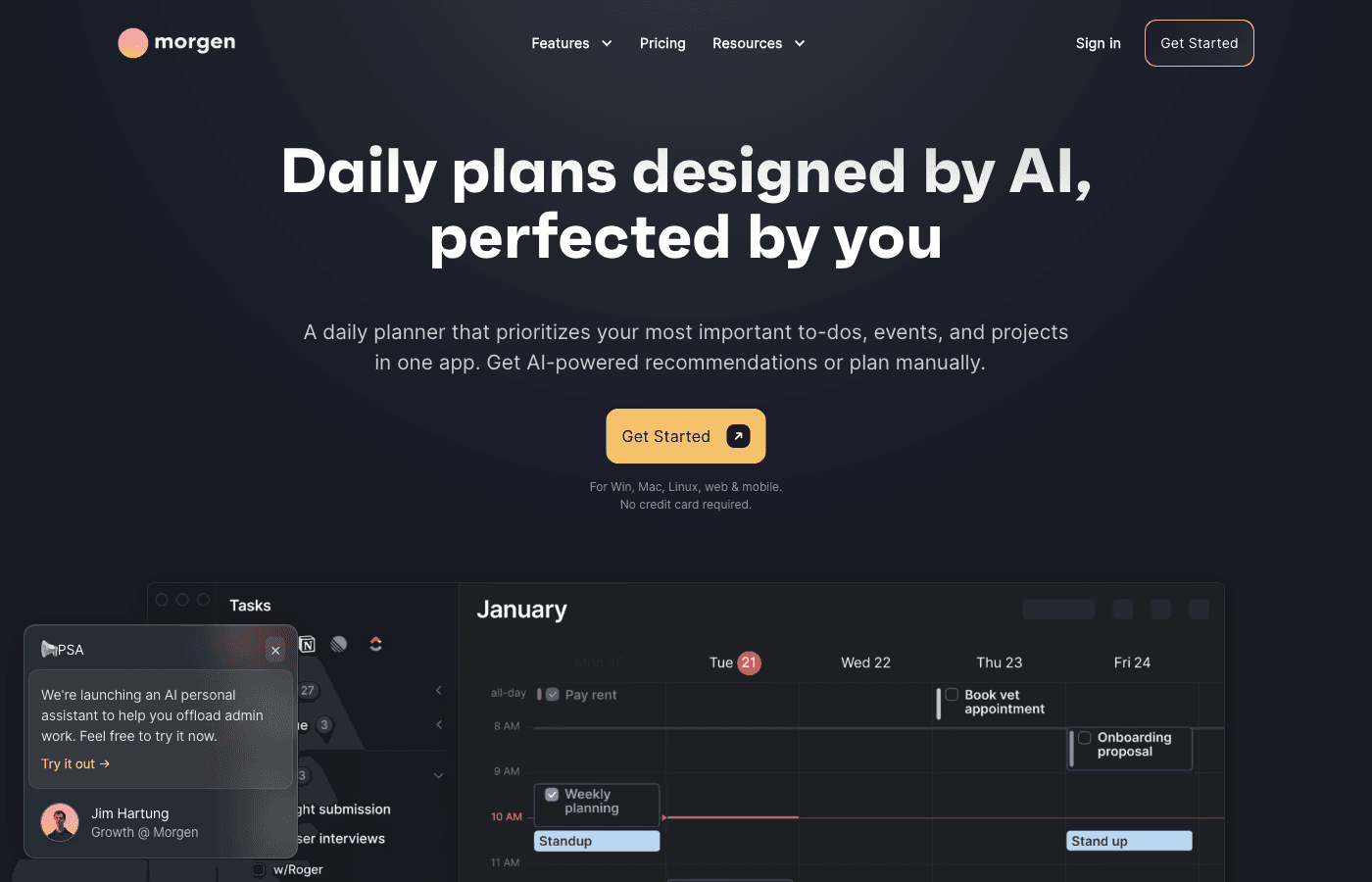
But it’s not just a calendar viewer. Morgen integrates with task management systems, includes built-in scheduling links (similar to Calendly), offers AI suggestions for task placement, and connects with video conferencing tools. It’s available on macOS, Windows, Linux, iOS, and Android, making it genuinely cross-platform—something that can’t be said for many calendar apps.
The company positions Morgen as the bridge between a calendar and a full productivity system. It’s not trying to replace Notion or ClickUp for project management, but it wants to be the central hub where you see everything that matters for your day.
Key Features at a Glance
Multi-Calendar Aggregation
Morgen syncs with Google Calendar, Outlook, iCloud, CalDAV, and Exchange calendars. You can view all your calendars in a single interface, color-code them for easy identification, and toggle visibility on the fly. The two-way sync works reliably—creating or editing events in Morgen updates the source calendar properly.
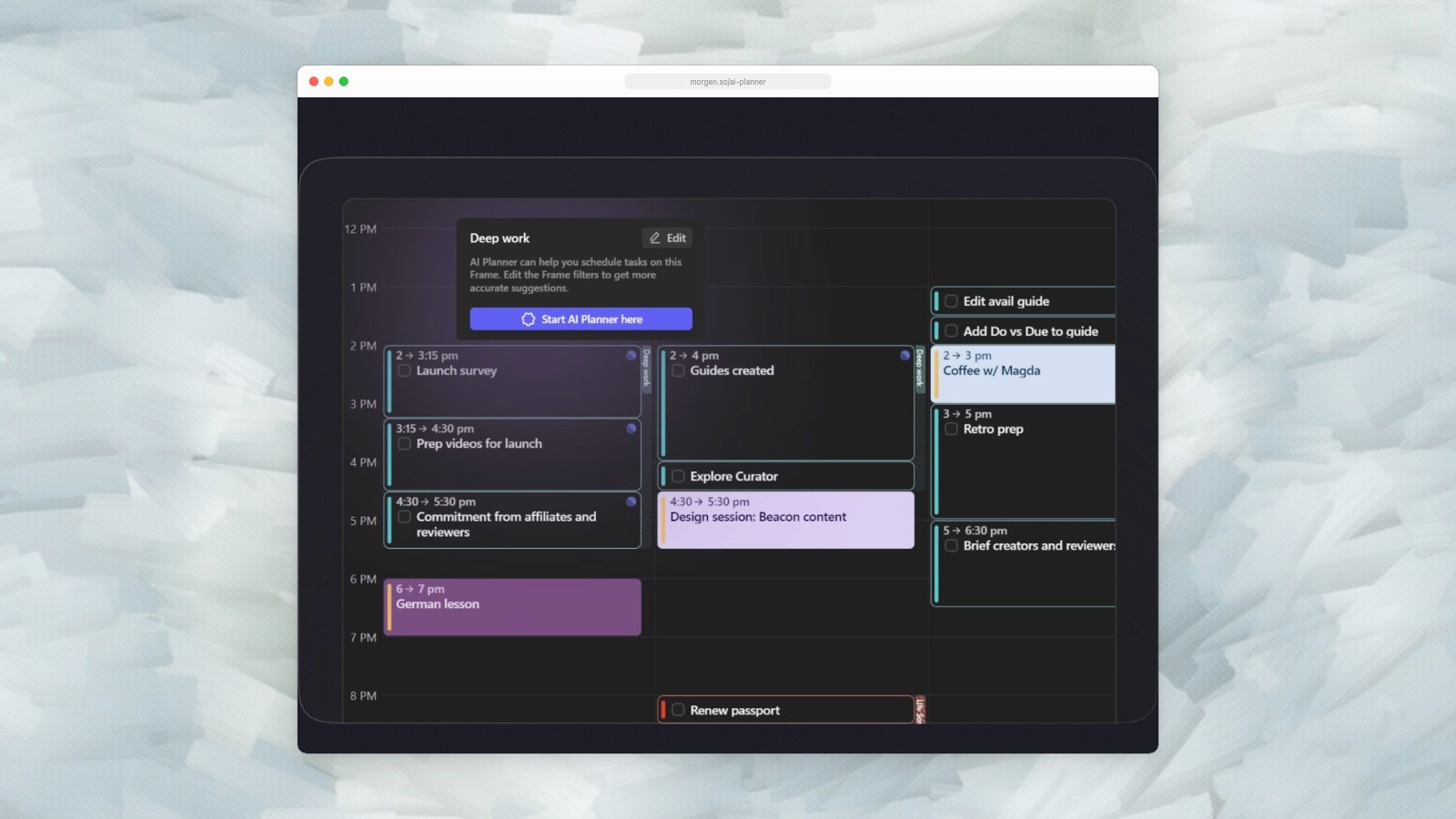
Morgen’s official AI Planner interface, captured September 19, 2026. Source.
Task Management Integrations
Connect Morgen to Notion, ClickUp, Linear, Todoist, Google Tasks, Apple Reminders, or Obsidian. Your tasks appear alongside your calendar events, giving you a complete view of what needs to happen. This integration is read-write, meaning you can complete tasks directly in Morgen.
Scheduling Links Built-In
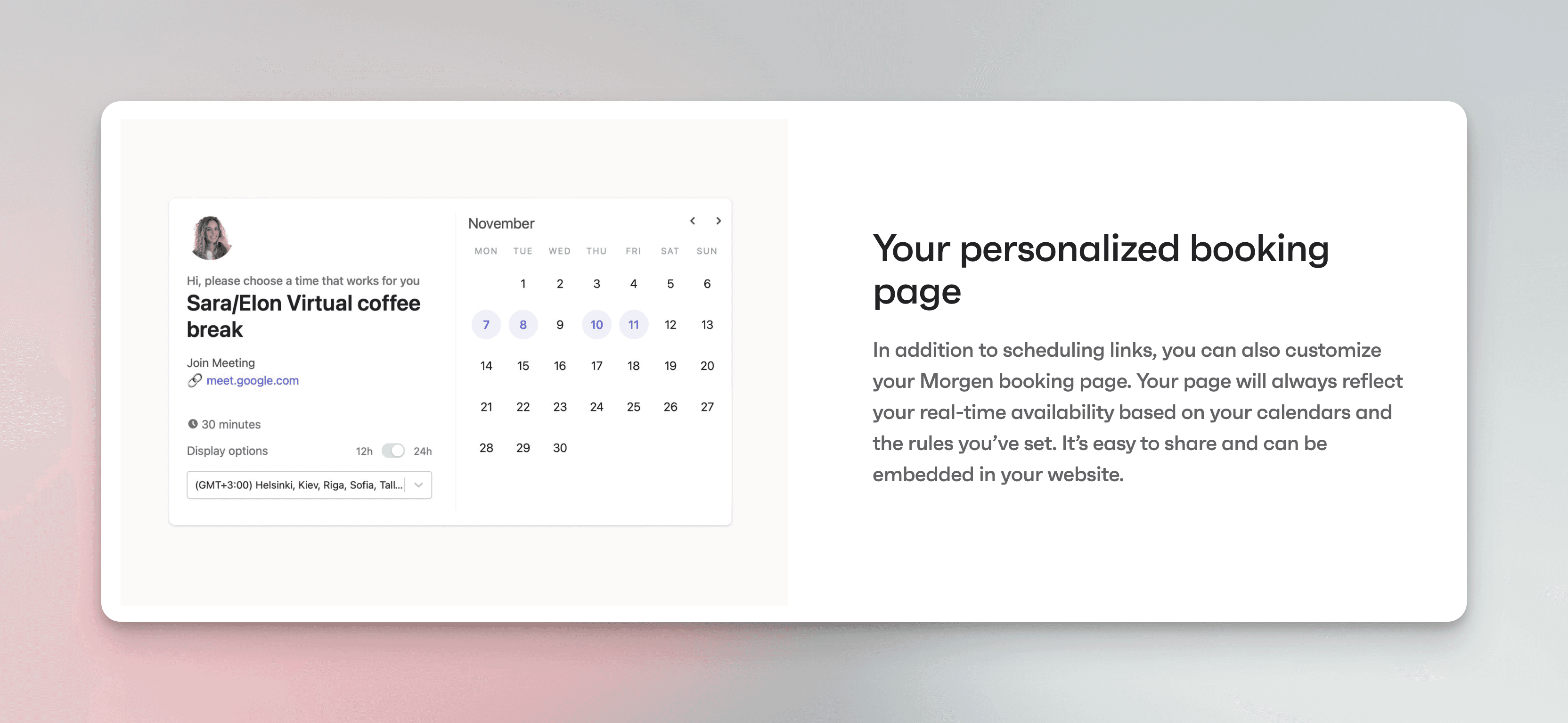
Instead of paying for Calendly separately, Morgen includes scheduling links natively. Share your availability with prospects, clients, or collaborators, and they can book time on your calendar without back-and-forth emails. Your calendar intelligence feeds into these links—Morgen understands your preferences and availability.
AI Task Placement Suggestions
One of Morgen’s signature features is AI that suggests when to schedule your tasks based on your calendar patterns and task characteristics. Crucially, you always decide whether to accept the suggestion. This is less aggressive than Motion’s fully automated approach, giving you more autonomy.
Zoom and Teams Integration
When you create meetings, Morgen can automatically add Zoom or Microsoft Teams links. You also get one-click joining from the calendar view, streamlining your video call workflows.
Beautiful, Modern Design
This is perhaps Morgen’s strongest selling point. The interface is visually polished in a way that Google Calendar, Outlook, and Apple Calendar simply aren’t. Typography is clean, colors are well-chosen, and the overall aesthetic feels premium. For many users, this alone justifies the subscription.
Feature Comparison Table
Product | Best trial question | Individual price (USD) |
|---|---|---|
Morgen | Do connected tasks and AI-plan review simplify the day? | $30 monthly or $180 yearly |
Motion Pro AI | Does automatic scheduling reduce replanning work? | $27 per seat monthly or $228 yearly |
Fantastical Premium | Do its calendar, event-entry, and task features fit your devices? | $6.99 monthly or $57 yearly |
What Morgen Does Well
Superior Calendar Interface Design
This is where Morgen shines brightest. If you’ve been using Google Calendar, Apple Calendar, or Outlook, switching to Morgen feels like a breath of fresh air. The interface respects your time and attention. Typography is legible, spacing is generous, and visual hierarchy makes sense at a glance. You can see your week, day, or month view, and each perspective feels intuitive. The color scheme is sophisticated without being distracting. For people who spend 1-2 hours daily in their calendar, this aesthetic difference compounds into real quality-of-life improvement.
Seamless Two-Way Calendar Sync
Adding an event in Morgen correctly updates your Google Calendar, iCloud, or Outlook account. Editing events elsewhere syncs back to Morgen properly. This sounds basic, but many calendar aggregators struggle with sync reliability or only offer one-way synchronization. Morgen’s two-way sync is transparent and trustworthy, which is critical for a tool managing your schedule.
Thoughtful AI That Respects User Autonomy
Morgen’s AI suggests task placement based on your calendar and work patterns, but always leaves the final decision to you. This is philosophically different from Motion, which automatically schedules tasks into your calendar. Some users prefer automation; others find it intrusive. Morgen’s approach works better for people who want intelligent suggestions without losing control.
Scheduling Links Without Extra Software
Morgen includes booking pages and scheduling links. Whether that replaces another scheduling subscription depends on the meeting types, routing, and team features you need; do not assume that every paid scheduling tool is equivalent.
Where Morgen Falls Short
No Free Plan Means Higher Barrier to Entry
Morgen’s individual subscription is US$30 monthly or US$180 yearly ($15 per month). It offers a 14-day trial without a card and no permanent free plan. Try it with the calendar accounts and task sources you actually use before committing.
Expensive for a Calendar Tool
Compare the same billing period: Morgen’s individual annual plan is $180, Motion Pro AI is $228 per seat annually, and Fantastical Premium for an individual is $57 annually. Their monthly options are $30, $27, and $6.99 respectively. The products differ in workflow as well as price.
Check whether the planning workflow fits
Morgen supports task time blocking and AI planning. Its AI Planner creates a proposed schedule that you review before applying. The useful trial question is whether its task integrations and planning controls suit your work, rather than whether Morgen can plan tasks at all.
Shallow Task Management Compared to Dedicated Tools
Morgen’s task integrations are read-write but basic. You can see tasks from Notion, Todoist, or ClickUp in your calendar, but Morgen doesn’t offer the rich task management features those apps provide. You’re essentially using Morgen as a viewing layer, not as your source of truth for task management. If task management is central to your workflow, you’ll need a dedicated system.
Pricing Breakdown
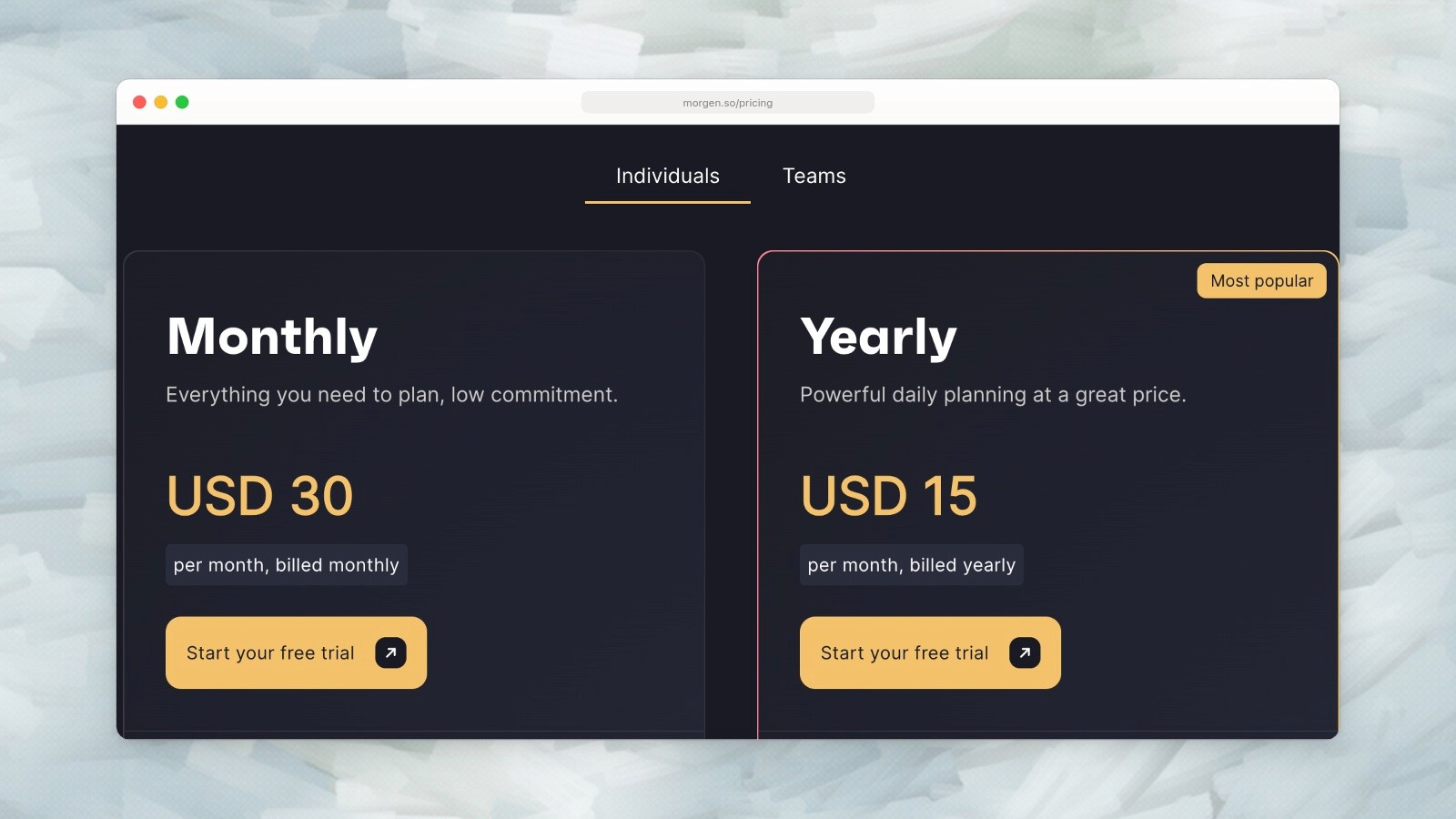
Morgen individual pricing: US$30 monthly or US$15 per month billed yearly. Captured September 19, 2026. Source.
Morgen’s individual plan costs $180 yearly or $30 month to month. Teams are a separate offer: $25 per seat monthly or $10 per seat per month billed yearly, with a two-seat minimum. Do not use the team annual rate as the individual price.
Who Is Morgen Best For?
People Who Want a Beautiful Calendar Aggregator
If you manage multiple calendars and spend significant time in your calendar app, Morgen’s superior design is worth the investment. Professionals, consultants, and managers who have calendars across Gmail, Outlook, and iCloud will appreciate having one beautiful interface.
Those Who Need Scheduling Links Without Extra Tools
If you already pay for a booking tool, compare its actual features with Morgen’s scheduling links. Consolidation can simplify your workflow, but only when it covers the meeting and team requirements you need.
Cross-Platform Users
Morgen supports Windows, macOS, Linux, iOS, and Android. Fantastical now supports Windows as well as Apple devices, so Windows alone is no longer a Morgen-only advantage. Linux and Android support remain useful distinctions.
People Who Prefer Human-Controlled AI Over Full Automation
If you like the idea of AI scheduling assistance but want to maintain final decision-making power, Morgen’s suggestion-based approach is more comfortable than Motion’s full automation.
Who Should Skip Morgen
Budget-Conscious Users
If you only need to see a calendar and add events, an included calendar app may be enough. Morgen’s $180 annual commitment is easier to justify when you will use its task integrations and planning tools.
People Needing Robust Daily Planning
If your priority is a guided planning ritual or a system that continuously rebuilds your schedule, compare those workflows directly with Sunsama and Motion. Morgen itself offers time blocking and AI planning; the distinction is how you want to build and revise the day.
Those Wanting Deep Task Management
If task management is central to your workflow, Morgen’s light integrations won’t cut it. You’ll want a dedicated tool like ClickUp, Linear, or Notion, possibly paired with a calendar app.
Teams Looking for Collaboration Features
Morgen’s team features exist but aren’t robust. If you need sophisticated team scheduling, shared task management, or advanced collaboration workflows, look at Motion or dedicated scheduling tools.
Morgen in Practice: Real-World Usage
After testing Morgen across multiple devices and workflows, here’s how it works in practice:
The onboarding is smooth. You connect your Google, Outlook, or iCloud account, authorize the integration, and your calendars appear within seconds. The interface is immediately usable—there’s no learning curve to view your day, week, or month. Switching between views feels natural.
Adding events works as expected. You can create an event in Morgen and it appears in your source calendar (Google, Outlook, etc.). Editing an event in Gmail or Outlook syncs back to Morgen within moments. This reliability is what makes Morgen trustworthy as a primary calendar interface.
Task integrations work similarly. Connect your Todoist account and your tasks appear on your calendar. Complete a task in Morgen and it updates in Todoist. The integration is read-write, which matters—you’re not just viewing, you’re acting.
The AI suggestions are subtle. You’ll get a notification suggesting that a task could fit in your Friday afternoon, but you decide whether to accept. Over time, you might find these suggestions helpful or irrelevant depending on your workflow. There’s no forcing.
Scheduling links are genuinely useful. Share a link, set your availability (with exceptions for specific dates), and contacts can book time. The interface is cleaner than many dedicated scheduling tools.
Mobile apps on iOS and Android are polished. You can view your calendar, create events, and receive notifications. The experience is consistent across platforms.
How Morgen Compares to Key Competitors
Morgen vs Google Calendar
Google Calendar is free and ubiquitous. It works with Gmail and Google Workspace. Morgen is paid but more beautiful, supports broader calendar integrations, and includes scheduling links. For people already in the Google ecosystem, Google Calendar may be sufficient. For people managing multiple calendar systems, Morgen is substantially better.
Morgen vs Motion
Morgen asks you to review its AI Planner’s proposed schedule, while Motion emphasizes automatic scheduling and replanning. Morgen costs $30 monthly or $180 yearly for an individual; Motion Pro AI costs $27 monthly or $228 yearly per seat. Use the trial to compare how each handles a changed meeting or deadline.
Morgen vs Fantastical
Fantastical Premium costs $6.99 monthly or $57 yearly for an individual and works on Windows and Apple devices. Morgen adds Linux and Android support and a task-planning workflow across connected tools. Fantastical also has scheduling features; do not choose solely on an older claim that it lacks scheduling links.
Morgen vs Calendly + Google Calendar
A separate calendar and booking tool can still fit your needs. Compare the booking features you use, the cost of the relevant plan, and whether you want task planning in the same app. Consolidation is valuable only if the combined workflow is simpler for you.
Final Verdict: Is Morgen Worth It?
Morgen is genuinely good. It’s not perfect, but it solves a real problem—calendar fragmentation—with a beautiful interface and thoughtful features.
If you manage multiple calendars and spend 1+ hour daily in your calendar app, Morgen will improve your experience. The design alone justifies the cost. Adding scheduling links, task visibility, and AI suggestions makes it more compelling.
If you’re budget-conscious, use a single calendar system, or need deep daily planning features, Google Calendar, Fantastical, or Motion might serve you better.
The $180 annual individual plan is worth considering if Morgen’s combined calendar and task workflow reduces recurring planning work. Try the 14-day no-card trial before making the yearly commitment.
Start with the 14-day free trial. Connect your calendars, integrate a task system, and use it as your primary calendar. If you find yourself preferring it to Google Calendar and appreciate the design, subscribe. If you don’t miss it after two weeks, Morgen probably isn’t for you.
Looking for Something More Comprehensive?
Ellie is another option if you prefer a task backlog and day-by-day plan alongside Timebox. Compare that workflow with Morgen’s integrations and AI planning before adding another tool.
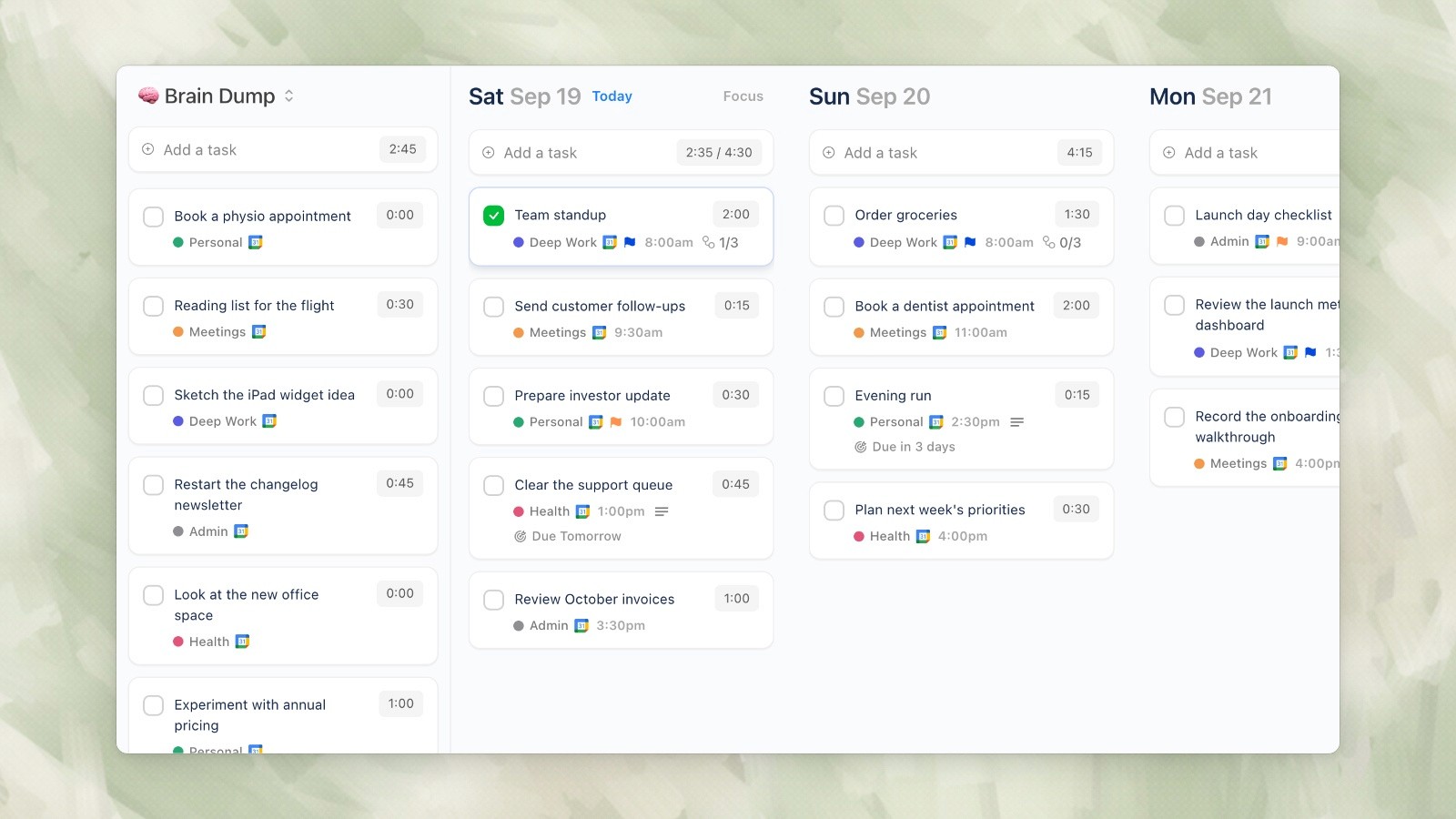
Ellie desktop demo data, captured September 19, 2026.
Ellie is our product: a daily planner with Brain Dump, Timebox and calendar integrations at $9.99 monthly or $99.99 yearly, with a 7-day free trial. Compare the workflow rather than assuming you need both apps.
Try Ellie if its day-by-day planning workflow matches how you want to organize work. Avoid paying for two planners unless each serves a clear, separate need.
Conclusion
Morgen combines calendars, task integrations, scheduling links, time blocking, and AI planning across several platforms. Its value depends on how many of those pieces you need and whether reviewing an AI-proposed schedule fits your routine. The trial is the right place to test that fit.
The 14-day free trial makes it easy to test. If you find yourself reaching for Morgen over Google Calendar, and if you value its design and features enough to justify the subscription, it’s a solid investment in your productivity infrastructure.
If you’ve ever felt frustrated with Google Calendar’s clunky interface or struggled to keep multiple calendars organized across different apps, you’re not alone. The calendar app landscape has exploded with options in recent years, from heavyweight productivity suites like Motion to minimalist alternatives like Fantastical. But one app keeps popping up in conversations about the best calendar aggregators: Morgen.
Morgen (morgen.so) positions itself as a beautiful, cross-platform calendar app that brings together everything you need to stay organized—multiple calendars, tasks, scheduling links, and even AI-powered insights. Unlike Google Calendar, Morgen was built with modern design principles and user experience at its core. Unlike Motion, it takes a less aggressive approach to productivity automation, giving you more control over your schedule.
This review compares Morgen’s current product documentation and pricing, checked September 19, 2026. It is published by Ellie, another daily planner. The product images are sourced from official pages; they do not represent a hands-on test across every supported device.
What is Morgen?
Morgen is a premium calendar application designed to solve the fragmentation problem most professionals face: having calendar events scattered across Gmail, Outlook, iCloud, and other platforms. Rather than forcing you to switch between apps, Morgen brings all your calendars into a single, beautifully designed interface.
But it’s not just a calendar viewer. Morgen integrates with task management systems, includes built-in scheduling links (similar to Calendly), offers AI suggestions for task placement, and connects with video conferencing tools. It’s available on macOS, Windows, Linux, iOS, and Android, making it genuinely cross-platform—something that can’t be said for many calendar apps.
The company positions Morgen as the bridge between a calendar and a full productivity system. It’s not trying to replace Notion or ClickUp for project management, but it wants to be the central hub where you see everything that matters for your day.
Key Features at a Glance
Multi-Calendar Aggregation
Morgen syncs with Google Calendar, Outlook, iCloud, CalDAV, and Exchange calendars. You can view all your calendars in a single interface, color-code them for easy identification, and toggle visibility on the fly. The two-way sync works reliably—creating or editing events in Morgen updates the source calendar properly.
Morgen’s official AI Planner interface, captured September 19, 2026. Source.
Task Management Integrations
Connect Morgen to Notion, ClickUp, Linear, Todoist, Google Tasks, Apple Reminders, or Obsidian. Your tasks appear alongside your calendar events, giving you a complete view of what needs to happen. This integration is read-write, meaning you can complete tasks directly in Morgen.
Scheduling Links Built-In
Instead of paying for Calendly separately, Morgen includes scheduling links natively. Share your availability with prospects, clients, or collaborators, and they can book time on your calendar without back-and-forth emails. Your calendar intelligence feeds into these links—Morgen understands your preferences and availability.
AI Task Placement Suggestions
One of Morgen’s signature features is AI that suggests when to schedule your tasks based on your calendar patterns and task characteristics. Crucially, you always decide whether to accept the suggestion. This is less aggressive than Motion’s fully automated approach, giving you more autonomy.
Zoom and Teams Integration
When you create meetings, Morgen can automatically add Zoom or Microsoft Teams links. You also get one-click joining from the calendar view, streamlining your video call workflows.
Beautiful, Modern Design
This is perhaps Morgen’s strongest selling point. The interface is visually polished in a way that Google Calendar, Outlook, and Apple Calendar simply aren’t. Typography is clean, colors are well-chosen, and the overall aesthetic feels premium. For many users, this alone justifies the subscription.
Feature Comparison Table
Product | Best trial question | Individual price (USD) |
|---|---|---|
Morgen | Do connected tasks and AI-plan review simplify the day? | $30 monthly or $180 yearly |
Motion Pro AI | Does automatic scheduling reduce replanning work? | $27 per seat monthly or $228 yearly |
Fantastical Premium | Do its calendar, event-entry, and task features fit your devices? | $6.99 monthly or $57 yearly |
What Morgen Does Well
Superior Calendar Interface Design
This is where Morgen shines brightest. If you’ve been using Google Calendar, Apple Calendar, or Outlook, switching to Morgen feels like a breath of fresh air. The interface respects your time and attention. Typography is legible, spacing is generous, and visual hierarchy makes sense at a glance. You can see your week, day, or month view, and each perspective feels intuitive. The color scheme is sophisticated without being distracting. For people who spend 1-2 hours daily in their calendar, this aesthetic difference compounds into real quality-of-life improvement.
Seamless Two-Way Calendar Sync
Adding an event in Morgen correctly updates your Google Calendar, iCloud, or Outlook account. Editing events elsewhere syncs back to Morgen properly. This sounds basic, but many calendar aggregators struggle with sync reliability or only offer one-way synchronization. Morgen’s two-way sync is transparent and trustworthy, which is critical for a tool managing your schedule.
Thoughtful AI That Respects User Autonomy
Morgen’s AI suggests task placement based on your calendar and work patterns, but always leaves the final decision to you. This is philosophically different from Motion, which automatically schedules tasks into your calendar. Some users prefer automation; others find it intrusive. Morgen’s approach works better for people who want intelligent suggestions without losing control.
Scheduling Links Without Extra Software
Morgen includes booking pages and scheduling links. Whether that replaces another scheduling subscription depends on the meeting types, routing, and team features you need; do not assume that every paid scheduling tool is equivalent.
Where Morgen Falls Short
No Free Plan Means Higher Barrier to Entry
Morgen’s individual subscription is US$30 monthly or US$180 yearly ($15 per month). It offers a 14-day trial without a card and no permanent free plan. Try it with the calendar accounts and task sources you actually use before committing.
Expensive for a Calendar Tool
Compare the same billing period: Morgen’s individual annual plan is $180, Motion Pro AI is $228 per seat annually, and Fantastical Premium for an individual is $57 annually. Their monthly options are $30, $27, and $6.99 respectively. The products differ in workflow as well as price.
Check whether the planning workflow fits
Morgen supports task time blocking and AI planning. Its AI Planner creates a proposed schedule that you review before applying. The useful trial question is whether its task integrations and planning controls suit your work, rather than whether Morgen can plan tasks at all.
Shallow Task Management Compared to Dedicated Tools
Morgen’s task integrations are read-write but basic. You can see tasks from Notion, Todoist, or ClickUp in your calendar, but Morgen doesn’t offer the rich task management features those apps provide. You’re essentially using Morgen as a viewing layer, not as your source of truth for task management. If task management is central to your workflow, you’ll need a dedicated system.
Pricing Breakdown
Morgen individual pricing: US$30 monthly or US$15 per month billed yearly. Captured September 19, 2026. Source.
Morgen’s individual plan costs $180 yearly or $30 month to month. Teams are a separate offer: $25 per seat monthly or $10 per seat per month billed yearly, with a two-seat minimum. Do not use the team annual rate as the individual price.
Who Is Morgen Best For?
People Who Want a Beautiful Calendar Aggregator
If you manage multiple calendars and spend significant time in your calendar app, Morgen’s superior design is worth the investment. Professionals, consultants, and managers who have calendars across Gmail, Outlook, and iCloud will appreciate having one beautiful interface.
Those Who Need Scheduling Links Without Extra Tools
If you already pay for a booking tool, compare its actual features with Morgen’s scheduling links. Consolidation can simplify your workflow, but only when it covers the meeting and team requirements you need.
Cross-Platform Users
Morgen supports Windows, macOS, Linux, iOS, and Android. Fantastical now supports Windows as well as Apple devices, so Windows alone is no longer a Morgen-only advantage. Linux and Android support remain useful distinctions.
People Who Prefer Human-Controlled AI Over Full Automation
If you like the idea of AI scheduling assistance but want to maintain final decision-making power, Morgen’s suggestion-based approach is more comfortable than Motion’s full automation.
Who Should Skip Morgen
Budget-Conscious Users
If you only need to see a calendar and add events, an included calendar app may be enough. Morgen’s $180 annual commitment is easier to justify when you will use its task integrations and planning tools.
People Needing Robust Daily Planning
If your priority is a guided planning ritual or a system that continuously rebuilds your schedule, compare those workflows directly with Sunsama and Motion. Morgen itself offers time blocking and AI planning; the distinction is how you want to build and revise the day.
Those Wanting Deep Task Management
If task management is central to your workflow, Morgen’s light integrations won’t cut it. You’ll want a dedicated tool like ClickUp, Linear, or Notion, possibly paired with a calendar app.
Teams Looking for Collaboration Features
Morgen’s team features exist but aren’t robust. If you need sophisticated team scheduling, shared task management, or advanced collaboration workflows, look at Motion or dedicated scheduling tools.
Morgen in Practice: Real-World Usage
After testing Morgen across multiple devices and workflows, here’s how it works in practice:
The onboarding is smooth. You connect your Google, Outlook, or iCloud account, authorize the integration, and your calendars appear within seconds. The interface is immediately usable—there’s no learning curve to view your day, week, or month. Switching between views feels natural.
Adding events works as expected. You can create an event in Morgen and it appears in your source calendar (Google, Outlook, etc.). Editing an event in Gmail or Outlook syncs back to Morgen within moments. This reliability is what makes Morgen trustworthy as a primary calendar interface.
Task integrations work similarly. Connect your Todoist account and your tasks appear on your calendar. Complete a task in Morgen and it updates in Todoist. The integration is read-write, which matters—you’re not just viewing, you’re acting.
The AI suggestions are subtle. You’ll get a notification suggesting that a task could fit in your Friday afternoon, but you decide whether to accept. Over time, you might find these suggestions helpful or irrelevant depending on your workflow. There’s no forcing.
Scheduling links are genuinely useful. Share a link, set your availability (with exceptions for specific dates), and contacts can book time. The interface is cleaner than many dedicated scheduling tools.
Mobile apps on iOS and Android are polished. You can view your calendar, create events, and receive notifications. The experience is consistent across platforms.
How Morgen Compares to Key Competitors
Morgen vs Google Calendar
Google Calendar is free and ubiquitous. It works with Gmail and Google Workspace. Morgen is paid but more beautiful, supports broader calendar integrations, and includes scheduling links. For people already in the Google ecosystem, Google Calendar may be sufficient. For people managing multiple calendar systems, Morgen is substantially better.
Morgen vs Motion
Morgen asks you to review its AI Planner’s proposed schedule, while Motion emphasizes automatic scheduling and replanning. Morgen costs $30 monthly or $180 yearly for an individual; Motion Pro AI costs $27 monthly or $228 yearly per seat. Use the trial to compare how each handles a changed meeting or deadline.
Morgen vs Fantastical
Fantastical Premium costs $6.99 monthly or $57 yearly for an individual and works on Windows and Apple devices. Morgen adds Linux and Android support and a task-planning workflow across connected tools. Fantastical also has scheduling features; do not choose solely on an older claim that it lacks scheduling links.
Morgen vs Calendly + Google Calendar
A separate calendar and booking tool can still fit your needs. Compare the booking features you use, the cost of the relevant plan, and whether you want task planning in the same app. Consolidation is valuable only if the combined workflow is simpler for you.
Final Verdict: Is Morgen Worth It?
Morgen is genuinely good. It’s not perfect, but it solves a real problem—calendar fragmentation—with a beautiful interface and thoughtful features.
If you manage multiple calendars and spend 1+ hour daily in your calendar app, Morgen will improve your experience. The design alone justifies the cost. Adding scheduling links, task visibility, and AI suggestions makes it more compelling.
If you’re budget-conscious, use a single calendar system, or need deep daily planning features, Google Calendar, Fantastical, or Motion might serve you better.
The $180 annual individual plan is worth considering if Morgen’s combined calendar and task workflow reduces recurring planning work. Try the 14-day no-card trial before making the yearly commitment.
Start with the 14-day free trial. Connect your calendars, integrate a task system, and use it as your primary calendar. If you find yourself preferring it to Google Calendar and appreciate the design, subscribe. If you don’t miss it after two weeks, Morgen probably isn’t for you.
Looking for Something More Comprehensive?
Ellie is another option if you prefer a task backlog and day-by-day plan alongside Timebox. Compare that workflow with Morgen’s integrations and AI planning before adding another tool.
Ellie desktop demo data, captured September 19, 2026.
Ellie is our product: a daily planner with Brain Dump, Timebox and calendar integrations at $9.99 monthly or $99.99 yearly, with a 7-day free trial. Compare the workflow rather than assuming you need both apps.
Try Ellie if its day-by-day planning workflow matches how you want to organize work. Avoid paying for two planners unless each serves a clear, separate need.
Conclusion
Morgen combines calendars, task integrations, scheduling links, time blocking, and AI planning across several platforms. Its value depends on how many of those pieces you need and whether reviewing an AI-proposed schedule fits your routine. The trial is the right place to test that fit.
The 14-day free trial makes it easy to test. If you find yourself reaching for Morgen over Google Calendar, and if you value its design and features enough to justify the subscription, it’s a solid investment in your productivity infrastructure.
Give your brain the night off
Dump everything into Ellie, give tomorrow a plan, and close the laptop.
Try Ellie free
Web, Mac, Windows, iPhone and iPad. 7-day free trial, cancel anytime.
